


Participant
May 23, 2023
Answered

No AI feature with new update

Just updated to the new beta version for PS, 24.6.0. (with AI)
I got the new UI but it lacks the AI portion (or option) in the menu bar, or anywhere else.
Is there a minimum hardware requirement that I need? I might have missed the minimum requirements.
I am running Apple iMac Monterey 12.6.6. (Late 2015 build).
I am providing a screen shot of the UI I have available to me at this moment.
Thanks for any help you could provide.

 

Kevin Stohlmeyer
Kevin StohlmeyerCorrect answer
Community Expert
June 1, 2023

Hi @Andrew30210510i27y uninstall that version then reinstall. The iterative version with Generative fill is 24.6.0 20230520.m.2181 4e0245f arm64 you are on the 516 release.

445 replies

Participant
May 28, 2023

i am stuck with v24.5 for photoshop and v24.6 beta , tried uninstalling and reinstalling photoshop from CC severally to no avail. still on v24.5 .

Someone please help


Translate
Photovlog.fr
Participant
May 26, 2023

Bonjour,


Je tente d'utiliser l'intelligence artificielle mais j'ai un message m'indiquant que je n'ai pas 18 ans selon mon compte et que cette fonctionnalité n'est disponible que pour les personnes ayants 18 ans et plus.

Je ne vois pas où renseigner ma date de naissance qui est de 1996.


Merci d'avance,

Jonathan.

Translate
Kevin Stohlmeyer
Community Expert
Community Expert
May 26, 2023

Hi @Photovlog.fr 

Setting your DOB to use Generative Fill
If you find that Generative Fill is greyed out for you, it is possible that you may not have a valid Date of Birth associated with your Adobe ID account. To update your Date of Birth, you can do any of the following:
• Log into Behance with your Adobe ID and enter your Date of Birth.
• Log into your Adobe account and enter your Date of Birth. To learn more, see Error: "Not eligible to use Creative Cloud services".
Once your Date of Birth is up to date, relaunch the Photoshop (beta) app to enable Generative Fill.
https://helpx.adobe.com/photoshop/using/generative-fill.html

Translate
Keith23242116exw5
Known Participant
May 26, 2023

A lot of people have had trouble with this, including me. The trick is go to your Creative Cloud account desktop. On the aps page, go to Behance (second from the bottom) and believe it or not the answer is you need to enter your date of birth to your profile. Apparently Adobe requires you to be over 18 to use it. Worked for me.

Also, this post from kevin stohlmeyer  Community Expert

If you find that Generative Fill is greyed out for you, it is possible that you may not have a valid Date of Birth associated with your Adobe ID account. To update your Date of Birth, you can do any of the following:
• Log into Behance with your Adobe ID and enter your Date of Birth.
• Log into your Adobe account and enter your Date of Birth. To learn more, see Error: "Not eligible to use Creative Cloud services".
Once your Date of Birth is up to date, relaunch the Photoshop (beta) app to enable Generative Fill.
https://helpx.adobe.com/photoshop/using/generative-fill.html


Translate
Participating Frequently
May 27, 2023

There's no date of birth option in Adobe. Is this the page you are referring to?

Translate
Participating Frequently
May 27, 2023
All good. Generative fill now is available.
Thank you.
Translate
Participant
May 26, 2023

The latest update available is 24.5. Why is this happening and how do i fix it. There's a lot of people with the same issue.

Translate
Participant
May 26, 2023

Quando acesso a ferramenta generativa, aparece essa mensagem. Não localizei onde atualizar a idade,

Translate
Kevin Stohlmeyer
Community Expert
Community Expert
May 26, 2023

Hi @WS730083975d7f3 

Why is the Generative Fill button not available?
If you find that Generative Fill is greyed out for you, it is possible that you may not have a valid Date of Birth associated with your Adobe ID account. To update your Date of Birth, you can do any of the following:
• Log into Behance with your Adobe ID and enter your Date of Birth.
• Log into your Adobe account and enter your Date of Birth. To learn more, see Error: "Not eligible to use Creative Cloud services".
Once your Date of Birth is up to date, relaunch the Photoshop (beta) app to enable Generative Fill.
https://helpx.adobe.com/photoshop/using/generative-fill.html

Translate
Participant
May 26, 2023

Hello Kevin, there is no way I can update or type my DOB neither in Behance (log out and then log in) or in my Adobe account. I could not find where or how to update my DOB. Any suggestion?

Thanks

Translate
SYCANONZONE-III
Participant
May 26, 2023

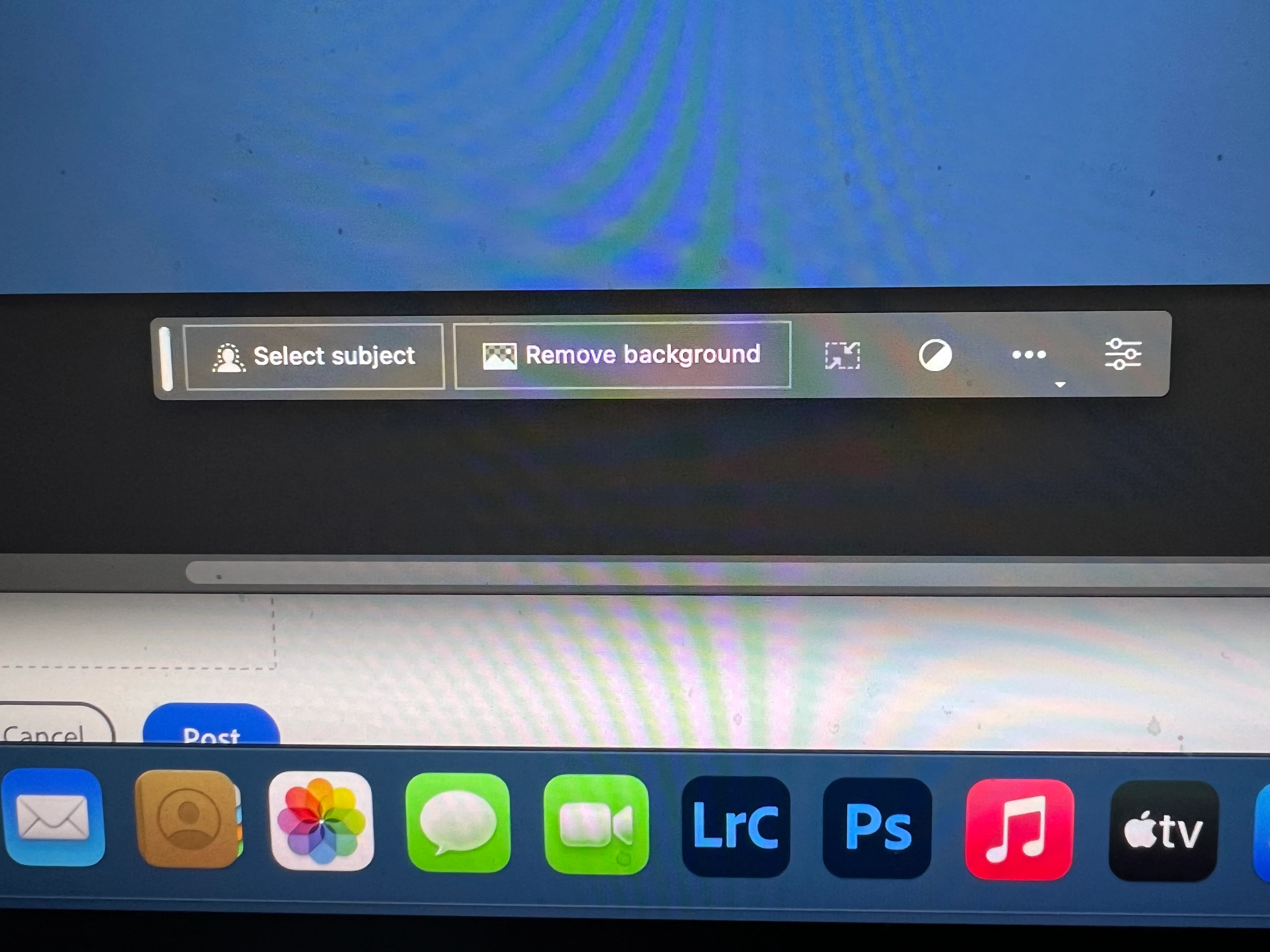
Hi, testing adobe ps beta for generative AI, I don't see any Generatrive? where is this, I can only see "select subject" and "remove background" when I use the marqie tool to select an area nothing changes, can't see and "generative" icon anywhere????

Translate
Lloyd Stevens
Participant
May 26, 2023

You have to uninstall the old photoshop app, and open the Photoshop Beta 

Translate
Participating Frequently
May 26, 2023

I did.

Translate
Participant
May 25, 2023

i installed a new beta of photoshop but the generation fill tool bottom doesnot work

Translate
Participating Frequently
May 25, 2023

I FOUND THE ANSWER MYSELF AFTER TWO DAYS!! If you're BETA is not updating to 24.5, if you're like me...my VPN was causing the problem. For some reason it blocked only that update. So if you're usiung a VPN...turn it off and then hit the update in Creative Cloud again. Worked for me right away.

Translate
Participating Frequently
May 25, 2023

sorry for all the grammatical errors. I was typing to excitedly. hahaha

Translate
Participant
May 25, 2023

I have the beta version of photoshop, 24.6 where there should be the new ai tech, but i dont have the ai part. i have the toolbar when selecting something but not generative fill


Translate