
Participating Frequently
October 18, 2023
Answered

No manual selection option for generative fill?

  • October 18, 2023
  • 1 reply
  • 674 views


I have an issue with generative fill that is very frustrating.


In earlier beta versions, you expanded the image selection are using the crop tool, selected the lasso tool and then manually select what needed expanding. It worked flawlessly. 


In the new version, selecting the lasso tool automatically triggers generative expand. This is very problematic when you have something near the boarder that doesn’t need expanding (e.g. a hand), creating all sorts of weird distortions.


There must be a way to still manually select (and ignore) what you want expanding?
This topic has been closed for replies.
Correct answer Kevin Stohlmeyer

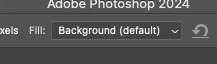
Hi @MCB1975 Im assuming you mean it automatically triggers with the Crop tool, not lasso. You can change the crop behavior using the options bar at the top to deselect generative expand then use the lasso tool as you have in the past with Generative Fill.


1 reply

Kevin Stohlmeyer
Community Expert
Kevin StohlmeyerCommunity ExpertCorrect answer
Community Expert
October 18, 2023

Hi @MCB1975 Im assuming you mean it automatically triggers with the Crop tool, not lasso. You can change the crop behavior using the options bar at the top to deselect generative expand then use the lasso tool as you have in the past with Generative Fill.


MCB1975Author
Participating Frequently
October 19, 2023

Ah, thank you! That worked. Much appreciated.