
Participant
September 26, 2022
Answered

Not enough

  • September 26, 2022
  • 7 replies
  • 804 views

Hi,


We're starting to use Photoshop (Beta) on Chromebooks in our school district. In one class, we have 30 of the same Chromebooks (specs below) and Photoshop works great. Very pleased with it so far, however, I have two Chromebooks that are presenting the following pop-up message.
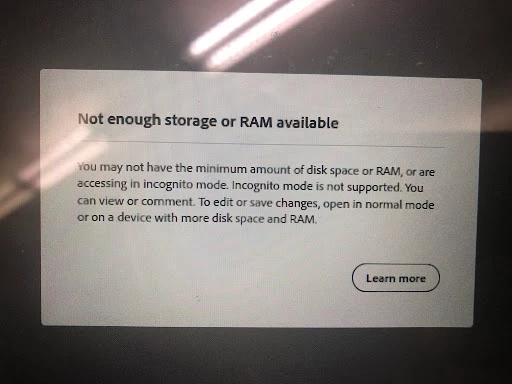


Does anyone have any ideas on what I can try to get these two students going with Photoshop? Their peers are able to use it. I've powerwashed and re-enrolled...kicked out any extensions that aren't pushed out by the district...hard reset...closed all tabs except for Photoshop...running out of ideas. Does anyone have anything else I can try?


Acer Chromebook Spin 511 (R752T, R752TN)

Intel(R) Celeron(R) N4020 CPU @ 1.10GHz

ChromeOS version: 105.0.5195.134


Best,
Darrell
This topic has been closed for replies.
Correct answer Darrell Schulte

Hi Benjamin,


The "Not enough..." message would pop-up when they clicked on the "+ New file" button.


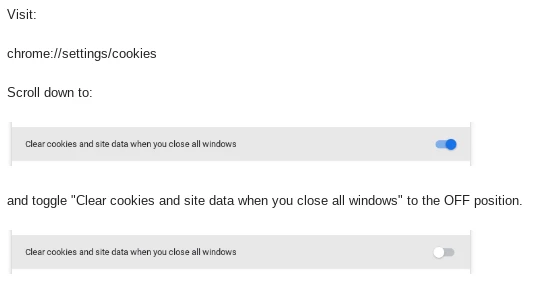
Since the problem followed the student...I started poking around the Chromebook's Settings and I found the solution.


Everytime I toggled that setting to the ON position, it would present the "Not enough..." message, and everytime I toggled it OFF, Photoshop would work.


So in this class of thirty, two students had poked around in the Settings area and toggled the "Clear cookies and site-data when you close all windows" to the ON position and the others did not. I believe it's typically turned off in our district environment, so this is something they had done on their own at some point along the way.


Darrell

7 replies

Pete.Green
Community Manager
September 29, 2022

Adjusting thread status and moved to bugs

Darrell SchulteAuthorCorrect answer
Participant
September 29, 2022

Hi Benjamin,


The "Not enough..." message would pop-up when they clicked on the "+ New file" button.


Since the problem followed the student...I started poking around the Chromebook's Settings and I found the solution.


Everytime I toggled that setting to the ON position, it would present the "Not enough..." message, and everytime I toggled it OFF, Photoshop would work.


So in this class of thirty, two students had poked around in the Settings area and toggled the "Clear cookies and site-data when you close all windows" to the ON position and the others did not. I believe it's typically turned off in our district environment, so this is something they had done on their own at some point along the way.


Darrell

Pete.Green
Community Manager
September 29, 2022

Wow, that's a great fine Darrell!


Thank you for figuring that out and passing on the details. Will work with the team on this one.


Regards,

Pete

Community Manager
September 29, 2022

Hi Darrell - a couple questions: Are the students attempting to open a specific file when they run into this? Also, if it appears to be tied to their specific accounts, can you share those accounts with us so we can debug what is happening.

Participant
September 28, 2022

From what I gathered from our Google / Systems admin, we are not imposing any web app storage quotas.


New wrinkle...if the students use a different Chromebook (one that is working for other students), they are presented with the same "Not enough storage or RAM available" message as before...so, I guess the problem is following the Google account...which is not great news for me. All these student accounts are the same...yet, there must be something unique to these two that I haven't discerned yet. More digging.


Darrell

Participant
September 27, 2022

Hi Pete,


All 30 use the same model Chromebook...all have 4 GB of RAM.


Disk space usage

34% (7.03 GB / 20.44 GB)


Disk space usage

11% (2.26 GB / 20.44 GB)


You raise a good question about a Storage quota. Since it's a school environment, we manage all the Chromebooks...there's a chance that we have a storage quota in place for web apps. I cannot check to see on a student Chromebook if that's in place becuase we lock out Developer tools. I'll connect with our Google / Systems admin to see if we have any limits in place.


Thanks!

Darrell

Pete.Green
Community Manager
September 26, 2022

Do you know if these systems are managed by an admin? This can also happen if an admin limits the storage quota for web apps.

Could you also provide the Storage quota value that you see in the browser Developer tools > Application tab > Storage pane? 


For instance, mine shows "2.3 kB used out of 600145 MB storage quota"


Regards,

Pete

Pete.Green
Community Manager
September 26, 2022

Hi Darrell,


Great to hear Ps Web is working well for you and students, but sorry about the trouble with these 2 machines.

Do you know if there's anything different with these systems as compared to the others?

Do you know how much RAM is available in these 2 Chromebooks?


Regards,

Pete