Participant
February 26, 2025
Answered

Options Tool Bar

  • February 26, 2025
  • 1 reply
  • 225 views

The options tool bar can usually be anchored to the top of the application. It now only floats and won't anchor. Incredibly frustrating. 

Also, after this last updated to Photosho (Beta) and Illustrator, my saved workspaces were deleted and I had to reset them all over again. 
Correct answer Trevor.Dennis

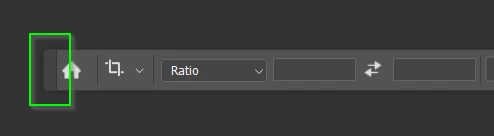
You can move the Options Bar by grabbing the darker rectangle at its left end .


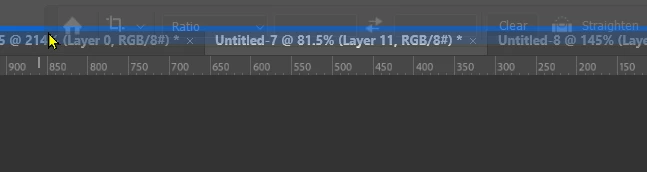
Then slowly move it to the top of the screen and release whern you see the blue line.  This will dock it.


Alternatively, you can go Window > Workspace > Reset (name of current workspace).

1 reply

Trevor.Dennis
Community Expert
Trevor.DennisCommunity ExpertCorrect answer
Community Expert
February 26, 2025

You can move the Options Bar by grabbing the darker rectangle at its left end .


Then slowly move it to the top of the screen and release whern you see the blue line.  This will dock it.


Alternatively, you can go Window > Workspace > Reset (name of current workspace).