
Participant
May 25, 2023 12:51 PM UTC
Question

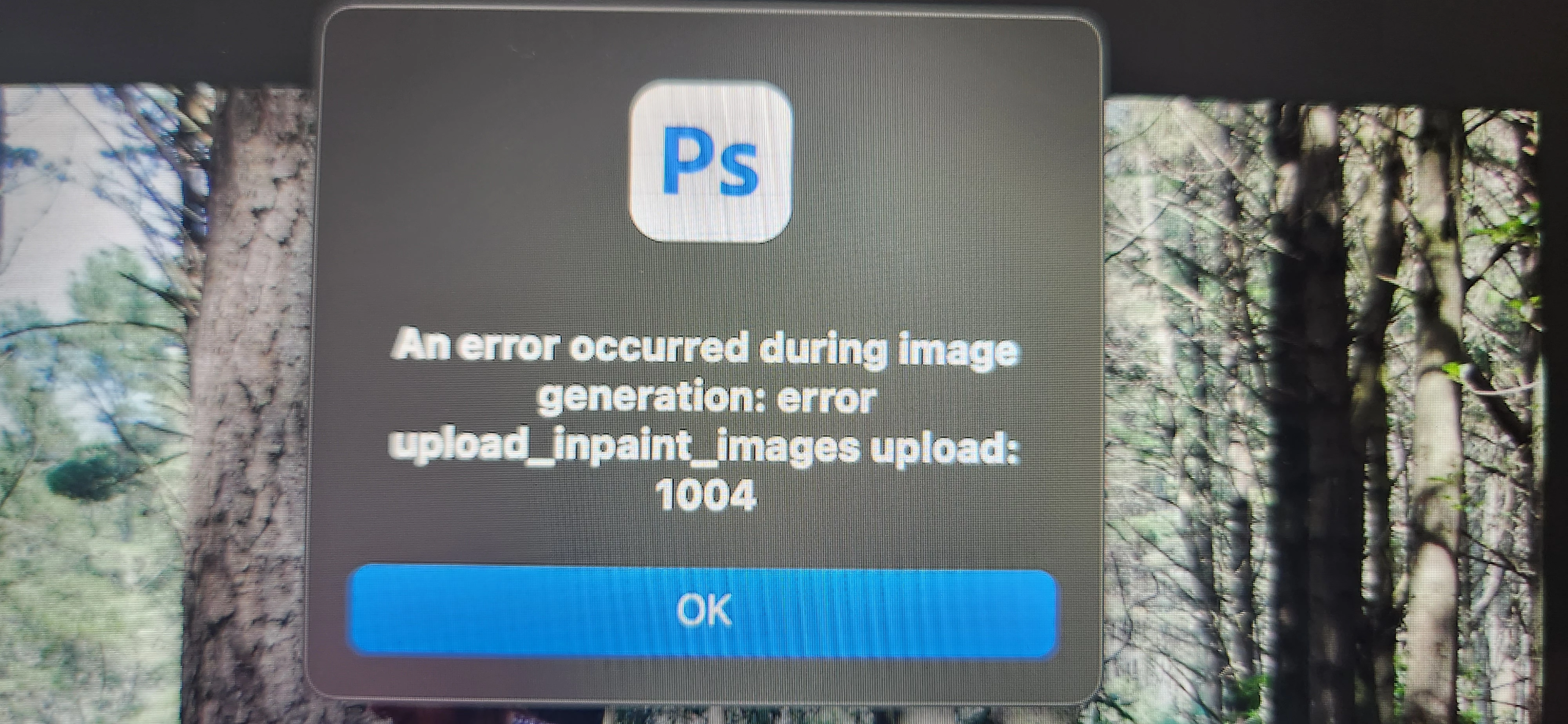
P: Generative fill Error 1004 in photoshop

 Hello 😀


I was so excited to try out the new update in photoshop  only to get this error code wverytime I click on the generate button, it will load for about 10 second and then this pops up. Can anyone help me PLEASE 🙏 


Thank you
This topic is closed to new replies. Start a new post to keep the conversation going.

74 replies

Participant
May 31, 2023 7:25 AM UTC

An error occurred during image generation: error
request_task: 1004

Translate
Participant
May 31, 2023 7:31 AM UTC

same here


Translate
Participating Frequently
May 29, 2023 3:33 PM UTC
Generative Fill Error: An error occurred during image generation: error upload_inpaint_images uploadI'm getting this error after selecting an area to fill and typing in "Futuristic Sunglasses" -


An error occurred during image generation: error upload_inpaint_images upload: 1004


This happens using either the Quick Selection tool and the Lasso tool, as well as a file opened from the hard drive and pasted in a new tab from scratch. I'm on a Mac with the OS Venture 13.4 Beta (22F5049e).

Translate
Participating Frequently
May 30, 2023 7:09 PM UTC

Anyone have a fix for error upload_inpaint_images upload: 1004    ???

Translate
Participant
May 31, 2023 8:15 AM UTC

same here, an error occured during image generation: error request task:1004

Translate
designabc123
Participating Frequently
May 27, 2023 9:59 PM UTC

Same issue here. None of the suggestions improved the problem in any way. 

Translate
Participant
May 27, 2023 7:57 PM UTC

Keep getting message:  an error occurred during image generation: error upload_inpaint-images upload: 1004

Translate
jane-e
Community Expert
Community Expert
May 27, 2023 10:14 PM UTC

@Lee242382421ddt 


I've moved your post to the primary thread


Jane

Translate
Participant
May 27, 2023 1:30 PM UTC

same fo me... tried changing to cloud base. still not working. has anyone found a solution?? 

Translate
jane-e
Community Expert
Community Expert
May 27, 2023 12:34 PM UTC

@CShubert and @Pete.Green 


I got this error multiple times a couple of evenings ago. I just tried again and it usually worked the second time. I wondered to myself if the servers were being taxed with the influx of folks trying GF and called it a day. I haven't seen the error since.


Jane


Translate
Participating Frequently
May 27, 2023 2:58 PM UTC

Could be.. I did restart my computer and program and then it worked at
least part of the time👍 Hope this works for anyone else having the same
issue--
Shanna Schwartz
SS Reflections Photography


[website removed as per forum guidelines]


Translate
Participating Frequently
May 27, 2023 2:53 AM UTC

Hello all, 

I'm having the same error message 1004 consistently.  Any help would be appreciated.  Very excited to try this new feature out.  

Thank you.

Translate
CShubert
Community Manager
Community Manager
May 26, 2023 4:50 PM UTC

Hey all, curious if this issue is persisting, or if after a few tries it goes away?  One thing to try is to try is turning Select Subject to cloud based vs Device, does this still give you the error?


Translate
Participant
May 30, 2023 3:28 AM UTC

您好,请问 Ai 的测试版是否只能在美国使用,而不能在亚洲使用?

它是通过最新版本的 Cloud,24.6,我不知道为什么它一直显示错误!

Translate
Participating Frequently
May 26, 2023 4:26 PM UTC

Hi,

Ive kust tied to use the generative fill function but I keep getting an error message

 How do I overcome the following error message when using generative fill:

An error occurred during image generation: error upload_inpaint_images upload: 1004


Any help would be greatly appreciated

Translate
Pete.Green
Adobe Employee
May 25, 2023 8:58 PM UTC

@Blayz3006128221oa, @defaultmt11las3dwof  and @BLTDFRNT ,

Might there be a firewall that could be blocking Photoshop from making network requests?

Translate
BLTDFRNT
Participant
May 25, 2023 9:12 PM UTC

@Pete.Green  I don't think so, because if there was any permission needed, the operating system would have shown me any prompt to go visit my settings and ask for any permission, but that didn't happen 😞 


Translate
Pete.Green
Adobe Employee
May 25, 2023 9:17 PM UTC

Any chance you'd try disabling the firewall and trying again? Would be curious if it resolves it for you

Translate