
Trevor.Dennis
Community Expert
Community Expert
October 10, 2023
Answered

P: Layer Mask Icons in 25.1

  • October 10, 2023
  • 21 replies
  • 25988 views

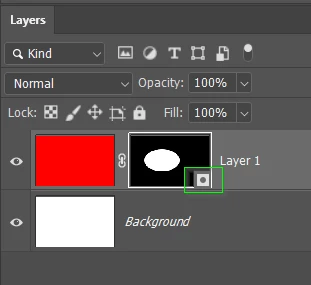
Someone has asked about this in the main Photoshop forum.  I'd not opened 25.1 and can't find any information — like a what's new.  @CShubert can you explain how the new layer mask icons work?  Thanks.
 

Correct answer Kevin Stohlmeyer

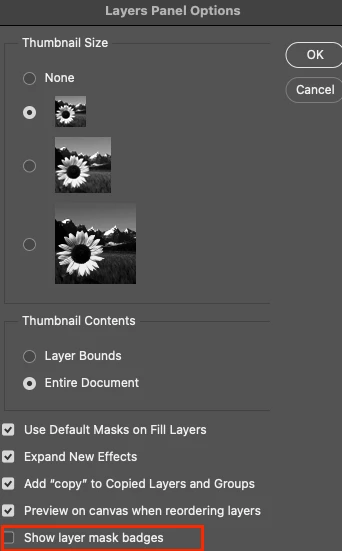
Hi all - happy to announce that this feature has been added as an option in the latest public release 25.2. Update your Photoshop 2024 to access via the Layers Panel Menu.

BONUS - it was off by default after update.
 

21 replies

BoekMarc
Participating Frequently
October 29, 2023

This is such a(nother) misunderstanding by Adobe how we use photoshop, and masks in perticular.

Please restore asap. Adobe is getting so anoying to work with it as a pro. Not only in photoshop.

New indesign (19) not accepting settings from previous version is one of them. This should be tried and tested.

Pantone pluginn is unworkable, and we have to pay extra when it was always past of the system.

And so on. We are not a test platform, these are pro tools.

So get your act together. ASAP.

Participant
October 29, 2023

Hi, I am completely new to photoshop and that icon just started showing up. What does it mean? It shows up anytime a create a mask or solid color layer. 

Trevor.Dennis
Community Expert
Community Expert
October 29, 2023

Adobe refers to these icons as 'badges', and they diferentiate between normal raster and vector masks, which is useful for designers who use a lot of vector content.   I have the thumnails set to large (see second screen shot), and if you have the screenspace, these make the badges a lot less intrusive.


The latest beta version (V25.2 m.2374) has the option to turn off the badges in the Layer Panel Options. and I am sure this will be added to the full release version in due course.


ed weston
Participant
October 28, 2023

This little mask icon really is a big nuisance, heres hoping Adobe will remove this icon or provide users a way to toggle it on and off. There are so many fixes that need to be addressed, why would Adobe spend time on adding something that I'm certain no one asked for. 

Legend
October 28, 2023

@Pete.Green 

Unfortunately, the Panel option to turn on/off the new Layer Mask Badges doesn't stay off after Ps is relaunched.


It needs to be sticky like the other Panel options.

lollozip
Known Participant
October 27, 2023

This new icon is terrible, I often use Photoshop on my Wacom HD13 and I need a UI as clean an simple as possible. Please give us the possibility to switch it off on PS 25.1.0!

thank you

Participant
October 27, 2023

Please turn this nonsense off! We do not need an icon that shows there's i a regular mask beneath. It's an icon for an icon 🫣 

Participating Frequently
October 26, 2023

Hello, put the option to "turn off" those stupid and obtrusive icons to the regular release ASAP!
And please stop messing the UI with those new features that no one asked for!!!

I usually work with many layers (and small layer thumbnails therefore) - this is so annoyng.
It actually hides 25% of the visible thumbnail, very stupid idea!


Focus to fix REAL probblems, e.g.:
https://community.adobe.com/t5/photoshop-ecosystem-bugs/color-value-selection-problem-on-color-picker/idc-p/14186784#M94131

Participant
October 29, 2023

Photoshop Team - please add an option to remove the new little square layer mask symbol - it is ruining the part of the layer mask which is in use all the time!

Participating Frequently
October 26, 2023

If I change something in the layers palette, the previews in the channels palette are not updated. Only when I manually click on the RGB channel with the mouse does the view of the thumbnails refresh.


OSX Ventura, M1 (with my old MacPro the same problem)

ELIJAH THINGS
Participating Frequently
November 1, 2023

Tell us who's this genius please i wanna pledge absolute submission to this master of design


Participating Frequently
November 2, 2023

Maybe someone promoted from Reader?

Pete.Green
Community Manager
Community Manager
October 25, 2023

Thanks for bringing this one up Trevor and all, apologies for the workflow disruption!


This layer mask badging went out intially without the preference to disable it when desired, and that preference has now been added to the latest Ps beta version Adobe Photoshop Version: 25.2.0 20231018.m.2368 in Layer panel options > Show layer mask badges.


Regards,

Pete

Trevor.Dennis
Community Expert
Community Expert
October 25, 2023

That is very cool Pete.  We love being able pass on such speedy responses from the Development Team.


Inspiring
October 14, 2023

The icon obscures the mask. Please provide an option to disable this new visual distraction.

Trevor.Dennis
Community Expert
Community Expert
October 15, 2023

If you have the screen space, you can set layer thumbnails to large in Panel Options.  I use three large screens and the only time I use the smaller thumbnails is with frame animations when I have lots of layers and need to see them all.  


This is a 1:1 screen shot.  The thumbnails are more or less ideal due to the document's aspect ratio.  Narrow aspect ratios make for shite thumbnails.


The other option, which is useful with smaller screen sizes, is to set Contents to Layer Bounds.  I doesn't help with the layer mask, but the layer element fills the thumnail making it easier to identify.


I actually named those layers for the sake of the screen shot, as I am not great at naming layers usually, so when I b]need to identify a particular layer's contents I either:

  • Ctrl click it to surround it with marching ants.  Works even better iof you hit Q to go into Quick Mask.
  • Alt click it's thumbnail, to turn all other layers off. 


To do it the other way round, right click over an image element to show eveery layer beneath the cursor position.


Something that I always seem to end up with are empty layers, which can become a pain.  So just a reminder that there is a script to remove them all at once. 🙂

Participant
October 11, 2023

Thanks Trevor, for posting this in regards to my original post.  Hope we can get some info on this as I'd sure like to be able to have the option of using the older icon format.

Trevor.Dennis
Community Expert
Community Expert
October 12, 2023

The mask still acts like it used (as far as I know).  I think the new icon is more about information, but I'm as interested as you to find out.

Earth Oliver
Legend
October 26, 2023

But there's ZERO information about the second mask. The only thing a user sees is that it's different, but not what that difference is. And the badge is only so slightly different that most users won't even see it. Ridiculous UI design here.
