Joe Creative
Inspiring
December 19, 2025
Answered

P: URGENT WINDOWS 11 BUG. Gradient and Gradient Map Not Working After 27.3.0 Update

  • December 19, 2025
  • 4 replies
  • 326 views

After updating to Photoshop Beta version 27.3.0 on Windows 11 today, 12.18.2025, the Gradient Editor and Gradient Map are no longer working correctly.

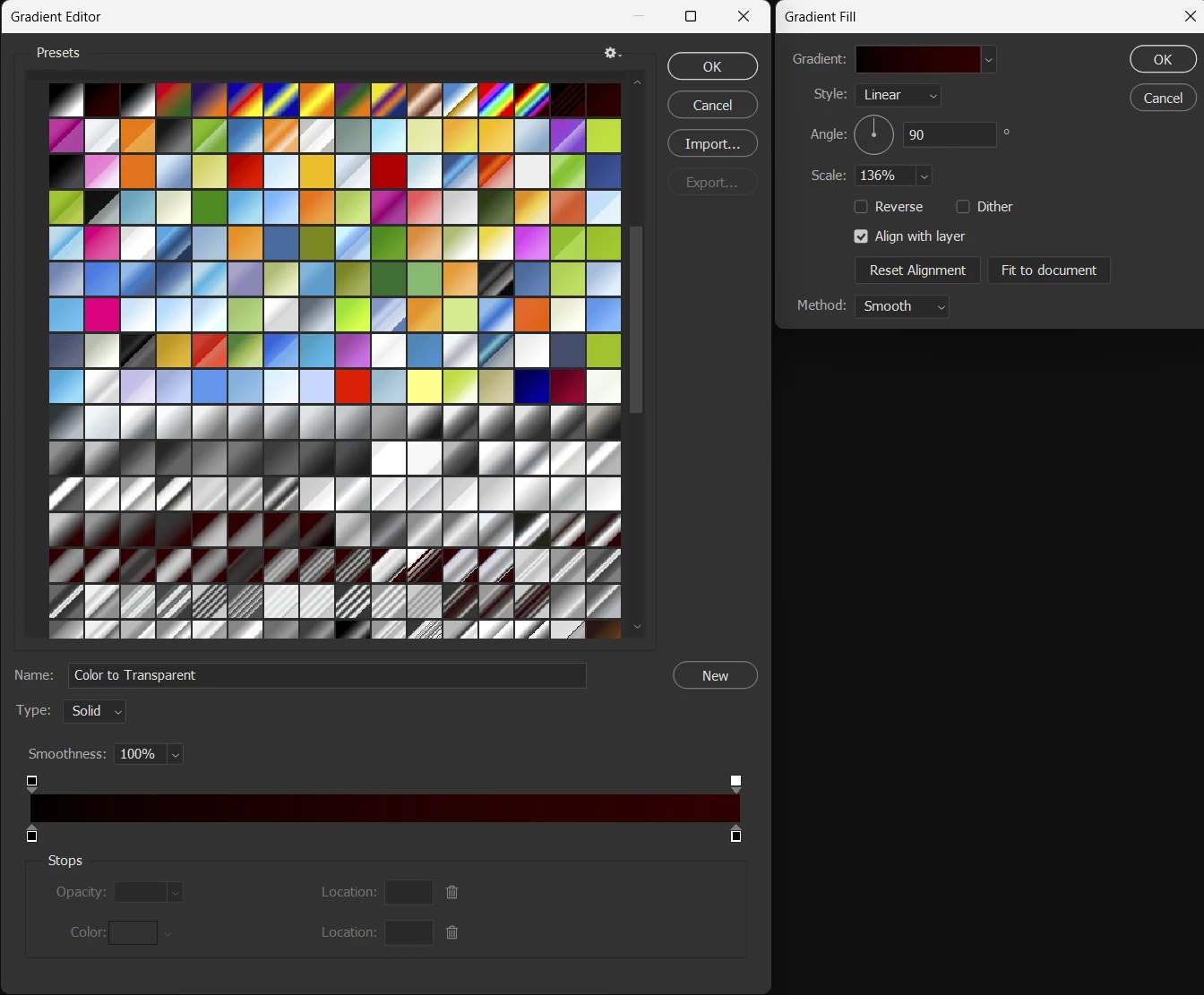
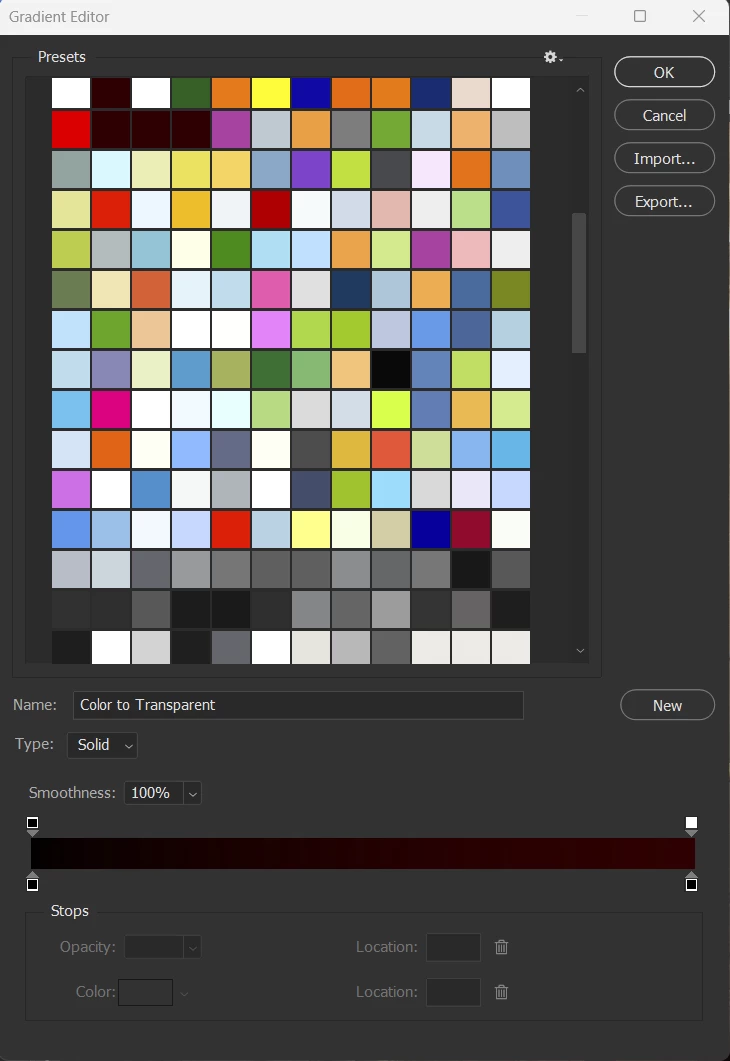
All gradient swatches are now displaying as solid colors instead of gradients. This issue affects all gradients, including default gradients, custom gradients, and Adobe Stock gradients. The problem appears inside the Gradient Editor itself.

I have tried the following steps and none resolved the issue:

• Restarted Photoshop multiple times
• Restarted my computer
• Deleted all gradients, including the default gradients
• Checked Adobe Stock gradients
• Reopened the Gradient Editor and Gradient Map

The issue still persists after all troubleshooting steps.

This makes Gradient Map and gradient based workflows unusable. This is a critical issue for professional work that relies on gradients for color grading, masking, and creative effects.

I have attached a screenshot showing the issue where all gradients appear as solid color swatches.

Please advise if this is a known bug or if a fix is being worked on. This issue appeared immediately after updating to version. 27.3.0. [Example Image 1 shows the bug in Photoshop Beta 27.3.0.] I reverted back to Photoshop Beta 27.2.0, where gradients work correctly. This issue only occurs in Photoshop Beta 27.3.0, confirming it is a newly introduced bug. [Example Image 2 shows version 27.2.0 working as expected.]Screenshot 2025-12-18 181214.pngScreenshot 2025-12-18 195824.png
Correct answer Joe Creative

Hi Corey,


Thank you and also say thank you to the Adobe Tech team for fixing the small little bug issue in the windows 11 operating system. I have updated it to the latest version that Adobe has on their current website. I have no further issues. Everything's been corrected. Thank you for all the hard work you guys do over there. I do not know how to close out this ticket. But everything's been fixed.


best,

Joe

4 replies

Joe Creative
Joe CreativeAuthorCorrect answer
Inspiring
January 16, 2026

Hi Corey,


Thank you and also say thank you to the Adobe Tech team for fixing the small little bug issue in the windows 11 operating system. I have updated it to the latest version that Adobe has on their current website. I have no further issues. Everything's been corrected. Thank you for all the hard work you guys do over there. I do not know how to close out this ticket. But everything's been fixed.


best,

Joe

CShubert
Community Manager
Community Manager
January 16, 2026

Hey @Joe Creative the issue you show was fixed last year, so why you are still seeing it?  


1. Try resetting Prefs for the Beta:
/Users/yourname/Library/Preferences/ Photoshop Beta Settings (Mac Ventura)
/Users/yourname/Library/Preferences/Adobe\ Photoshop\ \(Beta\)\ Settings (Mac)


C:\Users\user name\AppData\Roaming\Adobe\Adobe Photoshop (Beta)\Adobe Photoshop (Beta) Settings


Launch BETA Photoshop While Pressing The Keyboard Shortcut
With Photoshop closed, press and hold Shift+Ctrl+Alt (Win) / Shift+Command+Option (Mac) on your keyboard and then Launch Photoshop the way you normally would.
https://helpx.adobe.com/photoshop/using/preferences.html#Manually


2. It may help if we could see your Photoshop beta System Info. Launch Photoshop beta, and select Help >System Info...and copy/paste the text in a reply.  


Thanks,

Cory - Photoshop Product Manager

Joe Creative
Inspiring
December 22, 2025

Hi Cory,

Thank you for getting back to me. I appreciate you taking the time to look into this.

Unfortunately, I was not able to resolve the issue using the Legacy Gradients option. When I was on Photoshop Beta 27.3.0, I checked the flyout menu and enabled Legacy Default Gradients, but the problem remained the same. I normally do not use Legacy Gradients at all, but I still tested it to be sure. The previews did not display correctly and appeared as solid color swatches instead of gradients.

This issue affects all gradient types. That includes Legacy Gradients, newer default gradients, custom gradients, and Adobe Stock gradients. Inside the Gradient Editor, Gradient Map, and Gradient Fill, all gradient previews turn into solid colors rather than showing a smooth gradient transition. Even the Gradient panel you referenced showed the same solid color results on my system.

Because gradients are a core part of my workflow, especially Gradient Map and Gradient Fill for color grading and masking, this made the tools unusable in version 27.3.0. After testing and troubleshooting, I downgraded Photoshop Beta back to version 27.2.0. Once I reverted, all gradients worked correctly again and displayed as expected. This confirms the issue only occurs in Beta 27.3.0.

For reference, my PC is running Windows 11 fully up to date. All system updates, graphics card drivers, and hardware drivers are current. No changes were made to my system other than updating Photoshop Beta to 27.3.0, which is when the issue first appeared.

I am also providing examples of how I normally use gradients in my workflow, including Gradient Map and Gradient Fill. In all of these cases, the previews fail in 27.3.0 and display as solid colors instead of gradients.

Thank you again for your help and for looking into this. Please let me know if there is any additional information or testing I can provide. (Example Images are from Photoshop Beta 27.2.0. I had to downgrade to see any Gradients including Default Adobe Photoshop system Gradients.) I have update my Photoshop to 27.3.0 several times already and still have the same issues with solid Gradient Swatches.

Best regards,
Joe

Screenshot 2025-12-22 104434.pngScreenshot 2025-12-18 195824.png

CShubert
Community Manager
Community Manager
December 22, 2025

Hi @Joe Creative are you able to see them if you select Legacy Gradients from the flyout menu?

Screenshot 2025-12-22 at 11.10.44 AM.png

Adobe Photoshop Version: 27.3.0 20251221.m.3348 0256c3c arm64 (beta, PublicBeta)


Thanks,

Cory - Photoshop Product Manager