



Adobe Employee
June 20, 2022
質問

Photo Restoration Neural Filter now available in Photoshop Beta!

  • June 20, 2022
  • 返信数 53.
  • 128618 ビュー

Hello Beta Community!


We are excited to share that Photo Restoration is now available in the Photoshop Beta. Photo Restoration is a new Neural Filter that uses an AI trained model to help restore old or damaged photographs. Using the Photo Restoration filter, users can restore the quality of their images using the basic editing options or choose to further refine using our advanced options (adjustments). Once complete, there is always an option to export the image to the main Photoshop workspace for further refinement.


Main Editing Features:

  • Photo enhancement - Improve color, contrast, and details
  • Enhance faces - Improve the detail on face specifically
  • Scratch reduction - Restore areas of the photo that have been scratched or damaged (off by default)


Advanced Editing Features (Adjustments):

  • Noise reduction
  • Color noise reduction
  • Halftone artifact reduction
  • JPEG artifacts reduction


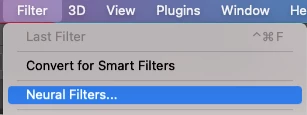
To access the filter, go to File > Neural Filters > Photo Restoration and switch the toggle to “on”. This will initiate the filter download and activate it for use.

 

Please share any thoughts and comments here on our community thread, or in-app through our Beta feedback panel (accessed via the flask icon in the upper righthand corner of the application). We look forward to hearing your feedback and seeing what you create!

返信数 53

bobk2992755
Participating Frequently
September 4, 2022

Hi, the previous version of the Photoshop Beta with the new Photo restoration filter was so much better than this latest update?  Can we get an option to choose which method we would like?

New one is pretty rubbish in comparison to the last version in my opinion.

Thanks

Participating Frequently
September 4, 2022

I have the same issue, the face enhancement feature is not working with this new update, no complaints about the rest of it.

TewRogers
Participating Frequently
August 31, 2022

I have the latest version and it is still not there. I have a few oldies that I would like to use it on, please update or advise.


Adobe Photoshop Version: 23.5.0 20220809.r.669 0e07917 x64
Number of Launches: 48
Operating System: Windows 10 64-bit

Pete.Green
Community Manager
September 1, 2022

Hi @TewRogers,

Make sure you've downloaded the Photoshop (beta) from the beta apps tab of Creative Cloud desktop, and also that it's the version of Photoshop that you're opening. It's the one with the White PS logo instead of the blue Logo.


Once in Photoshop beta, see if the Neural Filter is there for you.


Regards,

PG

TewRogers
Participating Frequently
September 1, 2022

Hello Pete-I downloaded it through the Adobe creative app, however, photo restoration still isn't there. Please advise.


Terry


Known Participant
August 30, 2022

The feature does not download. Is there something I need to do? Also, none of the new features will download. Any help or suggestions would be greatly appreciated.

Pete.Green
Community Manager
September 1, 2022

Can you give more details on what might be going on here @StFrancisAssisi

Maybe a screenshot would help. 


You could also reset the downloaded models and try downloading them again, perhaps we're hitting some permissions issues with the download folders:

  1. Quit Photoshop beta, delete or rename the following folder, Start Photoshop beta and try again:
  • WindowsC:\Users\[username]\AppData\Roaming\Adobe\UXP\
    PluginsStorage\PHSP\22\Internal\com.adobe.nfp.gallery\PluginData
  • Mac: ~/Library/Application Support/Adobe/UXP/PluginsStorage/
    PHSP/22/Internal/com.adobe.nfp.gallery/PluginData


Let us know how it goes for you.

Regards,

Pete

Known Participant
September 1, 2022

Participant
August 29, 2022

I have 23.5.0 relese of Photoshop. I installed Photoshop (beta) to use photo restorationfrom creative cloud. I downloaded all filters in neural but when I use photo restoration in neural either photoshop freeze for long and restart automatically or it gives message we've temporarily disabled this filter because of an error. Please suggest what to do?

Participant
August 29, 2022

It happens even when I use low resolution photo (in kb)

Participant
August 25, 2022

sir, not showing this option in my photoshop 

Pete.Green
Community Manager
August 25, 2022

Hi @Ramesh250621021plx,


Make sure you've downloaded the Photoshop (beta), and also that it's the version of Photoshop that you're opening. It's the one with the White PS logo instead of the blue Logo.


Once in Photoshop beta, see if the Neural Filter is there for you.


Regards,

PG

bobk2992755
Participating Frequently
September 4, 2022

Hi, can you help please. I just update to the latest Beta and the Neural filter (Photo Restoration) has changed significantly 😞  Yesterday's version was great (replaced facial features). Could there be a way to choose between them or which one you use?

craigjohnsonphoto
Participant
August 23, 2022

I downloaded the beta version today (23-Aug-2022 - 23.5.0 release) and although it has the photo restoration filter, it does not have the enhance face check box.  Was it removed?  Thanks

Known Participant
August 24, 2022

Was there face(s) in the photo? I tried to landscape photo with no faces and there wasn`t enhance face checkbox or slider for it.

craigjohnsonphoto
Participant
August 24, 2022

There was a face in the photo - a small child.  I tried a test using a another photo with clear and obvious faces and the enhace face button showed up.  Apparently the software doesn't alway detect the presence of a face and when it doesn't, the option is not shown.  

Polo Freitas
Known Participant
August 23, 2022

Impressive! seeing the result with just one click, it seems that I reconstruct the face, with new eyes, and also the definition that you put in the hair, very, very good. I hope it will soon move from beta to the final version of Photoshop.

Participant
October 14, 2024

How did this happened? I tried several ways using NF but it did make worse my image. In my experience this filter is utter waste. 

Known Participant
August 23, 2022

Tried it! Scratch reduction in lowest setting does almost nothing to scratches but blurs photo a lot. Higher values does better job to scratches but photo is so soft and filled with artifacts that it is unusable.

Pete.Green
Community Manager
August 23, 2022

Thanks for the feedback @Valokammi!

Will make sure the team sees your feedback.


One thing to think about is combining the edits from the Neural Filter with the original layer, or multiple passes by the filter on this layer together to get just the right end result you're after.


Hope this helps!

Regards,

PG

Participant
April 22, 2023

I'm having the same issue with scanned negatives


Participant
August 22, 2022

First, thanks for the filter. I cannot wait to fix my old photos!

Second, I had the same issue. I could not see the option to download the beta. In my case, I opened adobe creative cloud ->Help -> Check for updates. After it was checked, the photoshop beta appeared in the beta apps tab. Hope it helps

Participating Frequently
August 22, 2022

I also have the most recent version of PS. There is no Photo Restoration option in the neural filters section. I've watched numerous online videos about it for months but can't seem to find a way to get it. Is this feature available or not? Do you need to be a Beta tester to get it? Someone in Adobe community must know the answer. None of the postings here are helpful. 

Pete.Green
Community Manager
August 23, 2022

Hi @RayRainka

As @Cristian24577583ktoz, mentions below, it is available in the Photoshop (Beta) that should be a Neural Filter that is available for you in the Beta apps tab of the Creative Cloud desktop app.


No special sign up or anything, just download and install that version and you'll be good to go!


Let us know if you have any trouble.

Regards,

PG

Participant
August 29, 2022

I have 23.5.0 relese of Photoshop. I’m unable to use photo restoration in photoshop thus I installed Photoshop (beta) to use photo restorationfrom creative cloud. I downloaded all filters of neural but when I use photo restoration in neural either photoshop freeze for long and restart computer automatically or it gives message we've temporarily disabled this filter because of an error. Please suggest what to do?