Tulips.Studio
Participant
May 8, 2024
Answered

Photoshop Beta - Error while chaning workspace

  • May 8, 2024
  • 1 reply
  • 361 views

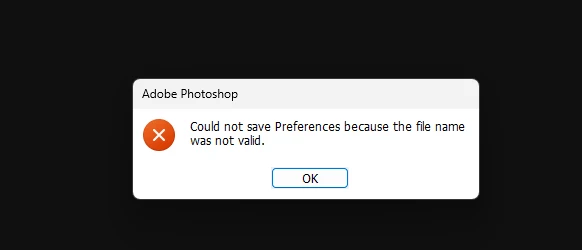
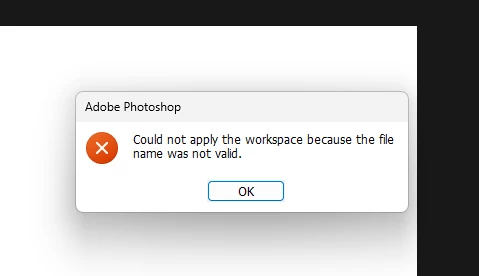
I recently installed Photoshop Beta from Creative cloud, Tried to change workspace to Photography, it throws error (ref pic 1)


Tried changing look n other settings in preferences, again I m unable to save the settings (Error msg Ref 2)


Let me know whats the issue to fix this.


Im using win 11

HP Victus Laptop (AMD Ryzen 7 5800H with Radeon Graphics 3.20 GHz ) 

RAM 16 GB


[Mod: Moved to the Photoshop Beta forum]

This topic has been closed for replies.
Correct answer Sameer K

Hey, @Tulips.Studio. Welcome to the Photoshop Community. I'll help you figure this out. 


Before troubleshooting, update Photoshop (beta) to the latest version (v25.10) via the Creative Cloud desktop app & check if the issue exists. 


Try these steps:
Please update Windows and the drivers for the AMD Radeon graphics and Nvidia 3050 GPU on your laptop to the latest version.

Go to the location of the preference folder below and rename it to backup.

  • Windows 10/11: Users/[user name]/AppData/Roaming/Adobe/Adobe Photoshop [version]/Adobe Photoshop [version] Settings
  • You can press Press the Windows key > Enter 'Run' > Enter %APPDATA%\Adobe
  • Rename the Adobe Photoshop folder by adding a .old at the end. (Adobe Photoshop 2024 > Rename > Adobe Photoshop 2024. old), You can restore these preferences later if needed.(https://adobe.ly/4860qM9)
  • Restart the computer.

These changes will give a fresh start to Photoshop as a fresh install. Let me know how it goes.

Thanks!

Sameer K

1 reply

Sameer K
Community Manager
Sameer KCommunity ManagerCorrect answer
Community Manager
May 20, 2024

Hey, @Tulips.Studio. Welcome to the Photoshop Community. I'll help you figure this out. 


Before troubleshooting, update Photoshop (beta) to the latest version (v25.10) via the Creative Cloud desktop app & check if the issue exists. 


Try these steps:
Please update Windows and the drivers for the AMD Radeon graphics and Nvidia 3050 GPU on your laptop to the latest version.

Go to the location of the preference folder below and rename it to backup.

  • Windows 10/11: Users/[user name]/AppData/Roaming/Adobe/Adobe Photoshop [version]/Adobe Photoshop [version] Settings
  • You can press Press the Windows key > Enter 'Run' > Enter %APPDATA%\Adobe
  • Rename the Adobe Photoshop folder by adding a .old at the end. (Adobe Photoshop 2024 > Rename > Adobe Photoshop 2024. old), You can restore these preferences later if needed.(https://adobe.ly/4860qM9)
  • Restart the computer.

These changes will give a fresh start to Photoshop as a fresh install. Let me know how it goes.

Thanks!

Sameer K

Tulips.Studio
Participant
May 21, 2024

Thanks for the update