Participant
October 11, 2025
Answered

Photoshop Beta Not shutting down

  • October 11, 2025
  • 2 replies
  • 116 views

Issue

  • Photoshop version: Adobe Photoshop Version: 27.0.1 20251008.m.3251 e0b4e51 x64 (beta, PublicBeta)
  • OS:  Windows 11 64-Bit  Version: 11 oder höher 10.0.26100.6584


Steps to reproduce:

  1. Exit Photoshop


Expected result:  Exiting
Actual result

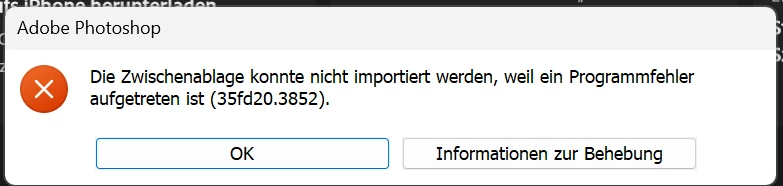
Message 35fd20.3852

"OK" goes back to Photoshop.
"Information..." goes to https://helpx.adobe.com/de/photoshop/kb/program-error-opening-psd.html?trackingid=C12Y2WS7&mv=in-product&mv2=ps


No possibility to exit - just kill the app from windows taskmanager



Correct answer CShubert

Hi @christophep6602379 please update to the latest Ps Beta and see if this solves this issue:
Adobe Photoshop Version: 27.0.1 20251012.m.3255 d971f80 arm64 (beta, PublicBeta)


If not, please share your workflow, what steps you were doing when this issue happened.


Thanks,

Cory - Photoshop Product Manager

2 replies

Participant
October 13, 2025

That helped, now everything works fine. Thanks a lot! BR Christophe

CShubert
Community Manager
CShubertCommunity ManagerCorrect answer
Community Manager
October 13, 2025

Hi @christophep6602379 please update to the latest Ps Beta and see if this solves this issue:
Adobe Photoshop Version: 27.0.1 20251012.m.3255 d971f80 arm64 (beta, PublicBeta)


If not, please share your workflow, what steps you were doing when this issue happened.


Thanks,

Cory - Photoshop Product Manager