
Known Participant
August 13, 2024
Frage

Photoshop Beta - unable to update or uninstall, installed but not shown in Desktop CC

  • August 13, 2024
  • 5 Antworten
  • 539 Ansichten

PS beta is telling me it's 5 weeks out of date and time to update.
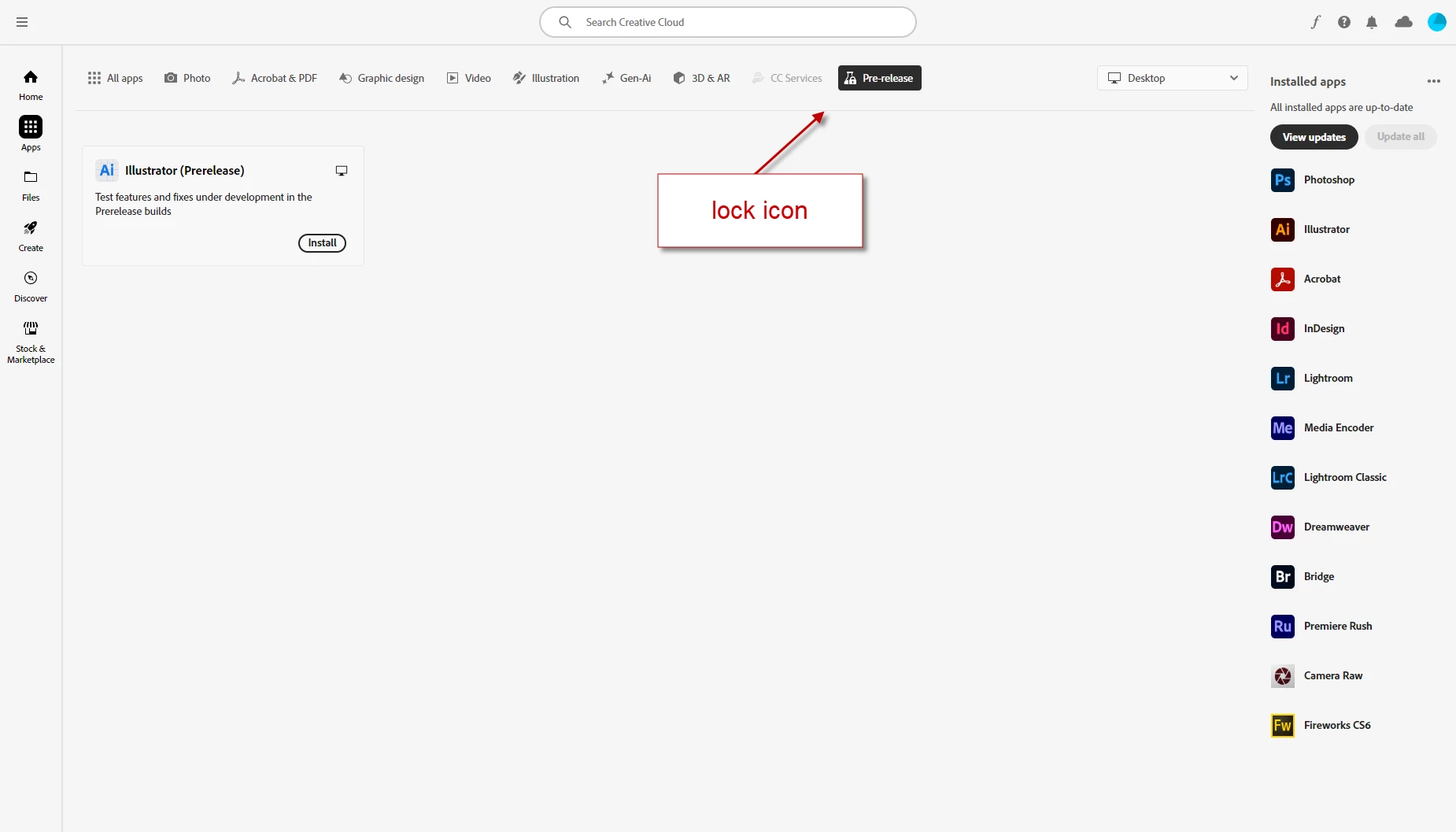
Desktop CC shows a lock over the Pre-release beaker icon, and the only app shown is Illustrator (Pre-Release). Photoshop Beta is not shown.

PS Beta v.  25.10.0 20240606.m.2655 bf45eb0 x64

running on Windows 10 Enterprise v 22H2

Steps to replicate:

open PS Beta

message box: time to update

menu: Help > Update

Desktop CC Updates tab opens automatically

Photoshop Beta is not listed

navigate to pre-release tab (which has a lock icon on it)

Photoshop Beta is not shown, only Illustrator (Prelease) is displayed

expected result: to see Photoshop Beta displayed so I could update it, or at least uninstall

actual result: I don't see Photoshop Beta anywhere
5 Antworten

Kevin Stohlmeyer
Community Expert
Community Expert
August 13, 2024

There should be a standalone uninstaller app in the same folder as the exe application.

Known Participant
August 16, 2024

I didn't see files in that folder called "setup" or "update" or "uninstall" so I asked our Sys Admin for assistance. He was able to remove Photoshop Beta. I still don't have a "Beta" tab in Desktop CC, so it looks like I'm out of the beta program permanently 🙂

Thank you for all the help, kevin, much appreaciated

Known Participant
August 13, 2024

Kevin, you've hit upon my problem 🙂 as the attached screenshot shows there is no Beta tab next to the locked Pre-Release tab. And Photoshop Beta is not in the list of Installed Apps.

When I try to uninstall from Windows Control Panel, Desktop CC opens.
The only way I know to uninstall is from Desktop CC but I can't find Photoshop Beta anywhere to do that.


Kevin Stohlmeyer
Community Expert
Community Expert
August 13, 2024

@Fearless_smarts1587 Sorry I didnt see this before - Prerelease is not Beta. Try uninstalling the PS Beta application then checking your CC Desktop App for updates. Beta should show as a similar icon (without the lock) to the left of the Prerelease icon.

Known Participant
August 13, 2024

just a single user license, installed by me, not managed by IT

Kevin Stohlmeyer
Community Expert
Community Expert
August 13, 2024

@Fearless_smarts1587 are you on a managed account like education or enterprise?