
Participant
September 11, 2024
Question

Photoshop beta version cannot save files.

  • September 11, 2024
  • 1 reply
  • 182 views

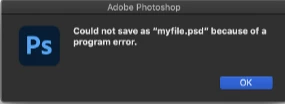
I encountered an issue where, after updating Photoshop beta to the latest version, I am unable to save files. I also checked Adobe's support and tried using an older version and uninstalling, but the problem persists. The following image appears when I attempt to save.
 

This topic has been closed for replies.

1 reply

CShubert
Community Manager
Community Manager
September 11, 2024

Hi @magnetic_critic0806 


Try resetting Prefs for the Beta:
/Users/yourname/Library/Preferences/ Photoshop Beta Settings (Mac Ventura)
/Users/yourname/Library/Preferences/Adobe\ Photoshop\ \(Beta\)\ Settings (Mac)


C:\Users\user name\AppData\Roaming\Adobe\Adobe Photoshop (Beta)\Adobe Photoshop (Beta) Settings


Launch BETA Photoshop While Pressing The Keyboard Shortcut
With Photoshop closed, press and hold Shift+Ctrl+Alt (Win) / Shift+Command+Option (Mac) on your keyboard and then Launch Photoshop the way you normally would.
https://helpx.adobe.com/photoshop/using/preferences.html#Manually 


Thanks,

Cory - Photoshop Product Manager

Participant
September 12, 2024

Thank you. I will give it a try.