
r_isabel
Participant
September 15, 2021
Answered

Photoshop Beta – "you do not have permission"

  • September 15, 2021
  • 4 replies
  • 5397 views

Hi there, 

I can see that Photoshop Beta has recently been updated to v 23.0. However, I have this message appear whenever I try to open the programme or a photoshop document on my Macbook M1(macOS, Big Sur, v 11.2.2):
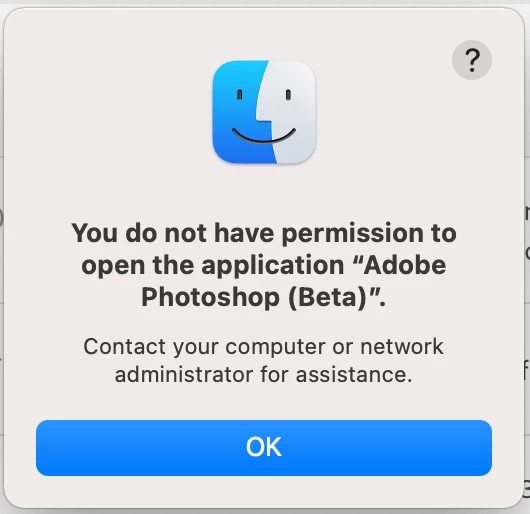
 

Could this be a bug from the recent update? 

Thanks for your help.

This topic has been closed for replies.
Correct answer Pete.Green

Hi r_isabel, 

In addition to the steps mentioned by Ashutosh, I have a few suggestions for you to try.


Firstly, try the uninstall/reinstall method --- This has been useful as we've changed over to beta.

Uninstall any versions of Photoshop beta that are on your system, delete the Photoshop beta folder that is left behind after uninstallation, and then reinstall the latest version of the beta.


If that doesn't resolve it for you, then you might also consider updating your version of Big Sur that is on the system. Looks like current is 11.6.


Give those workflows a go and let me know if you're back up and running. 


Regards,

Pete

4 replies

Participant
June 26, 2023

هل يشتغل تطبيق بيتا فوتوشوب على الهاتف

ROSI.
Pete.Green
Community Manager
Pete.GreenCommunity ManagerCorrect answer
September 22, 2021

Hi r_isabel, 

In addition to the steps mentioned by Ashutosh, I have a few suggestions for you to try.


Firstly, try the uninstall/reinstall method --- This has been useful as we've changed over to beta.

Uninstall any versions of Photoshop beta that are on your system, delete the Photoshop beta folder that is left behind after uninstallation, and then reinstall the latest version of the beta.


If that doesn't resolve it for you, then you might also consider updating your version of Big Sur that is on the system. Looks like current is 11.6.


Give those workflows a go and let me know if you're back up and running. 


Regards,

Pete

r_isabel
r_isabelAuthor
Participant
September 22, 2021

Hi Ashutosh.Nigam and Pete.Green,

I could see that I had permission to open the programme, so I went ahead and uninstalled/reinstalled Photoshop Beta. I managed to open the programme with no issues.

Thanks for your advice!

Pete.Green
Community Manager
September 23, 2021

Great! Glad you're up and running now! Thanks for letting us know!


Regards,

Pete

Ashutosh.Nigam
Adobe Employee
Adobe Employee
September 22, 2021

Please refer to following for fixing the permission issue :

https://helpx.adobe.com/photoshop/kb/required-permissions-for-photoshop0.html


Coppers12
Participating Frequently
September 15, 2021

I have been a Photoshop Beta tester for some considerable time now.  Only today, when I attempt to use the software I get an error message 'We can't verify your subscrition status'.  I am able to use the current production version of Photoshop with no issues.  The internet connection has no issues whatsoever.  I have a current montly subscription.


I have closed the beta version and restarted it many times also logged out of Adobe and back 

in again, same result.


Regards


James


Pete.Green
Community Manager
September 15, 2021

Hi James, 


Thanks for checking in. Looks like you've been a part of prerelease for some time and were part of the change over to Beta.


To resolve this, I recommend that you uninstall the prerelease/beta builds of Photoshop that are on your system, delete the Photoshop beta folder, and then reinstall it. 


Give that workflow a go and let me know if you're back up and running. 

Regards,

Pete

Coppers12
Participating Frequently
September 16, 2021

Hi Pete


Thanks for getting back to me, great news, it is now working again after a re-install.


Thanks


James


ps. Did you know when the new neural 'face clean' is due for beta release.  I'm really looking forward to that.