

Sam B+
Inspiring
May 5, 2022
Answered

PHOTOSHOP version 'clock icon' missing from .psdc on web and in Creative Cloud App

  • May 5, 2022
  • 1 reply
  • 321 views

The version icon (as described in this Adobe documentation: https://helpx.adobe.com/creative-cloud/help/open-revert-cloud-document-version.html) is currently not present in the web beta version of Photoshop. I recall using it successfully via the browser view in the past. It is not present in the CC app view of the file either. 


The only way I was able to find to revert to an older version was to use PS desktop File->Version History.
This topic has been closed for replies.
Correct answer Pete.Green

Hi Sam!


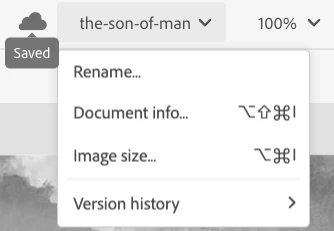
Thanks for checking for Version History in Photoshop Web. Currently you can find Version History at the bottom of the document name tab along the top toolbar, like so:


Regards,

Pete

1 reply

Pete.Green
Community Manager
Pete.GreenCommunity ManagerCorrect answer
May 9, 2022

Hi Sam!


Thanks for checking for Version History in Photoshop Web. Currently you can find Version History at the bottom of the document name tab along the top toolbar, like so:


Regards,

Pete