Participant
June 10, 2023
Answered

Photoshop won't reopen after close - need to force quit - Windows

  • June 10, 2023
  • 1 reply
  • 453 views

Same problem with Beta release 24.6

I cannot re-open photoshop once I close a session unless I go to TASK MANAGER and kill the process.

This topic has been closed for replies.
Correct answer Sameer K

Hey, @stepheng76970152. Welcome to the Photoshop community. Separated your post as a new thread from the original post for Photoshop 2023 to the Photoshop (beta) board. I'll help you figure this out.


Please share a screen recording of this behavior & the system info of Photoshop from Help > System info > Copy & paste into a text document > upload to Creative Cloud files (https://assets.adobe.com/files) and share the link here. 


What troubleshooting steps have you tried already?

Ensure Photoshop (beta) is in the default state, go to the location of the preference folder below, and rename it to backup. https://helpx.adobe.com/photoshop/using/preferences.html
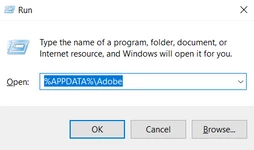
 

  • Windows 10/11: Users/[user name]/AppData/Roaming/Adobe/Adobe Photoshop (Beta) [version]
  • Press Windows + R & type this is the Run Window - %APPDATA%\Adobe


  • Rename the Adobe Photoshop folder by adding a .old at the end. (Adobe Photoshop 2023 > Rename > Adobe Photoshop 2023. old)


These changes will give a fresh start to Photoshop (beta) as a fresh install. Let me know if the issue exists.

Thanks!

Sameer K

1 reply

Sameer K
Community Manager
Sameer KCommunity ManagerCorrect answer
Community Manager
June 13, 2023

Hey, @stepheng76970152. Welcome to the Photoshop community. Separated your post as a new thread from the original post for Photoshop 2023 to the Photoshop (beta) board. I'll help you figure this out.


Please share a screen recording of this behavior & the system info of Photoshop from Help > System info > Copy & paste into a text document > upload to Creative Cloud files (https://assets.adobe.com/files) and share the link here. 


What troubleshooting steps have you tried already?

Ensure Photoshop (beta) is in the default state, go to the location of the preference folder below, and rename it to backup. https://helpx.adobe.com/photoshop/using/preferences.html


  • Windows 10/11: Users/[user name]/AppData/Roaming/Adobe/Adobe Photoshop (Beta) [version]
  • Press Windows + R & type this is the Run Window - %APPDATA%\Adobe


  • Rename the Adobe Photoshop folder by adding a .old at the end. (Adobe Photoshop 2023 > Rename > Adobe Photoshop 2023. old)


These changes will give a fresh start to Photoshop (beta) as a fresh install. Let me know if the issue exists.

Thanks!

Sameer K