


Participant
July 17, 2026
Question

PSD File suddenly displays faded in PS Beta version but is OK in the regular PS

  • July 17, 2026
  • 8 replies
  • 78 views

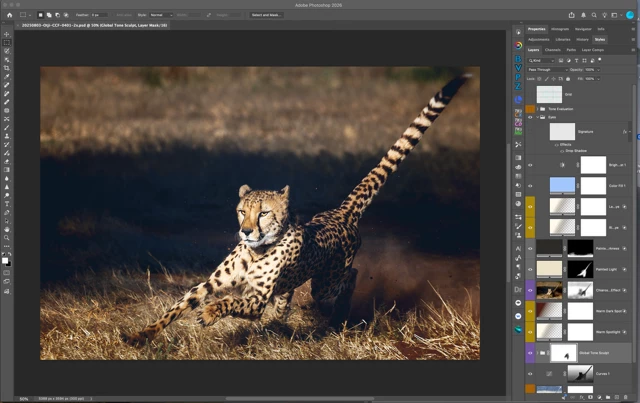
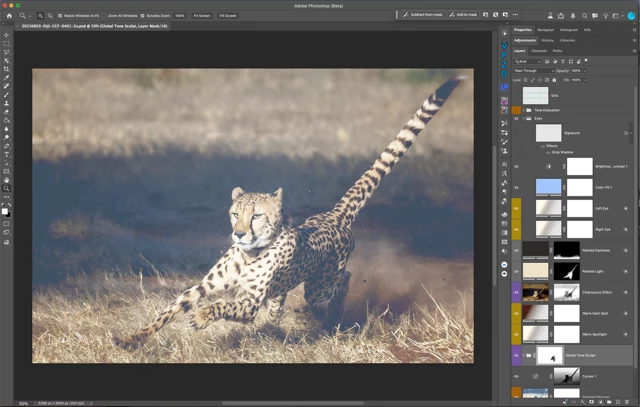
A PSD Document I created in PS Beta suddenly displays all faded when opened in Pgotoshop Beta but still displays correctly in the regualr PS26
PS Beta is 27.10.0 release
PS26 is 27.8.0 release
Screenshots attached:
Top: PS26, Bottom PS Beta
 

    8 replies

    Participant
    July 30, 2026

    yes, this seems to work, however I think it is only a work-around and certainly not intended to be like that.
    Adobe, Please fix this!
    I hope it doesn't make its way from the Beta to the final product

    Known Participant
    July 29, 2026

    I’m having the same issue and going crazy. I have tons of photos to work on and they’re all  opening up very faded. This has NEVER happened to me before in 20+ years of using Photoshop. I think it’s a bug in Photoshop Beta 27.10. Can someone please confirm?

    But I found a solution, which I hope is temporary. Turn OFF the Graphic Accelerator. I did this just as a test and my image suddenly opened up as normal. I then turned the Graphic Accelerator back on again, and the image opened up completely faded again. Adobe, please fix this!

    c.pfaffenbichler
    Community Expert
    Community Expert
    July 29, 2026

    Have you turned off 

    Preferences > Technology Previews > Precise color management for HDR display

    and restarted Photoshop? 

    Known Participant
    July 29, 2026

    That setting was never on for me, so it has nothing to do with my images opening up faded. As I mentioned above, this has never happened before in my long history of using Photoshop. It’s a nasty new problem, and it needs to be fixed asap.

    Thank you.

    Participant
    July 24, 2026

    I have the same problem. This morning, everything worked fine in beta. After I updated this afternoon, everything appeared faded and grayed out. I can change the color in the image pull-down menu, but I don’t want to have to do that for every file I open.

    c.pfaffenbichler
    Community Expert
    Community Expert
    July 17, 2026

    Please set the Status Bar to »Document Profile« and post more meaningful screenshots.


    Please try turning off 

    Preferences > Technology Previews > Precise color management for HDR display

    Participant
    July 22, 2026

    I did this then closed and reopened it and it did not work so I’m doing command Y as soon as I open a file until a permanent solution is found.