Participant
August 2, 2023
Question

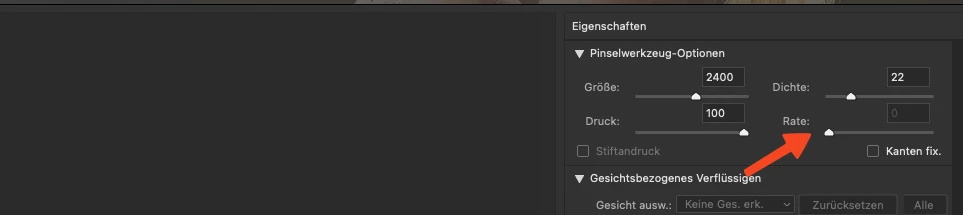
Rate greyed out in liquify tool

  • August 2, 2023
  • 4 replies
  • 150 views

Hello Support,


The rate buttton is greyed out in the liquify tool in the latest beta (2024) 

Please fix 


This topic has been closed for replies.

4 replies

CShubert
Community Manager
Community Manager
August 3, 2023

It appears the tool is working as designed:


Liquify has two types of tools:
  1. Non-repeating (like Warp, Push Left/Right, Freeze, Thaw and so on..)
  2. Repeating (like smooth, reconstruct and so on)
The "Rate" feature is only valid for repeating tools.(The difference between the two is that, in repeating tools -- after a mouse-click, and NO mouse move, it'll still apply the effect. And the "rate" affects this.)
 
Hope this helps,
 
CShubert
Community Manager
Community Manager
August 2, 2023

Thank you for the update @Markus2817711125qt what tool are you using in your workflow, ie Forward Warp, Push Left or another one? In the first two the Rate field is grey in both Ps release and Ps beta.  Maybe we are missing something, could you share a video or a couple more bits of info so we can make sure we are doing what you are?


Participant
August 2, 2023
Hi,

it works flawlessly in the latest non-beta.


Steps to reproduce:

Open any file in PS Beta
Copy Background to new layer
Liquify layer with the Liquify Drag tool


in PS 2023 it works, in the Beta of PS2024 is does not work and is greyed out.
CShubert
Community Manager
Community Manager
August 2, 2023

Hi @Markus2817711125qt could you explain your workflow or share some screen shots/video of what you are trying to do and when you see this? Do you remember when this worked as you expected?
