This topic is closed to new replies. Start a new post to keep the conversation going.
annaf22082551
annaf22082551Correct answer
Participant
June 20, 2023

IGNORE ME.


I've found how to revert back to the old way.

Oops haha.


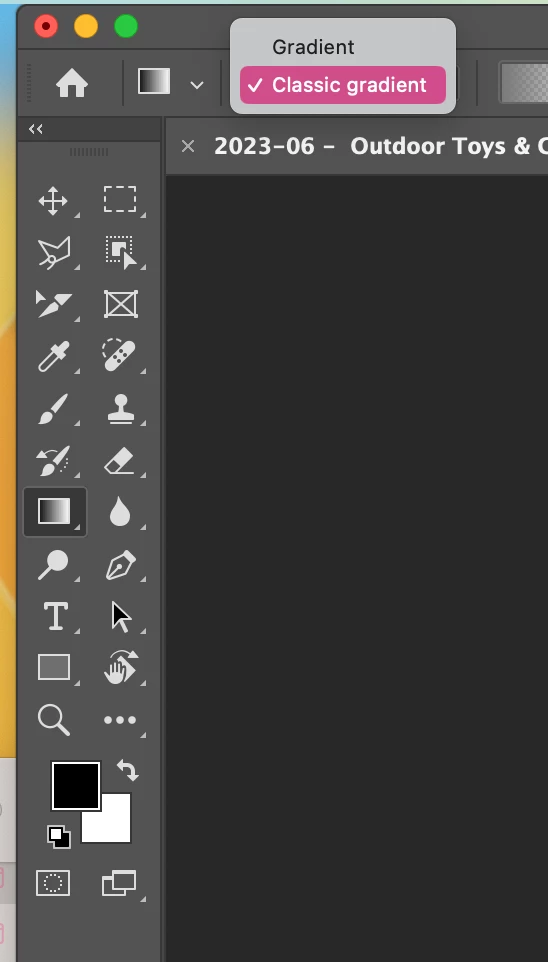
Select your gradient tool › right at the top, select the drop down where it says 'Gradient' › Change this to Classic Gradient.

Your welcome.


47 replies

gus7777
Inspiring
May 20, 2026

Agree - not a good infrastructure - the old tool was way better

Translate
Participant
July 18, 2025

Agree.  the leagcy was fine- quick and got desired effect immedialty. we are smart enough to duplicate layer since destructive.

Translate
deenas69190555
Participant
March 12, 2025

Bummer, this option does not exist in any version of illustrator I have. 2019 to 2023. Not there. 

Translate
Participant
September 24, 2024

Agreed - the new gradient tool is  absolutely unusable in it's current form. Slow, cumbersome and quite frankly useless to my workflow now.  It was so handy for small blends and shading and now its takes me 10x the time to attempt the same process. Seriously Adobe, please revert to old gradient - or at least give us the option. I dont PS tools mimicing AI's. 

Translate
drevious
Participant
September 17, 2024

Which Photoshop version is the last one without this new gradient? That's the worst thing happened to Photoshop ever. Even with classic mode you can't use foreground color with it. Just wow.

Translate
aidas56174307
Participant
February 7, 2024

Still it not working like was before

Translate
Participant
January 23, 2024

New gradient problems: -- doesn't default to the foreground color.
Legacy you could hit G gradient, pull the gradient and it would choose the foreground color.
X to switch foreground background colors.
Now you have to manually go into the graident groups to choose one.
Anyone able to find how to get that functionality back?
Constraining: Also shift would constrain the gradient, and now it is difficult do draw a straight gradient. 

Agree with the frustration. this is a new tool, that took away our fantastic gradient tool! Whyyyyyyy???? Add it as a new tool instead.


Translate
Jeff Arola
Community Expert
Community Expert
January 23, 2024

You have to press the Shift key after you start drawing the gradient.


Translate
Inspiring
January 4, 2024

Thank you! I'm guessing some busybody at Adobe decided to redesign something unnecessarily to make it look like they were hitting some sort of quota. Fixing what isn't broke yet again, Adobe.

Translate
Participating Frequently
January 6, 2024

I would really like to see the use cases that were used to justify changes. I don't mean that in a snarky way, it just would be really helpful to see how adobe is evolving and the driving force behind those changes. It would help people understand the background for these changes and I think ease adoption.

Translate
Participant
June 6, 2024

I couldn't agree more.

It is annoying when something used often is deprecated for no apparent reason.

Translate
Participant
December 14, 2023

Agreed. These new gradients are terrible. Everything is exporting wrong. Adobe, please fix this! I got back to the classic, but do I have to do that regularly? It keeps reverting back. 

Translate
Jeff Arola
Community Expert
Community Expert
December 3, 2023

Now that Adobe fixed the Gradient Tool so it works on both layer masks and in the Quick Mask Mode without having to switch to Classic gradient, Adobe stll needs to make it so one can use it on Channels without having to switch to the Classic

gradient.

Translate