



jmbritto
Participant
April 20, 2026

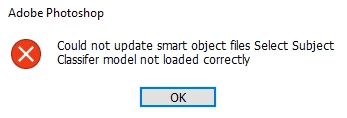
Select Subject Classifier Model not loaded correctly
  • April 20, 2026
  • 3 replies
  • 262 views

Hi! I've been getting this message for a while (Photoshop Beta and 2026) when I try to use the object selection tool.

I already tried to reinstall photoshop, to reset the reset the PS preferences, to update graphics card and to change image processing (faster/more stable). Nothing fixed this problem. This tool just doesn't work anymore.

Any solutions?

Thank you.

    3 replies

    Palming
    Participant
    June 20, 2026

    I was using Japanese characters in my username, and it turns out that was the cause of the issue.

    *This is a Windows 11 environment.

    It seems like problems occur when using country-specific characters. 
    Once I changed my username to simple English letters, the issue stopped happening.

    The cause might be different in your case, but I hope this solution works for you too!

    CShubert
    Community Manager
    Community Manager
    June 18, 2026

    Hi ​@vladkech please update to the latest Ps Beta or Ps release version…

    Adobe Photoshop Version: 27.8.0 20260610.r.13 4081857  arm64 (final, Release) or
    Adobe Photoshop Version: 27.9.0 20260616.m.3575 199f0a1  arm64 (beta, PublicBeta)

    Thanks,

    Cory - Photoshop Product Manager


    CShubert
    Community Manager
    Community Manager
    May 4, 2026

    Hi ​@jmbritto 


    1. Try resetting Prefs for the Beta:
    /Users/yourname/Library/Preferences/ Photoshop Beta Settings (Mac Ventura)
    /Users/yourname/Library/Preferences/Adobe\ Photoshop\ \(Beta\)\ Settings (Mac)


    C:\Users\user name\AppData\Roaming\Adobe\Adobe Photoshop (Beta)\Adobe Photoshop (Beta) Settings


    Launch BETA Photoshop While Pressing The Keyboard Shortcut
    With Photoshop closed, press and hold Shift+Ctrl+Alt (Win) / Shift+Command+Option (Mac) on your keyboard and then Launch Photoshop the way you normally would.
    https://helpx.adobe.com/photoshop/using/preferences.html#Manually 

    2. It may help if we could see your Photoshop beta System Info. Launch Photoshop beta, and select Help >System Info...and copy/paste the text in a reply.  

    Thanks,

    Cory - Photoshop Product Manager