


Set the default image quality for saving a jpg
I scanned a paper photo at 600 resolution with the name photo-orig, opened it in Photoshop, and wanted to save a copy called photo-edit. Over and over, it suggested a medium image quality of 5 instead of the 10 or 12 I like. Degrading a shot down to 5 should be a conscious (and rare) choice, not the default! Why is this suddenly happening and is there something I can do to get it to always be 12? Or at least 10?
I could see it maybe saves the last one you used instead of defaulting at all, but I've tried setting it to 12 repeatedly and it keeps coming back with 5 the next time.
I've heard that re-saving a photo does always degrade it some and there's nothing I can do about that, but Photoshop shouldn't be suggesting that I do! Thank you all!
Please note: I'm not SUPER techie so if there are steps in your answer, please include then instead of assuming that i know where things are. 🙂
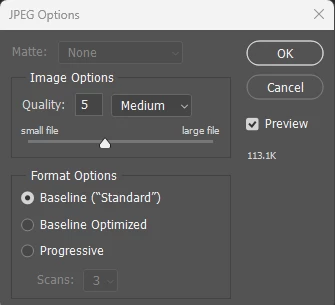
If it makes a difference, I'm on Beta 25.6.0 on a Windows 11 platform.
 AdChoices