Inspiring
October 12, 2023
Answered

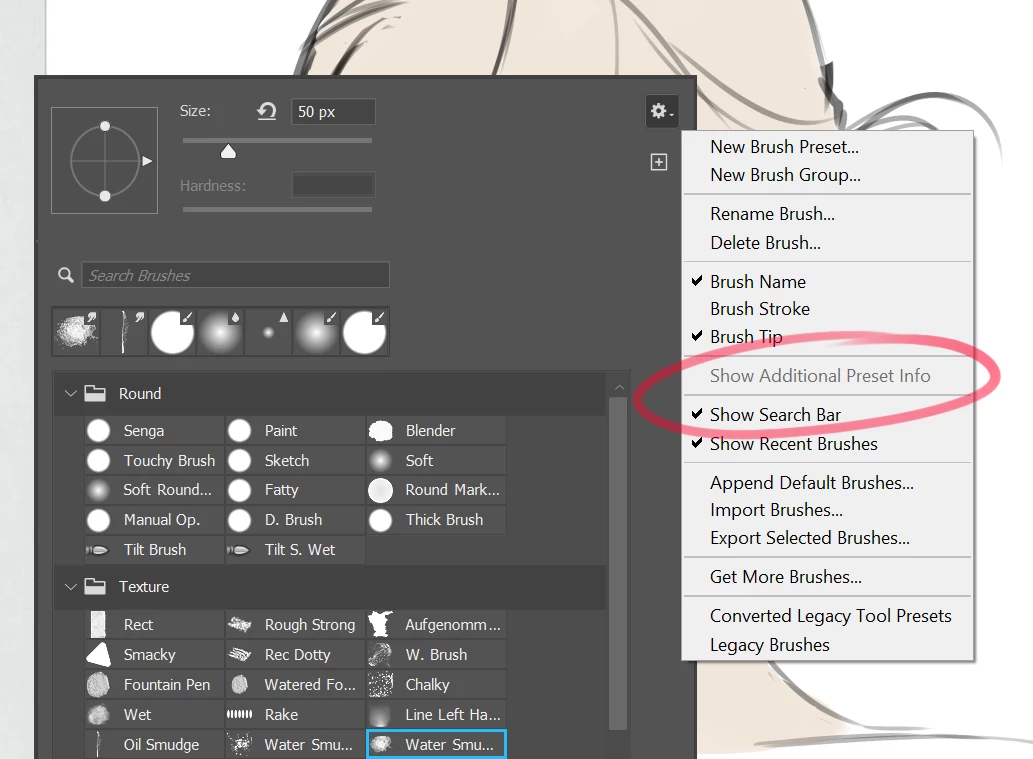
"Show Additional Preset Info" is grayed out on Brush Popup Panel

  • October 12, 2023
  • 2 replies
  • 525 views

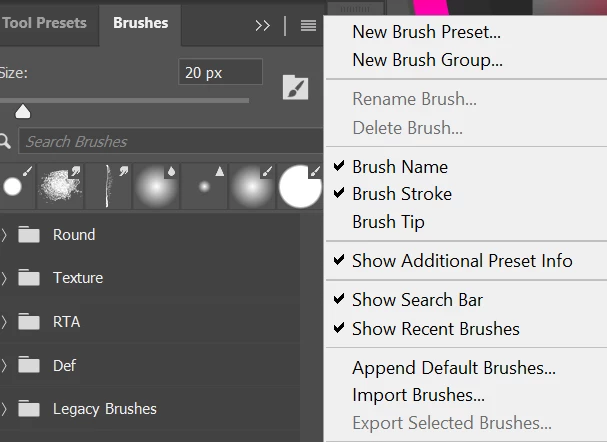
Hi on Photoshop Beta 25.1 (Windows 11), the right-click (brush pop up panel), "Show Additional Preset Info" option is grayed out and not working.  But strangely enough that option is not grayed out and working perfectly fine on the regular brush panel.   
This topic has been closed for replies.
Correct answer June1234

Hi thanks for the reply!  I think I have figured out the issue. It seems that the option becomes grayed out when the size of the brush icons are too small to fit the additional preset info.  So all I did was increase the brush icon size, using the size slider on the bottom of the pop-up panel, and that option became available again.

2 replies

June1234AuthorCorrect answer
Inspiring
October 18, 2023

Hi thanks for the reply!  I think I have figured out the issue. It seems that the option becomes grayed out when the size of the brush icons are too small to fit the additional preset info.  So all I did was increase the brush icon size, using the size slider on the bottom of the pop-up panel, and that option became available again.

CShubert
Community Manager
Community Manager
October 17, 2023

Hi @June1234 curious if you see the same thing in the latest Ps beta: Adobe Photoshop Version: 25.2.0 20231014.m.2363 a76db7f x64?  Do you also have the same issue in Ps release version?