mikaels71195823
Inspiring
Aug 28, 2023 9:40 PM UTC
Answered

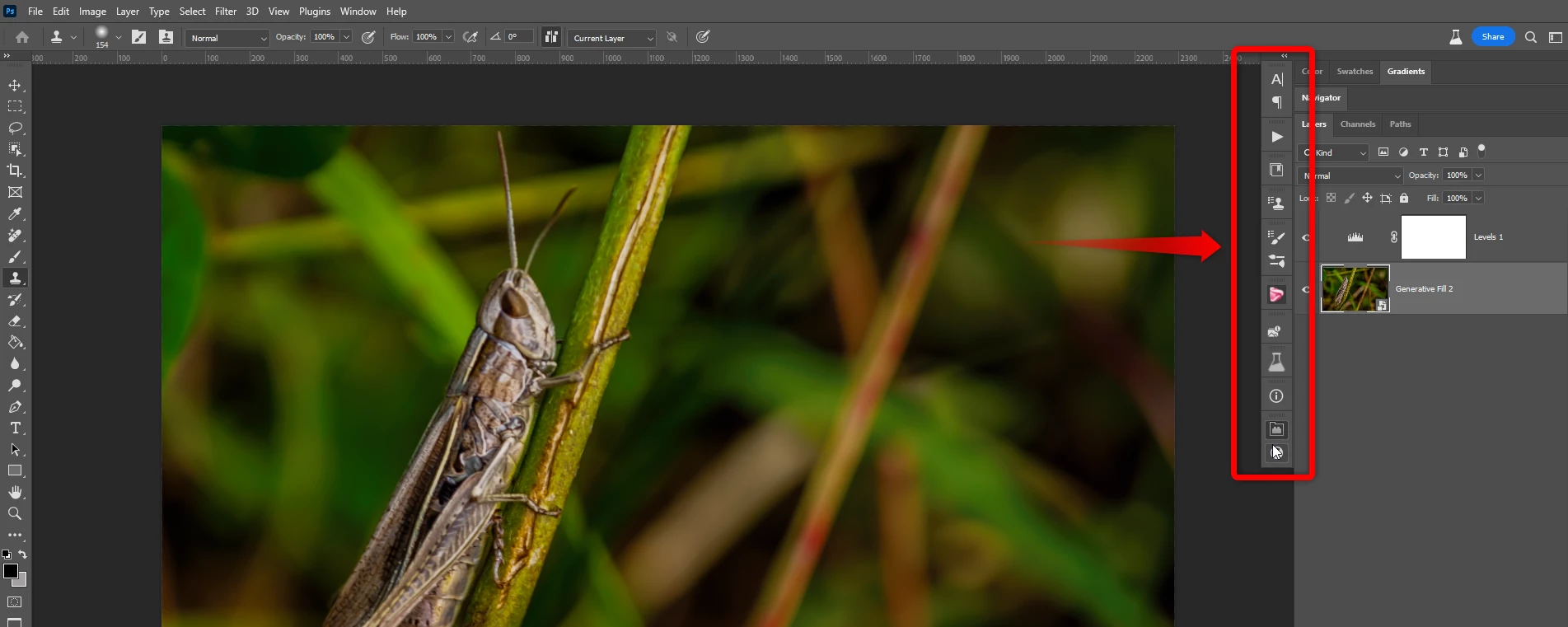
Some buttons don't work in Beta V25.1

I brought home Beta V25.1 and when I run with full screen, the buttons in the right panel that I dialed in do not work.

This topic is closed to new replies. Start a new post to keep the conversation going.
mikaels71195823
mikaels71195823Correct answer
Inspiring
Aug 28, 2023 9:52 PM UTC

I found the issue I had to uncheck "Enable narrow option bar" Under "Preferences > Workspace

Best regards: Micke Seise

2 replies

mikaels71195823
mikaels71195823AuthorCorrect answer
Inspiring
Aug 28, 2023 9:52 PM UTC

I found the issue I had to uncheck "Enable narrow option bar" Under "Preferences > Workspace

Translate
Best regards: Micke Seise
Caity.psd
Community Manager
Community Manager
Aug 28, 2023 9:52 PM UTC

Hi @mikaels71195823, thanks for letting us know!


A few things I am curious of:

Any way the panels are on a seperate screen/monitor?

Could you try changing to a different workspace? Window > workspace (any will do) and see if the behavior is different?

Try resetting the workspace and a fresh launch of PS?


Let me know if any of these help!

Caity

Translate