
Participant
December 2, 2023
Answered

Text in permanent italics in PS

  • December 2, 2023
  • 1 reply
  • 910 views

Hi,


When I use a "regular" font, it's always slightly italicized.
When I use italics, there's a clear difference.

I've looked in the layer properties, but I can't find what's causing the problem. I'm sure it's a setting, but everything looks "normal".

Do you have a solution to this problem?

Thanks you !

In the attached image: my version of Roboto regular vs. the same font on Google Font.
This topic has been closed for replies.
Correct answer BaptHillz

I tried resizing the Character panel to see if it could be made too small to display all options, but it only has the one size when open.  So I am not sure what is happening with yours, but it looks broken.


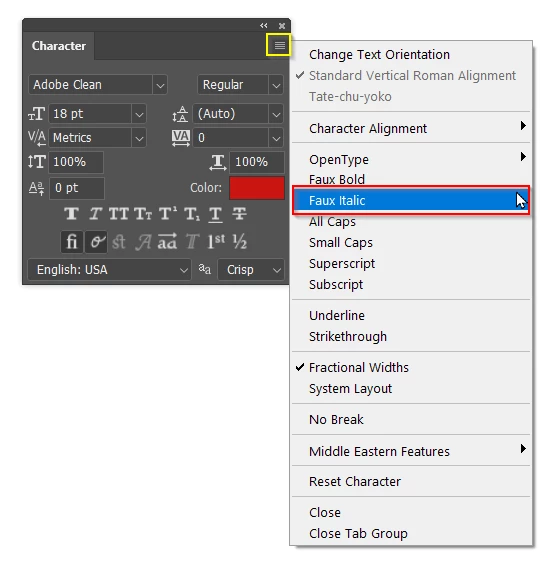
You do still have an option though.  Click on the bars (top right corner) and you should hopefully see Faux Italic in the fly out list, and I'm guessing that it has a tick against it.  Click on it, and it should turn off.


Problem fixed !
 
I simply went to menu -> characters.
The panel opened as a floating window (in addition to the other parameters already present)
 
Thanks for your help !
 

1 reply

Trevor.Dennis
Community Expert
Community Expert
December 2, 2023

Check the Character panel

BaptHillzAuthor
Participant
December 3, 2023

Hi, there,


I had this in my old version of PS, and I did think of this parameter.
The problem is that I can't find it anymore...

image: sreenshot of my character settings.


BaptHillzAuthor
Participant
December 3, 2023


I used to have the same configuration panel as you
Now I have this...