

Adobe Employee
Feb 1, 2024 7:38 PM UTC
Question

The Adjustment Brush Now in Photoshop Beta

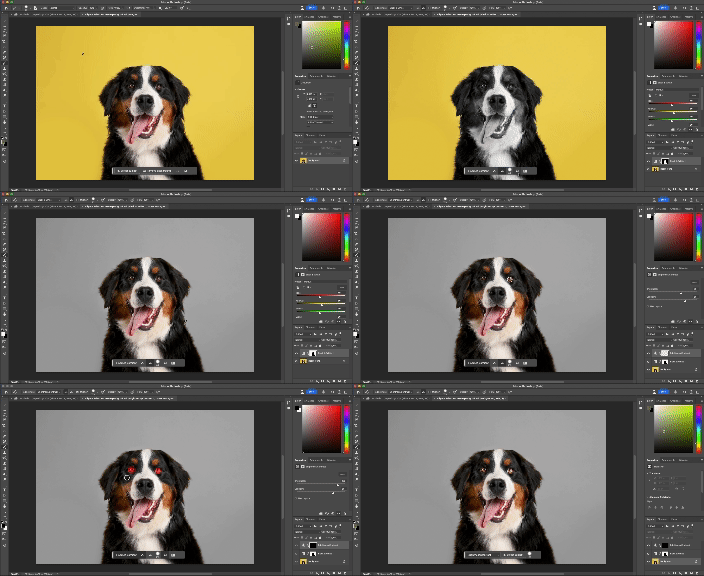
We are excited to share that the new Adjustment Brush is now available in Photoshop Beta! This new tool simplifies the process of making local adjustments to images and allows users to apply their adjustments with a paint brush in one single step. All adjustments made with the Adjustment Brush are non-destructive, as they generate a new adjustment layer with layer mask when applied. The adjustments are applied with default values. Once applied, users can always edit their adjustment values in the properties panel. Learn more below:


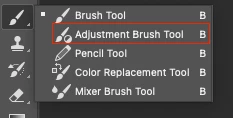
On by default, the Adjustment Brush is housed under the brush tools in your tool bar:


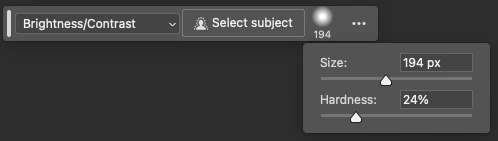
There are also two new contextual task bars that work alongside the Adjustment Brush aimed at helping users quickly choose their desired adjustment, set their brush settings and refine their adjustment output.

Step 1 - Choose adjustment type, set desired brush size and hardness, or use Select Subject to apply your adjustment:
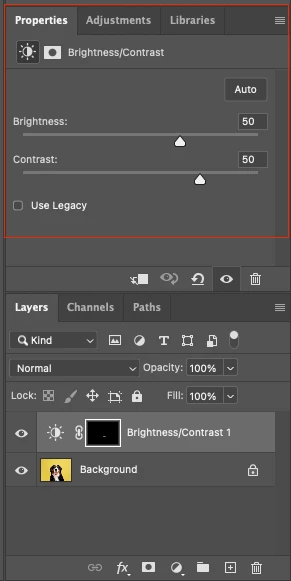
Step 2 - Once you have made your first paint stroke, a new bar appears that allows you to add/subtract from your adjustment, view on overlay, invert your selection, or add a new adjustment:

Step 3 - Adjust your adjustment settings in the properties panel:
 

We would love your feedback!

Please try out the feature and let us know what you think. Thanks!

This topic is closed to new replies. Start a new post to keep the conversation going.

12 replies

Participating Frequently
Apr 3, 2024 7:34 PM UTC

While clearly there are other things that need addressing per previous comments, I for one think this is very useful and it is appreciated. Thanks!

Translate
Participant
Feb 18, 2024 11:45 AM UTC

When are we going to be able to adjust the brush diameter in PS with the mouse wheel like we've been able to do in LR for years?

Translate
Inspiring
Feb 15, 2024 3:34 PM UTC

Sorry, but Capture One has had this feature for a long time and is implemented in a much better way. Including the ability to convert and save these brushed in adjustments as reusable custom styles and style brushes. Unless I'm missing something, this just looks like a reworking of layering masking. 

Translate
c.pfaffenbichler
Community Expert
Community Expert
Feb 14, 2024 9:59 AM UTC

For the Brush Tool alt-shift-plus and alt-shift-minus step forward/backward in the Blend Modes (displayed in the Options Bar). 

It would seem intuitive to me that the same shortcuts would switch »Adjustment« in the Options Bar for the Adjustment Brush. 

Translate
Inspiring
Feb 13, 2024 6:19 PM UTC

I think this will be a useful feature in some of my workflows. Please note that after I added a local "brightness/contrast" adjustment to an image I was editing and then used the Contextual Task Bar to add another adjustment (Vibrance), the application crashed on my Macbook Pro M1 Max running under MacOS Monterey. If I added another adjusment layer from the "top" tool bar "Adjustments" dropdown to add another Adjustment Brush Tool layer, the app didn't crash.

Translate
c.pfaffenbichler
Community Expert
Community Expert
Feb 10, 2024 10:58 AM UTC

I fail to see merit in this Tool and having to remove it from the shortcuts means additional work. 

As has already been pointed out Photoshop users are capable of creating and editing Adjustment Layers as it is. 


And the omission of Curves Layers seems curious to me. 

Translate
Known Participant
Feb 6, 2024 10:30 AM UTC

Please work on stability ensurance before pushing updates. As detailed in another thread, the Beta has become increasingly buggy and prone to crashes with each subsequent update in the last month.

I know configurations and drives vary but I've changed absolutely nothing hardware or software wise, and have only updated nVidia's Studio driver afer the fact to check if it would help (which it hasn't), so it's not me.

Translate
Inspiring
Feb 5, 2024 8:51 PM UTC

Haven't figured out how this can improve my workflow. Like someone else mentioned, I hate to be a killjoy but this seems to be a "solution looking for a problem."


Translate
Community Expert
Feb 2, 2024 10:58 PM UTC

Very nice

Translate
Carlos_Oliveras
Known Participant
Feb 2, 2024 5:17 PM UTC

Thanks for letting us know about this new feature. But I find it a little bit redundant... Isn't it a convoluted and more limited way to do the same things we were already doing? 😔 (I love Photoshop so I hate to be a killjoy! It's just my first impression)

Translate