

Participant
Dec 3, 2024 4:53 PM UTC
Answered

Uninstall Photoshop Beta

I can't uninstall Photoshop Beta. There is no "uninstall" option under the three dots.

silk-m
silk-mCorrect answer
Community Expert
Dec 6, 2024 6:48 AM UTC

1. Uninstall from the application folder.
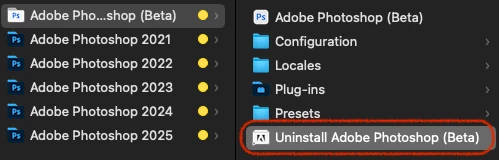
 

2. If not, find the original data of the uninstaller and uninstall it.

/Library/Application Support/Adobe/Uninstall/PHSPBETA_26_x_x.app


3. If that doesn't work, uninstall Photoshop 2025 and reinstall Photoshop Beta.
    Then uninstall Photoshop Beta and reinstall Photoshop 2025.

--Susumu Iwasaki

4 replies

silk-m
Community Expert
silk-mCommunity ExpertCorrect answer
Community Expert
Dec 6, 2024 6:48 AM UTC

1. Uninstall from the application folder.


2. If not, find the original data of the uninstaller and uninstall it.

/Library/Application Support/Adobe/Uninstall/PHSPBETA_26_x_x.app


3. If that doesn't work, uninstall Photoshop 2025 and reinstall Photoshop Beta.
    Then uninstall Photoshop Beta and reinstall Photoshop 2025.

Translate
--Susumu Iwasaki
Trevor.Dennis
Community Expert
Community Expert
Dec 4, 2024 2:43 AM UTC

Your screenshot doesn't show enough to see the Uninstall option, like below, but the bottom line is we can see that 'Update Failed'.  So were you trying to uninstall or update?


Try restarting your computer and trying uninstall or update again.  My guess is that that will fix it, but let us know if that is not the case and we'll take it from there. 

Translate
Stoy-boyAuthor
Participant
Dec 4, 2024 2:29 PM UTC

Hi Trevor,

Thank you for replying. I can't run the update because there isn't enough memory space on my laptop. That is the reason I want to get rid of Photoshop Beta: I can't use it any more due to not having enough memory space on my computer. When I click the three dots, the only options I get "Manage plugins" and "Other versions".

Translate
jane-e
Community Expert
Community Expert
Dec 3, 2024 5:25 PM UTC

@Stoy-boy 


I've moved your post to the Photoshop Beta forum. Does this page help?

https://helpx.adobe.com/x-productkb/global/creative-cloud-beta.html


Jane


Translate