


Inspiring
Jul 15, 2026 5:31 PM UTC
Released

Washed colours when opening any image in Photoshop after updating to 27.9.0 (Beta) Mac release.


PROBLEM :  Images have Washed colours when opening any image in Photoshop after updating to 27.9.0 (Beta) Mac release.

SEVERITY : URGENT.

  1. Ps Preferences > Performance > Use Graphics Processor is Checked.
  2. Ps Preferences > Technology Previews > Precise colour management for HDR display is Unchecked.
  3. View > Proof colours Unchecked.

DETAILS :

Opening any image or duplicating any image with an embedded icc profile (jpg, psd png etc.), it appears the embedded icc profile is not read.

Updating seemed to have reset all Custom Color settings.

After update I found Color Management Policies off, Profile Mismatches Ask When Opening UNchecked, and Missing Profiles Ask When Opening Unchecked.

My custom Color Settings were not preserved through the update.

My Saved Custom Color Settings are not found under the pop-up Settings.

Reseting Working space to RGB: Adobe RGB(1998) and Color management Policies to Preserve Embedded Profiles and checking all “Ask When Opening” does not seem to have an affect and colours continue to be washed when opening files.

(Note: desaturate monitor colours by 20 % was and remains unchecked).


EXPECTED RESULT :

icc profile is read and applied, or default Monitor is applied in respect to Custom Colour Profile Choices.


SOLUTION 1 : (Temporary ) Menu select,  View > Proof Setup > Monitor. Profile Colours are restored and the  image is as expected. But Proof Setup must be selected each and every time for each image opened or duplicated.

SOLUTION 2 : (Temporary ) Menu select,  View > Proof Colours. Profile Colours are restored and the image colour is as expected. But Proof Colours must be selected each and every time for each image opened or duplicated.

SOLUTION 3 : (Semi-Permanant) Photoshop Preferences > Performance > Uncheck Use Graphics Processor. Restarting the Photoshop app does not appear to be necessary. All color profile choices appear to be respected. Opening or image duplication respects the Custom Colour Profile Choices. But Photoshop is crippled with this choice and should not be considered a permanent solution.

Why is Photoshop not applying my Custom Colour Profile Choices?  
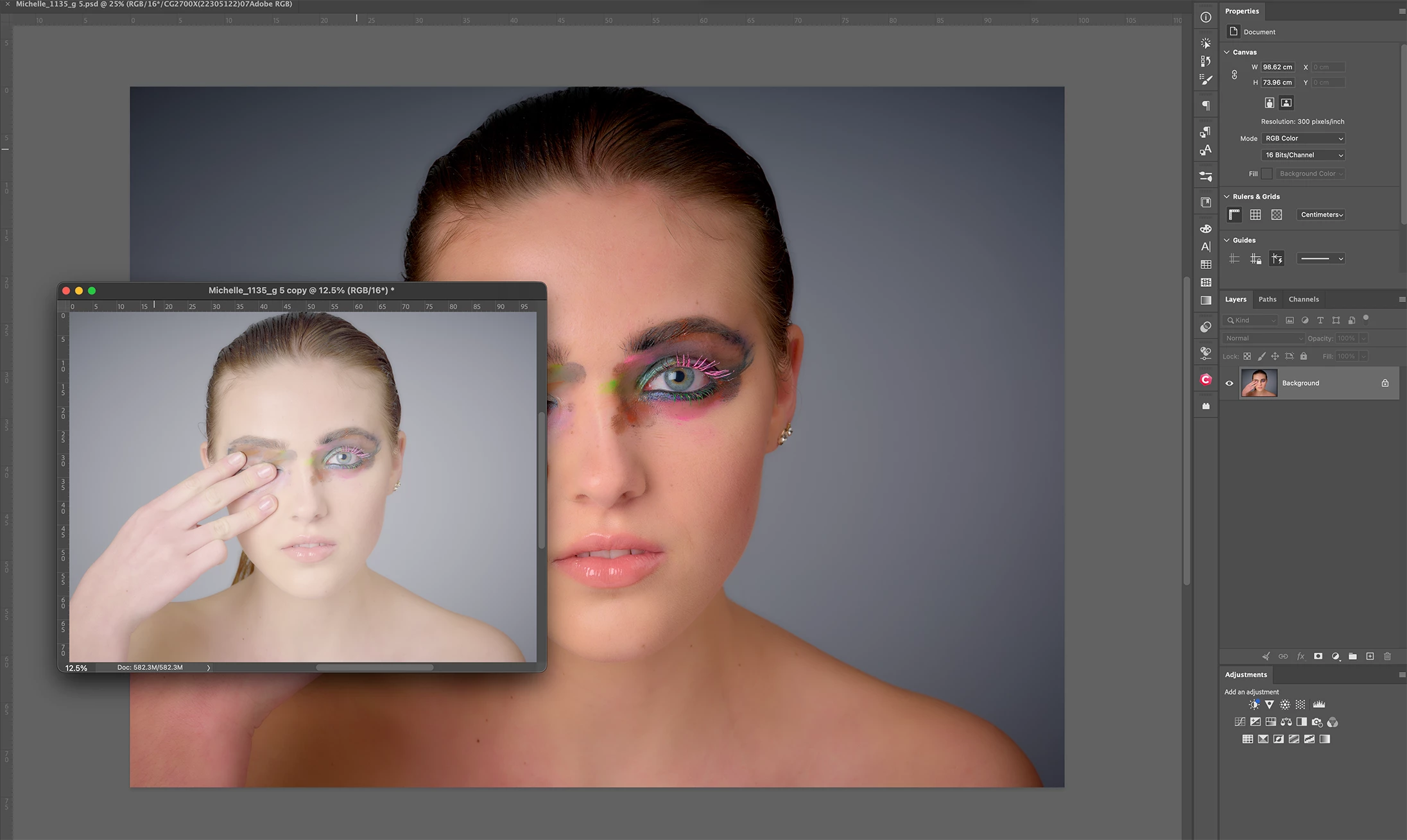
 

… Attached image has proof colors checked because Monitor (default ) is not respected. Duplicating the image colours get washed out again, the icc profile (adobe RGB) is not respected at all. My monitor profile, an EIZO CG2700x with self calibration and Adobe RGB 1998 are practically indistinguishable.

Thanks in kind for your help in this ===urgent matter. 

    19 replies

    Participating Frequently
    Sep 22, 2026 11:30 AM UTC

    UPDATE: Adding to my reply below. Something I’ve just discovered. I have 3 monitors, 2 regular and a Wacom screen graphic tablet. Images appear washed out and over bright on the Wacom tablet, but when I drag photoshop to my newest monitor the images are too dark, and on my oldest monitor the images are correct. However, I notice as I drag photoshop between monitors, the image appears correct on all screens, but only while dragging. Maybe that helps with diagnosis?

    Translate
    Participating Frequently
    Sep 22, 2026 10:47 AM UTC

    I’m getting the same problem and still having to use 2025. Updates to 2026 haven’t worked. Please let me know if there is a solution on another thread.

    Translate
    Participant
    Sep 5, 2026 12:43 PM UTC

    Happening to me too since few weeks ago. I’m using Windows 11. 
    Graphics Processor is uncheck, looks normal but laggy.
    But when using camera raw - the image looks washed although I turned off the graphic processor. 
    So annoying! Can Adobe just return all the features back to older version fro HDR setting. 
    I’m using other software because of the problem persist.

    Translate
    Participant
    Sep 1, 2026 5:34 PM UTC

    I’m downgrading too! Exact same issue and it’s driving me insane having to hit CMD + Y on every image I open!!! We pay enough, surely the bug should be fixed immediately.

    Translate
    CShubert
    Community Manager
    Community Manager
    Aug 3, 2026 4:18 PM UTC

    Hi everyone… please update to the latest Ps Beta: Adobe Photoshop Version: 27.10.0 20260802.m.3625 and confirm this has solved this issue.

    Thanks,

    Cory - Photoshop Product Manager

    Translate
    Participant
    Aug 5, 2026 3:28 PM UTC

    Problem solved!

    Thanks!

    Translate
    CShubert
    Community Manager
    Community Manager
    Jul 20, 2026 6:44 PM UTC

    Hi all, please reference this thread: 

    The team has an update to fix this and should be out soon. Thank you for your patience.


    Thanks,

    Cory - Photoshop Product Manager

    Translate
    Participant
    Aug 3, 2026 12:22 PM UTC

    Any news?

    Translate
    ralph hasenohr
    Inspiring
    Jul 19, 2026 7:40 PM UTC

    same here.

    Translate
    Participant
    Jul 17, 2026 2:52 AM UTC

    Same problem here.  Went back to 27.8 (Creative Cloud=> Apps=>Photoshop Beta=>  . .  .=> Other Versions => Install27.8. Color has been restored. BTW had the same problem when loaded 27.9.

    Translate
    Participant
    Jul 16, 2026 8:54 PM UTC

    Go to settings → performance  and disable Use Graphic processor than restart. 

    Translate
    Participant
    Oct 24, 2026 4:06 PM UTC

    Thank you!

    Translate
    Participant
    Jul 16, 2026 5:59 PM UTC

    Same happening for me even with the latest beta (27.20.0) —looks like files are being displayed with linear gamma, instead of normal 2.2 for sRGB & AdobeRGB

    Translate