
Participant
August 28, 2023
Answered

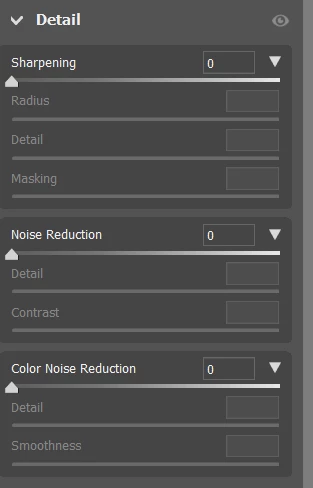
Where is the denoise filter in Photoshop Beta 25.0?

  • August 28, 2023
  • 2 replies
  • 3375 views

It is supposed to be in the Camera Raw filter under Detail: Noise Reduction, but it's not there. I'm on Windows 11. I guess I could save the file as a DNG and work on it in Lightroom? Thoughts? Thanks!
 

This topic has been closed for replies.
Correct answer D Fosse

Denoise is not in the ACR filter in the Photoshop filter menu.


Denoise is in the ACR raw processor, and only works on mosaic raw files that come directly from a camera. It does not work on RGB files like PSD/TIFF/jpeg etc.


2 replies

D Fosse
Community Expert
D FosseCommunity ExpertCorrect answer
Community Expert
August 28, 2023

Denoise is not in the ACR filter in the Photoshop filter menu.


Denoise is in the ACR raw processor, and only works on mosaic raw files that come directly from a camera. It does not work on RGB files like PSD/TIFF/jpeg etc.


Participant
August 28, 2023

Ahhh. OK. The file was a raw in an early iteration, went through Lightroom, then Helicon, then finally to Photoshop where it was saved as a PSD. Thanks for clarifying!

Inspiring
August 28, 2023

Are you working with a RAW file or a tiff/jpeg?