

100% view in PS shows double sized in browser.
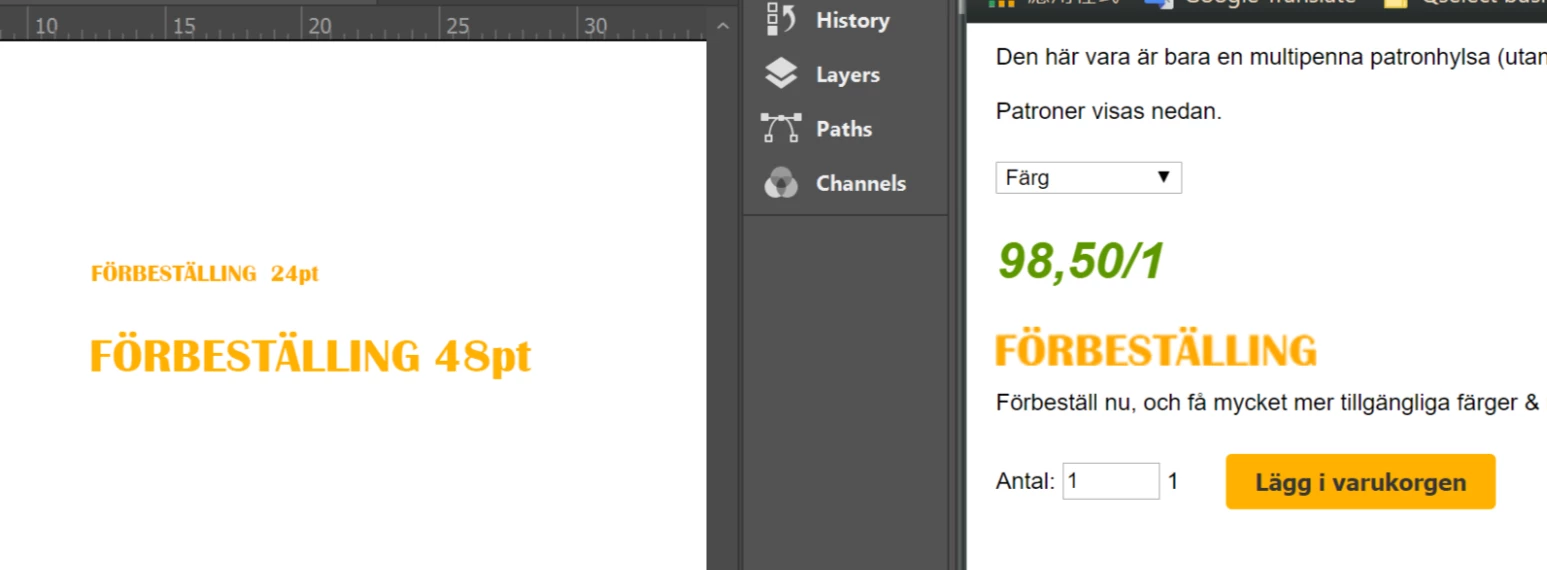
Left side is my PS artboard, while the right side shows how it looks in my browser.
As shown the 24pt-sized "FÖRBESTÄLLNING" text shown in my browser on the right side is as big as the 48pt one in PS on the left.
I read the year 2013 posts which might be related on this topic, but couldn't get a clue...I could accept doing all the editing with 200% view in Photoshop, until I noticed the pictures finally shown in browser are not as sharp/crisp as in PS.
I'm no professional with neither PS nor monitor resolution etc. I don't think I have a retina screen, or do I? I'm currently using a Microsoft Surface pro 4. It doesn't show size difference on my other laptops though.
From what I understand is that my monitor is so sharp that I need the 48pt sized text to fill in the 24pt space to get the same sharpness, but as long as I have the 48pt on a webpage, the browser doesn't squeeze it into a 24pt space, it shows it in double sized area.
How can I solve the problem? Anyway as long as it's crispy and sharp in browser.
 AdChoices