Known Participant
November 6, 2018
Answered

2 problems : 1.new constrain proportion not working all the time 2.weird glitch on text

  • November 6, 2018
  • 2 replies
  • 624 views

Hi,

maybe someone has this issue and can share a fix or a workaround.

so first issue is the new default constrain proportion. It works but not all the time. For some reason I have to press shift to constrain proportion.

example: I can resize a text or an image, it works, but when it comes to resize a smart object or a shape on the same document I have to use shift to modify it proportionally.... weird, maybe there is a hot key triggering this I don't know yet.

the second issue regards the text, since the cc 2019 update I have this really annoying behavior. when I select a text or move something on the canvas some texts have the top of the letters that disappear, like if there were a blank line running horizontally over it. Sometimes it returns normal after deselecting, sometimes not. So I have to make the layer invisible then visible again, or move the text up and down with the arrow keys to get it back to normal. Problem is that I've tried to save the images to see if it was a display issue but it shows up on the saved images, so I have to be extra careful when saving images, and having to move objects or make them visible/invisible several times while working is time consuming.

any clue ?

** UPDATE **

resetting the preferences corrected the smartobjects constrain but not the shapes/vector objects.

neither the text glitch 😕😕
    This topic has been closed for replies.
    Correct answer Muqqarib Hassan

    Hi, It is the new behavior added in Photoshop Cc 2019.

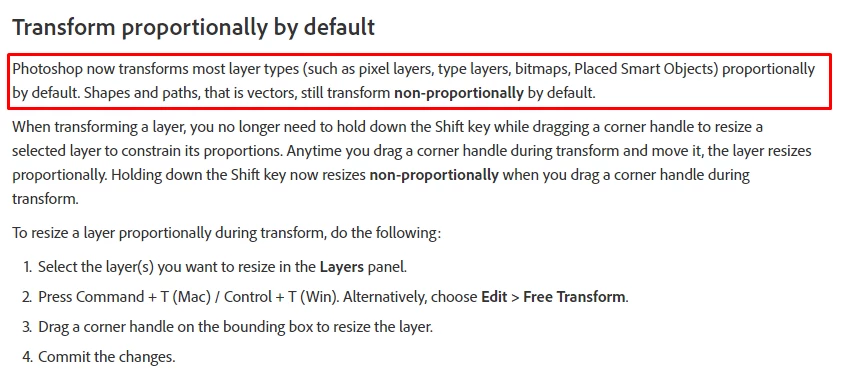
    1:- When you try to resize any raster image or text then you no need to hold shift to maintain their proportions.

    2:- When you try to resize the Shape / vector / smart object then you have to hold shift to maintain their proportions.

    New and enhanced features | Latest release of Photoshop CC

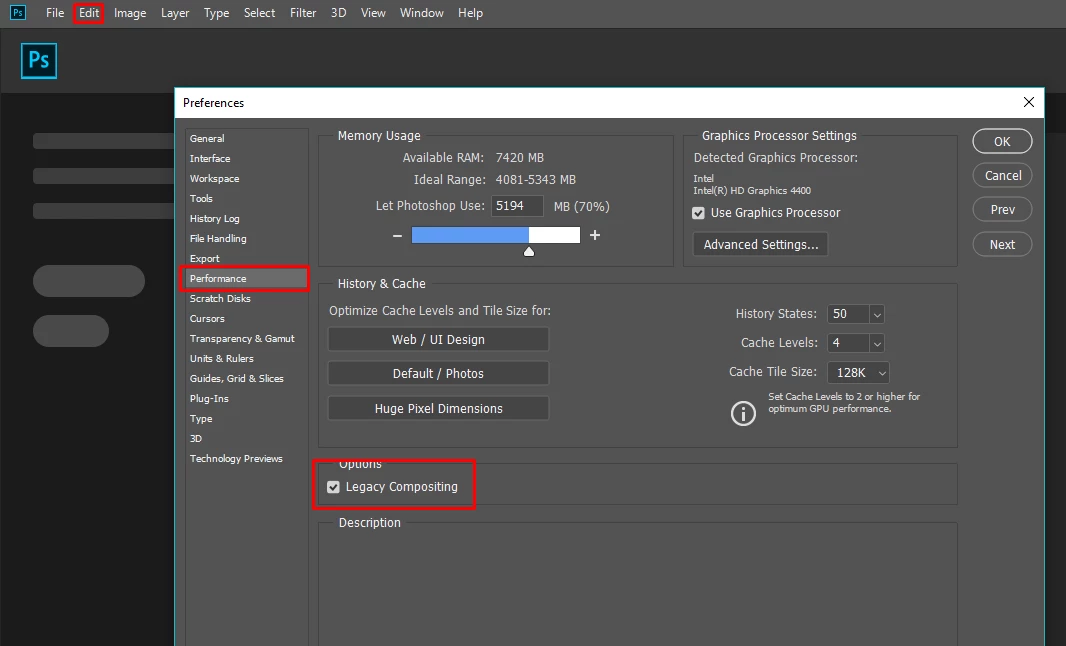
    For the Text Please Check the Legacy Composting option.

    Go to Edit > Preferences > Performance > Legacy Composting and restart photoshop.

    (If this will solve your issue that will be great otherwise Temporarily Disable your GPU and restart the photoshop.

    Thanks.

    2 replies

    jeremias123123
    Participant
    November 6, 2018

    Thanks for opening this topic helped me complete a job.

    Muqqarib Hassan
    Muqqarib HassanCorrect answer
    Inspiring
    November 6, 2018

    Hi, It is the new behavior added in Photoshop Cc 2019.

    1:- When you try to resize any raster image or text then you no need to hold shift to maintain their proportions.

    2:- When you try to resize the Shape / vector / smart object then you have to hold shift to maintain their proportions.

    New and enhanced features | Latest release of Photoshop CC

    For the Text Please Check the Legacy Composting option.

    Go to Edit > Preferences > Performance > Legacy Composting and restart photoshop.

    (If this will solve your issue that will be great otherwise Temporarily Disable your GPU and restart the photoshop.

    Thanks.

    nenimeAuthor
    Known Participant
    November 6, 2018

    thx for the legacy compositing tip Hassan, looks like it worked

    Muqqarib Hassan
    Inspiring
    November 6, 2018

    welcome!