Participating Frequently
March 23, 2023
Answered

23.3.2023: Photoshop V 24.3 Problem

  • March 23, 2023
  • 12 replies
  • 1233 views

I meet the problem as this video clip

https://youtu.be/2uEY8QJtMZU

This topic has been closed for replies.
Correct answer Ged_Traynor

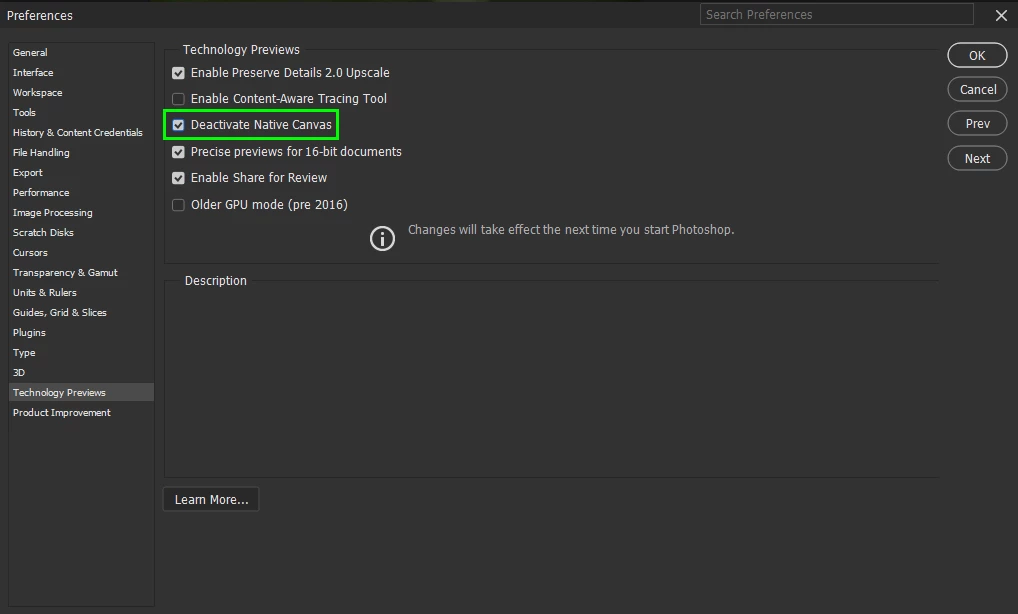
@TranHieu enable the GPU again and then enable this option in preferences and restart Photoshop


12 replies

March 27, 2023

I have the same problem 

Ged_Traynor
Community Expert
Community Expert
March 27, 2023

@27769101 did you enable Deactivate Native Canvas in preferences and restart Photoshop

April 14, 2023

@Ged_Traynor wrote:

@27769101did you enable Deactivate Native Canvas in preferences and restart Photoshop


Yes I did & It worked thanks for your help

Ged_Traynor
Community Expert
Community Expert
March 25, 2023

@TranHieu you don't need to enable "Older GPU Mode" just enable "Deactivate Native Canvas"

TranHieuAuthor
Participating Frequently
March 25, 2023

I also do as you guide. It is OK now.

Thank you very much!

TranHieuAuthor
Participating Frequently
March 25, 2023

I turn on Use Graphic Processor, and then go to tech preview - check Older Gpu mode. It is OK.

Thank you!

Ged_Traynor
Community Expert
Ged_TraynorCommunity ExpertCorrect answer
Community Expert
March 25, 2023

@TranHieu enable the GPU again and then enable this option in preferences and restart Photoshop


TranHieuAuthor
Participating Frequently
March 25, 2023

This is 


Jqqerry
Inspiring
March 24, 2023

What's your GPU driver version? 
And turn on Use Graphic Processor, and then go to tech preview - check Older Gpu mode.
is it works?

TranHieuAuthor
Participating Frequently
March 24, 2023

It is OK when I remove stick in "Use Graphic Processor". But this problem do not in previous version.

TranHieuAuthor
Participating Frequently
March 24, 2023

Can you try again https://youtu.be/2uEY8QJtMZU

I also try go to Edit/ Preference/ Performance, remove stick in "Use Graphic Processor" then OK.


Jeff Arola
Community Expert
Community Expert
March 24, 2023

You still to sign in to youtube to see it