
Participant
December 20, 2023
Question

25.3.1 Unable to open any file after update

  • December 20, 2023
  • 4 replies
  • 1028 views

I updated to ver. 25.3.1 last night but when I came to my machine this morning I could not open any file or start a new one. 
Starting a new document does nothing

Opening a document produces this error.
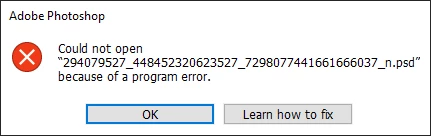
 Any Help Appreciated.

This topic has been closed for replies.

4 replies

Participant
February 21, 2024

I´m also having the same issue. It seems to happen whenever there´s a new update for either my graphics card or a new version of Photoshop. It always result in the same error. I cant open any file. And I have to reinstall Photoshop. Really annoying. 


Participant
January 21, 2024

I'm also having the same issue.
Photoshop does not open any kind of file, and it does not create a new file.

Participant
January 21, 2024

On version 24.7.2 everything seems to be working fine.

Participant
December 29, 2023

I have also this problem. When I first downloaded the app some weeks ago it was called Photoshop 2024, then I updated it to the latest version 25.3.1 and now I can not open old files or even start new ones. Nothing happens when I press new file or try to open a file. The app just launces and shows me a list of previous files. But I cannot open them.

Only get that same message "could not open "file.psd" because of a program error.  Learn how to fix is of no help. 

Now I have to reinstall photoshop every single time I reboot my computer. Becase the first session I start up works fine, but If I save my work and close the app down I have to re-install photoshop in order to access my work again! Very frustrating. 

Sameer K
Community Manager
Community Manager
December 20, 2023

Hey, @Skrellan. Thanks for sharing the screenshots & details. For now, I'll move this post to discussions. More info is required to help you figure this out. 


Please share the system info from Photoshop Help > System info > Copy & paste into a text document > upload & attach here. 

Where are the original files stored? What troubleshooting steps have you tried?


As a primary step, try launching Photoshop.exe as an Administrator from Photoshop's install folder. (Default location is at C:\Program Files\Adobe\Adobe Photoshop 2024).


Let us know how it goes. Thanks!
Sameer K

SkrellanAuthor
Participant
December 20, 2023

Here is the system info file
I've tried updating graphics drivers and loading by right-clicking the file and by choosing several files in the loading screen on PS