

D.A.R
Legend
July 16, 2018
Question

3D curves with straight edges

  • July 16, 2018
  • 2 replies
  • 558 views

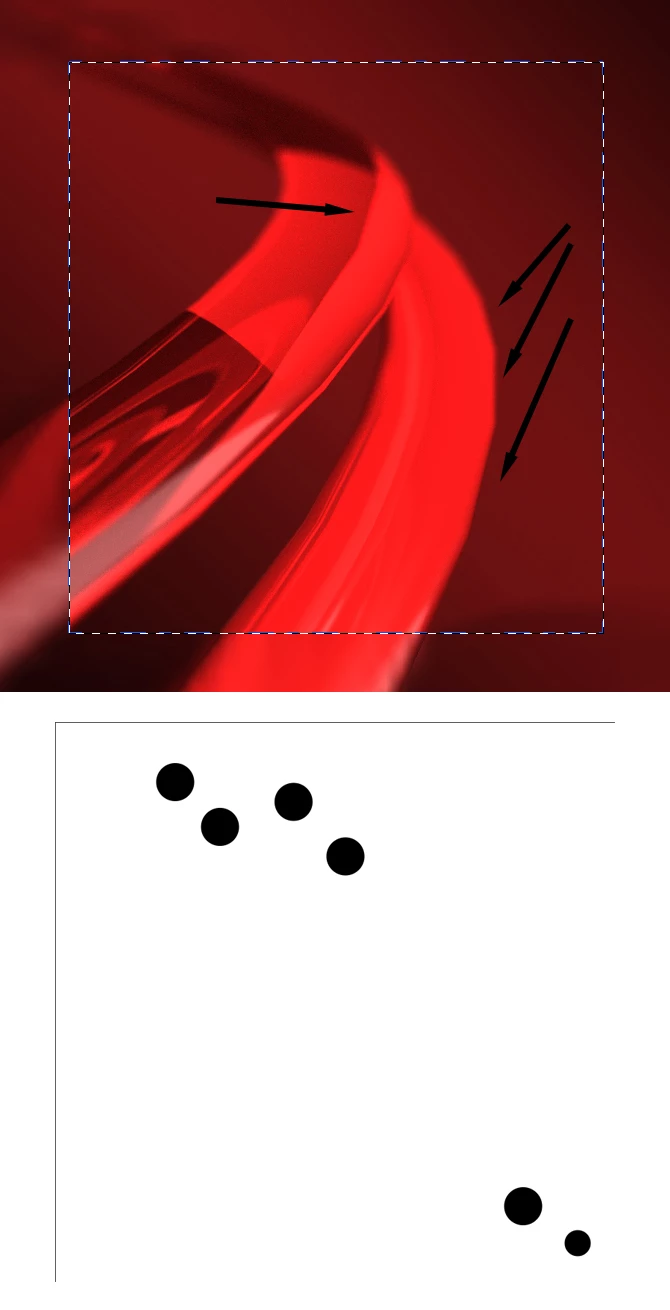
I am experiencing an issue with 3D extrusions and curves that have straight edges. New to 3D so not sure what I can do to fix or what I have done to cause.

The areas indicated in the screenshot should be smooth curves. The files used to create was simple circles from shape tool. Also pictured.

File resolution is 300ppi and 1500px square

Rendering does not fix this issue.

3D details

Extrusion depth 2500px

Twist 672 degrees

Taper 15%

Bend -101 degrees

Front and Back bevel 37%

Angle 44 degrees

Inflate -49 degrees

Strength 0

Camera:

FOV 23mm

Distance .03

Depth 7
iMac 5k Mac OS Sierra

PS CC 19.1.5

    This topic has been closed for replies.

    2 replies

    davescm
    Community Expert
    Community Expert
    July 16, 2018

    Hi

    To expand on Myleniums answer , if you turn on Lines in Scene Properties you can see why you are seeing the corners.

    Exporting the model to Blender and subdividing the surface fixes the issue

    Dave

    D.A.R
    D.A.RAuthor
    Legend
    July 16, 2018

    Dave, are you showing the subdivided version back in Photoshop?

    Does that cause any issues with PS in term of adjustments or additional rendering after the adjustments?

    Im thinking that if it cannot create such detail it wouldn't really handle it well when it gets it.

    davescm
    Community Expert
    Community Expert
    July 16, 2018

    Yes
    I brought the subdivided model back into Photoshop for demo. There was a bit of a delay but it would still render.

    Normally I would just render it in Blender then bring the render back as a layer, as the GPU "Cycles" rendering in Blender is much faster than Photoshops Ray tracing on the CPU.

    Dave

    Mylenium
    Legend
    July 16, 2018

    New to 3D so not sure what I can do to fix

    Basically nothing. That's the extrusion algorithm's automatisms. The geometry density is determined by angle thresholds and such and you have no manual control over it. Doing so would require to use a proper 3D program. Sometimes ever so slightly tweaking your twists and bends can coerce PS to re-calculate the tesseleation, but generalyl the process is too limited for detailed work.

    Mylenium