joannak45563552
Participant
July 3, 2019
Answered

3D greyed out

  • July 3, 2019
  • 3 replies
  • 1501 views

Hi

I have this issue: 3D lights, 3D ground plane etc. are grayed out.

I was working with Fuse character in Photoshop and suddenly all 3d options stopped working - I can't scale, rotate my character or work on lightning anymore.

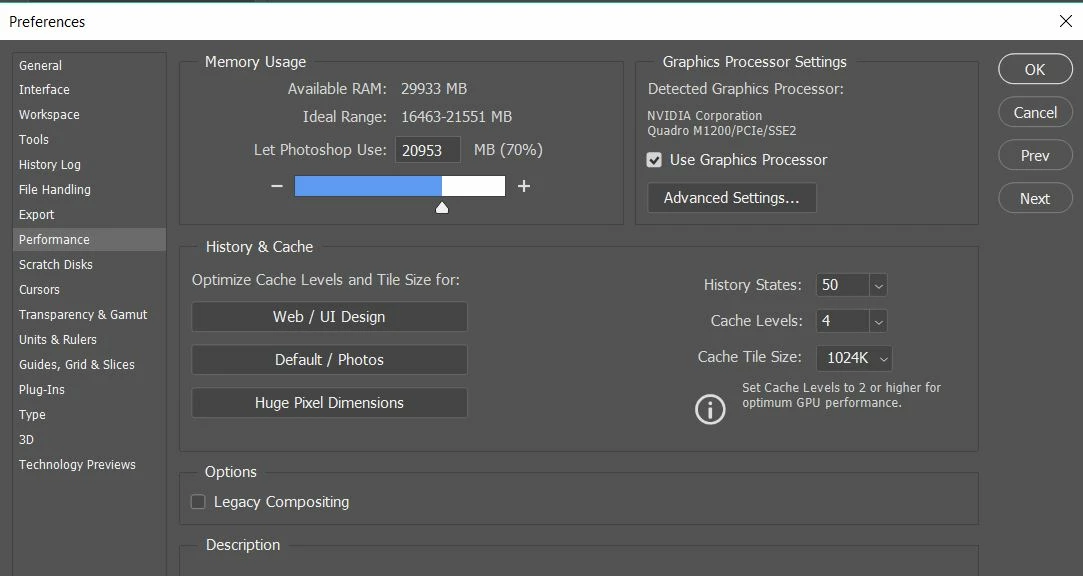
Here are my settings in Performance panel. Can anyone help please?

thanks

Joanna
This topic has been closed for replies.
Correct answer joannak45563552

hi Guys

thanks everyone for your reply.

I'm on the latest Ps version 20.0.5, my graphics driver is up to date and I'm using RGB 8 bit.

Actually this tricky solution brought my 3D options back again.

Joanna

3 replies

davescm
Community Expert
Community Expert
July 3, 2019

Hi

Make sure your image mode is still RGB. 3D does not work in other modes such as CMYK.

Dave

joannak45563552
joannak45563552AuthorCorrect answer
Participant
July 4, 2019

hi Guys

thanks everyone for your reply.

I'm on the latest Ps version 20.0.5, my graphics driver is up to date and I'm using RGB 8 bit.

Actually this tricky solution brought my 3D options back again.

Joanna

Sahil.Chawla
Adobe Employee
Adobe Employee
July 3, 2019

Hi Joanna,

That does not sound good, let's make it right.

As 3D is grayed out in Photoshop, could you please let us know the exact version of Photoshop you're working with?
What operating system are you using?

Please try the steps shared by Ged, if that does not help, then check if there is any Graphics driver update available on the manufacturer's website.

You may also try the troubleshooting steps mentioned here: Troubleshoot Photoshop graphics processor (GPU) and graphics driver issues

Regards,
Sahil

July 3, 2019

Hi

What exact version of Photoshop do you have, have you tired resetting Photoshop preferences, updating your GPU driver from the manufactures website.

Perhaps you can post a screenshot of Photoshop with all the pertinent panels