georgeo85218018
Participant
March 17, 2018
Answered

3D 'Hole' constraint problem ---HELP---

  • March 17, 2018
  • 1 reply
  • 1285 views

Hello everyone!

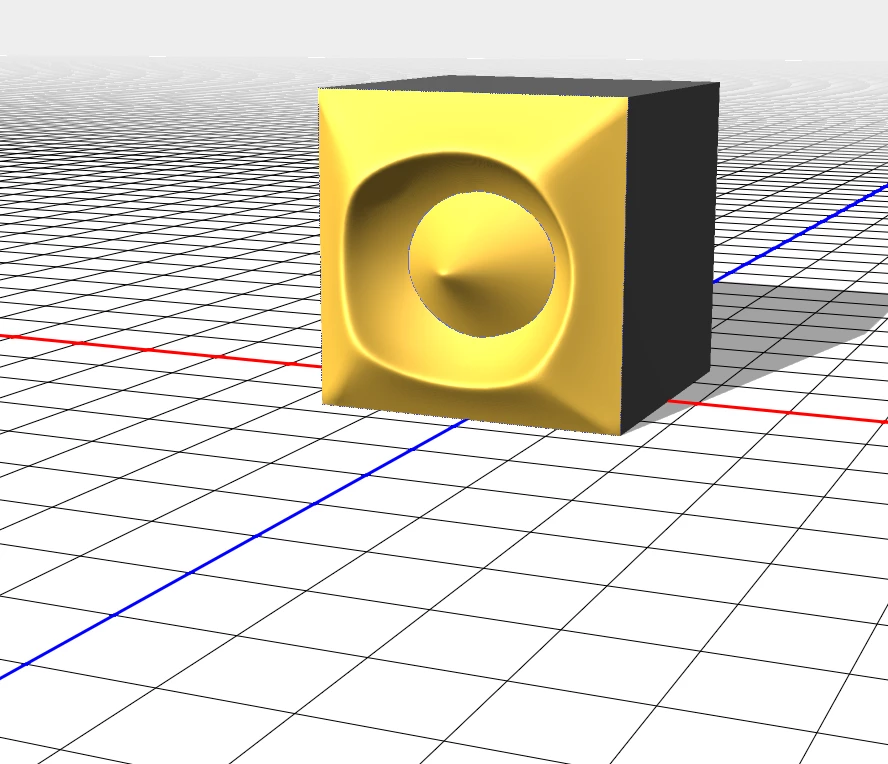
I have a problem: in 3d mode on extrusion 'Hole' constraint does not work as it must and do the same function as just 'Active'
This topic has been closed for replies.
Correct answer davescm

As posted earlier , it is an issue. Make the hole before extruding and you should be OK

Dave

1 reply

davescm
Community Expert
Community Expert
March 17, 2018

Can you share some further info :

1. What version of Photoshop are you using

2. What Operating system
3. How exactly did you make the constraint

It is working here on Photoshop CC 19.1.2 Windows 10.

Edit - I made the hole constraint above when making the mesh. Adding a hole constraint later via path or selection does not appear to be working correctly. The only way was to Edit Source and add the constraint that way

Dave

Participating Frequently
August 2, 2018

Hi,

I see exactly the same issue.

I am very new to Photoshop so I may have misunderstood something, but this thread is one of the few things I found about the subject. The process I was using is as follows:

  • Create the extrusion
  • Click on the 'Boundary Constraint 1' in the 3D panel
  • Make a selection
  • In properties press the 'Add Selection to Surface' button
  • Click on the 'Internal Constraint 2' that was created
  • In the Properties change from Active to Hole
  • Nothing happens

Windows 10

Adobe Photoshop Version: 19.1.5 20180604.r.346 2018/06/04: 1175273  x64

I noticed that 'Hole' is cut, but not through the front and back inflation material. If Ireduce the opacity of these materials you see a tube where the hole was cut.

Am I doing something wrong, or is this an issue?

Thanks.

davescm
Community Expert
davescmCommunity ExpertCorrect answer
Community Expert
August 2, 2018

As posted earlier , it is an issue. Make the hole before extruding and you should be OK

Dave