
Answered
3D Models Showing Up Black
Why does when a layer in made into 3D it turns into jet black? Is there a way to fix this?
I'm trying to make a spaceship and am making it piece by piece, but this is driving me crazy.

Why does when a layer in made into 3D it turns into jet black? Is there a way to fix this?
I'm trying to make a spaceship and am making it piece by piece, but this is driving me crazy.
Be careful with those 3D settings help pages. Whilst they give some useful info, the screenshots refer to CS5 wheras the panels changed in CS6 and remain changed to the current CC version. Those pages really do need an update.
Ricky - take a look at :
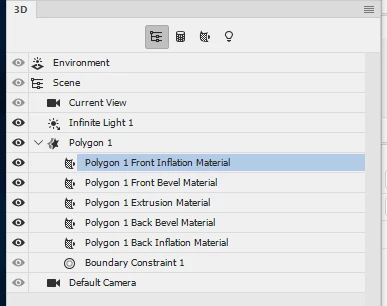
a. The light position and intensity .
The default light is usually an infinite light and the properties panel allows you to adjust colout and intensity.
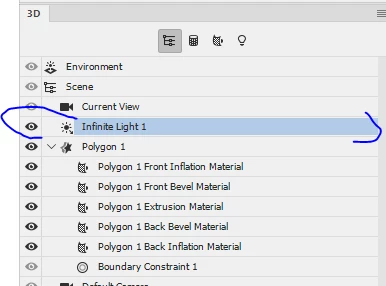
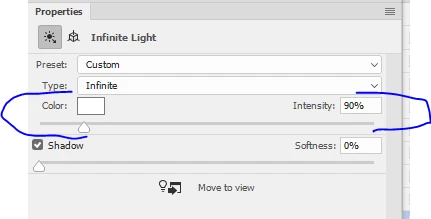
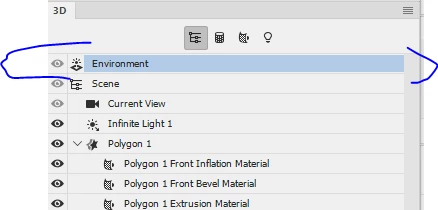
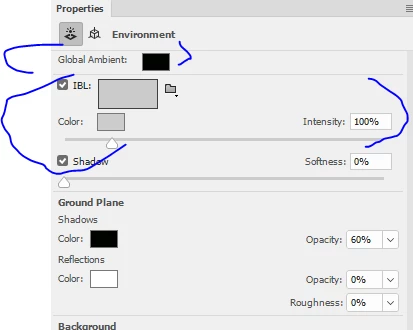
b. The Environment lighting - this is your "background or world light". You can set here a global ambient light as well as image based lighting where you can load an image to act as a light source.
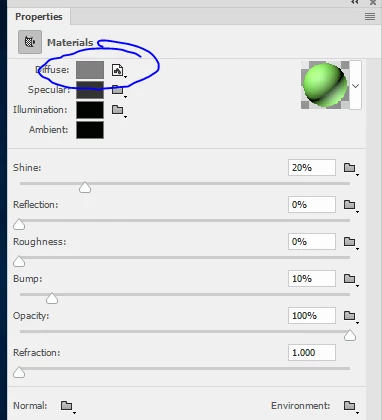
c. Your material settings in the Properties panel for each material in your model. Particularly the diffuse material settings
I hope that helps
Dave
Already have an account? Login
Enter your E-mail address. We'll send you an e-mail with instructions to reset your password.
 AdChoices