Inspiring
June 21, 2018
Answered

3D render options panel not avalable

  • June 21, 2018
  • 3 replies
  • 605 views

I'm trying to get to the rendering options panel and everything I'm finding tells me I need be in the Scene layer in the 3D panel. However when I'm in the 3D panel the  top 3 layers; Environment, Scene, and Current View, are grayed out.

What am I missing?
This topic has been closed for replies.
Correct answer Dramenon

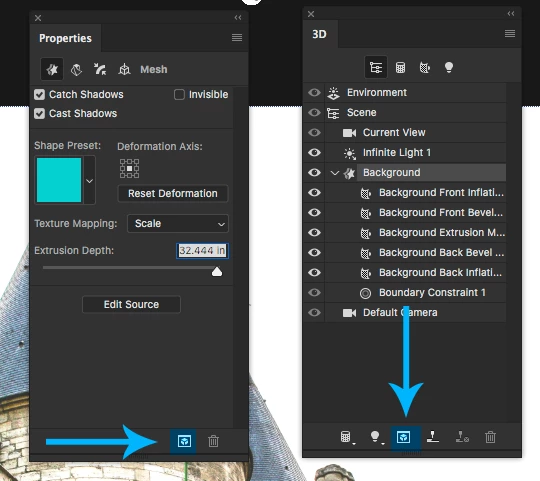
There is no 3D "Rendering Panel." There is the 3D Panel and Properties panel. The Proprieties will update based on what is selected in the 3D Panel.

You may choose to render at any time by selecting from the menu 3D > Render 3D Layer or click the Render button icon found on the 3D panel and Properties Panel.

For further tutorials on Photoshop 3D please see my channel:

Daniel Presedo - YouTube

3 replies

Dramenon
DramenonCorrect answer
Inspiring
June 21, 2018

There is no 3D "Rendering Panel." There is the 3D Panel and Properties panel. The Proprieties will update based on what is selected in the 3D Panel.

You may choose to render at any time by selecting from the menu 3D > Render 3D Layer or click the Render button icon found on the 3D panel and Properties Panel.

For further tutorials on Photoshop 3D please see my channel:

Daniel Presedo - YouTube

/end of line/
Inspiring
June 21, 2018

Thank you

I just thought I had seen an option where I could choose the speed at which it rendered and the quality of the rendered file.

davescm
Community Expert
Community Expert
June 21, 2018

That option is now in Preferences >3D

Dave

Inspiring
June 21, 2018

I forgot to include a screen shot...

JJMack
Community Expert
Community Expert
June 21, 2018

A screen capture. One would help us to see what you are doing and let us see all of what you see.

JJMack