
carold57476829
Participant
February 17, 2020
Question

7.0 Photoshop cannot read layers on newer Photoshop

  • February 17, 2020
  • 2 replies
  • 608 views

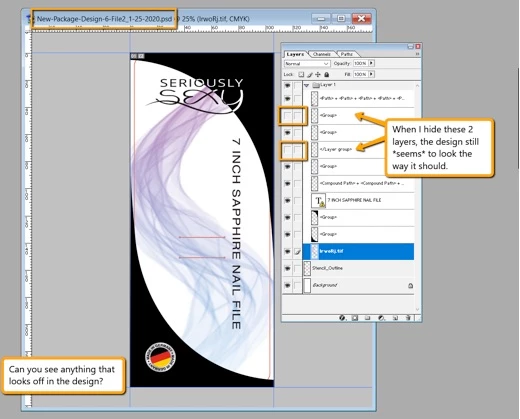
So I've been working on a project for a cilent and the client requires me to send a PSD over with the layers still intact. When I do this, the client's Photoshop doesn't seem to read certain Photoshop files as it does with mine, even though I saved the file as "Maximum Compatibility". Even when he hides the layers, nothing in the file happens as it does with mine. 


Here is the client's side of Photoshop (which is Photoshop 7.0)
 

Here is my version of Photoshop (newest version 2020)
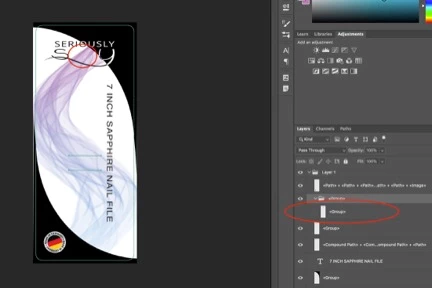
 

Anyone know why Photoshop does this? 


This topic has been closed for replies.

2 replies

JJMack
Community Expert
Community Expert
February 17, 2020

Setting layer visibility off does not delete the layers. They are still in the Document. If an old version of Photoshop can not support a layer that layer's visibility can not be set  off or on it can not be processed.  With max compatibility there is a full size composite layers saved in the layered file that an old version of photoshop may be able to use for the image.   Does  the old Photoshop versions offer your client any options for the layers it can not process like a substitute layer. or delete layer. There are new layer kinds, Layer styles can have more effects.  Layer kind may have option and attachments not available in old  Photoshop.  Maximum compatibility does not eliminate compatibility problem.   Like Lightroom the old Photoshop version can use the Composite in the document instead of layers.   Maximum compatibility includes a full size composite for your documents image so old versions of Photoshop can render your image even when there may be layer that photoshop can not process.

JJMack
Myra Ferguson
Community Expert
Community Expert
February 17, 2020

Wow, Photoshop 7 was released in 2002, so that's pretty far back for backward compatibility--and Photoshop is doing a great job with the file. From the screenshots, it looks like the issue is that the nested layer groups aren't showing up. Hierarchical layer groups weren't released until Photoshop 8. When you know you're trying to make a file as backward compatible as possible, try to avoid features that weren't available in the targeted version. Also, according to this article from ProDesignTools, you could try saving a .tif.