

Elisei Kulikovsky
Known Participant
January 21, 2020
Answered

A bug on Replace Color mini-preview in Photoshop 2018

  • January 21, 2020
  • 2 replies
  • 484 views

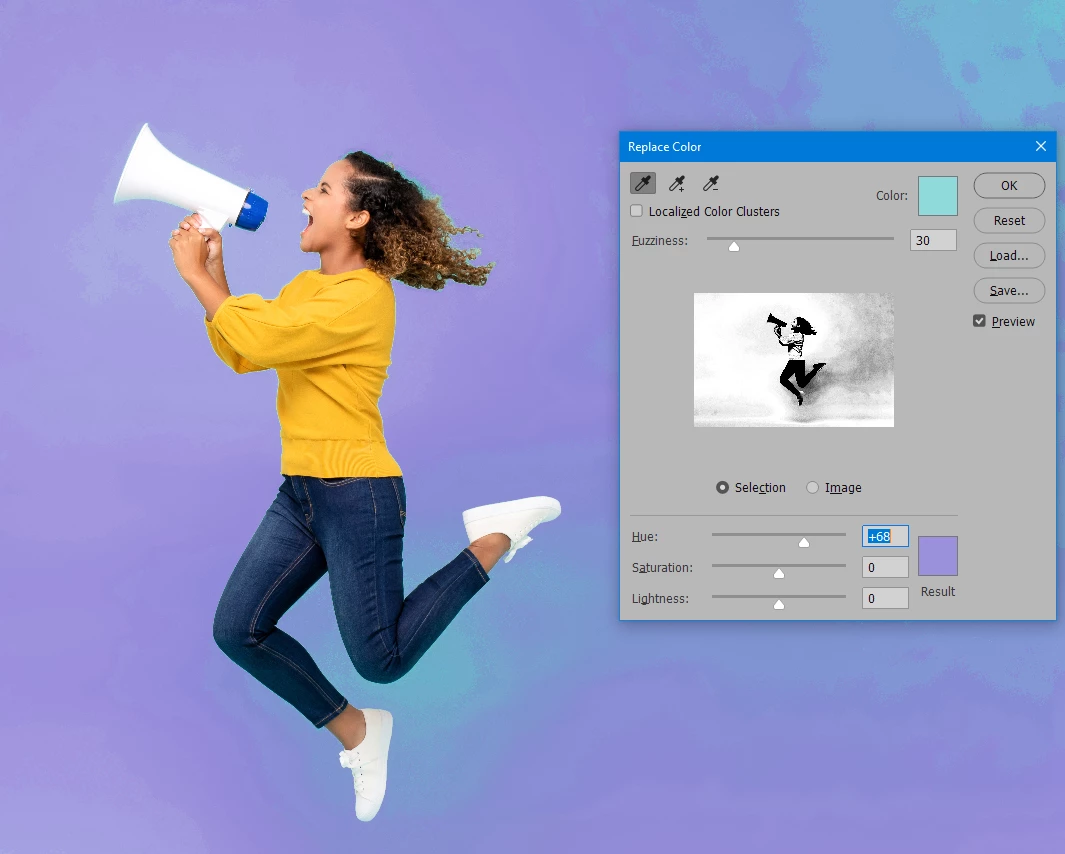
The mini-preview of the Replace Color Adjustment shows a wrong selection (see the screen). As you can see, I select turquoise color (only one). But on the mini-preview the girl's skin and the pullover are also selected. The adjustment itself works correctly, only the mini-preview is wrong. Is it a bug or something's wrong with my PS installation?


{Thread renamed by moderator}

This topic has been closed for replies.
Correct answer davescm

Looks like a bug. I can replicate it here in V21.0.2 with Windows 10. The on screen preview works correctly, but the grey "selection" preview in the dialogue box is incorrect. Switching between Legacy compositing and new compositing makes no difference


You can raise a bug report here, where Adobe developers will see it:

https://feedback.photoshop.com/photoshop_family


Dave

2 replies

davescm
Community Expert
davescmCommunity ExpertCorrect answer
Community Expert
January 21, 2020

Looks like a bug. I can replicate it here in V21.0.2 with Windows 10. The on screen preview works correctly, but the grey "selection" preview in the dialogue box is incorrect. Switching between Legacy compositing and new compositing makes no difference


You can raise a bug report here, where Adobe developers will see it:

https://feedback.photoshop.com/photoshop_family


Dave

Elisei Kulikovsky
Known Participant
January 22, 2020

Ok, thank you.

Sahil.Chawla
Adobe Employee
Adobe Employee
January 21, 2020

Hi Elisei,

That does not seem right, does it happen with every image or only this specific image?
Also, could you try updating Photoshop to version 2020 via the Creative Cloud Desktop app and see if it helps?

Regards,
Sahil