
Participant
February 28, 2020
Answered

A line is automatically drawn towards the top left. (and It may be selected automatically.

  • February 28, 2020
  • 3 replies
  • 1362 views

A line is automatically drawn towards the top left. (and It may be selected automatically.


When using the functions such as the Lasso tool, the Droplet tool, the Brush tool, and the Eraser tool, dragging the left click and releasing the click forces a line to the upper left. For example, the Lasso tool automatically creates a sharp selection in the upper left corner even if you draw a line in a circle. I tried to reset the tool and reinstall the program. Please help me. T_T


This sentence was translated by Google Translator. Please note that even if it is awkward.


*Attach the screen capture of the symptom. As you can see, the painting tool and the lasso tool were automatically activated toward the top left corner after the last click while drawing the curve. I need help solving it. Help. T_T
This topic has been closed for replies.
Correct answer

Hi

It's a known issue with 21.1 and has been reported to Adobe

https://feedback.photoshop.com/photoshop_family/topics/ps-21-1-every-drawing-action-snaps-to-upper-l...

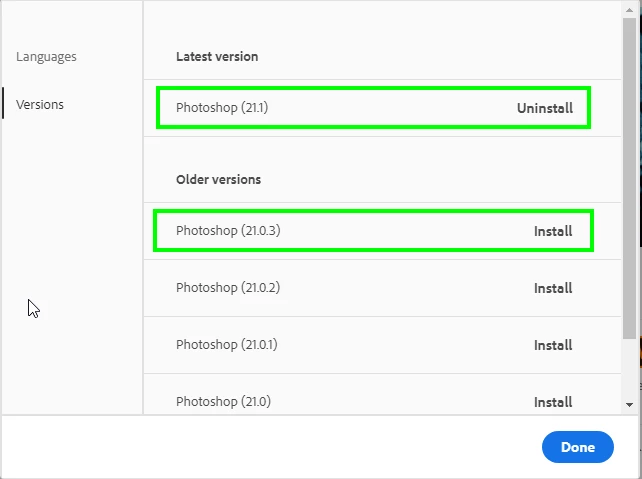
You can revert back to version 21.0.3 from the CC app until Adobe fixes the issues with this new update

3 replies

kys8094Author
Participant
March 5, 2020

Thank you! It was a big help. : D

davescm
Community Expert
Community Expert
February 28, 2020

If you are using Windows 10 , then switch to Windows Ink and remove any PSUserConfig.txt file from your Photoshop Settings folder.


Dave

JJMack
Community Expert
Community Expert
February 28, 2020

Its best to backup ones preferences reinstall 21.0.3 then restore you preferences on Windows there are Problems with Photoshop 21.1.0 and Wacon Tablets using INK or WinTab API.   There are also many other issues in 21.1.0 many Actions will fail, shortcuts operate differently 21.1.0 is bad news.

JJMack
Correct answer
February 28, 2020

Hi

It's a known issue with 21.1 and has been reported to Adobe

https://feedback.photoshop.com/photoshop_family/topics/ps-21-1-every-drawing-action-snaps-to-upper-l...

You can revert back to version 21.0.3 from the CC app until Adobe fixes the issues with this new update