yeah_not
Known Participant
December 24, 2017
Answered

A script for measuring the distance between two elements?

  • December 24, 2017
  • 2 replies
  • 7190 views

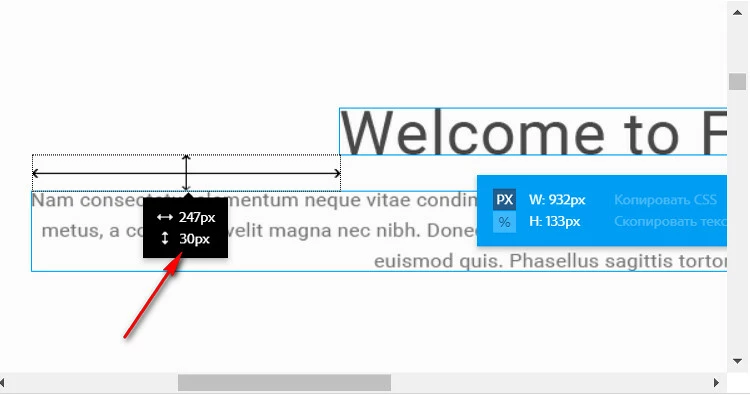
Anyone can help me with the script for measuring the distance between two elements (layers) in Photoshop.

I know that there are smart guides . I need this funcionality as a script to apply correct margins/paddings in CSS

Layers should be selected by shift. It's works very similar in Adobe Dreamweaver Extract and Assets Extract.

This topic has been closed for replies.
Correct answer r-bin

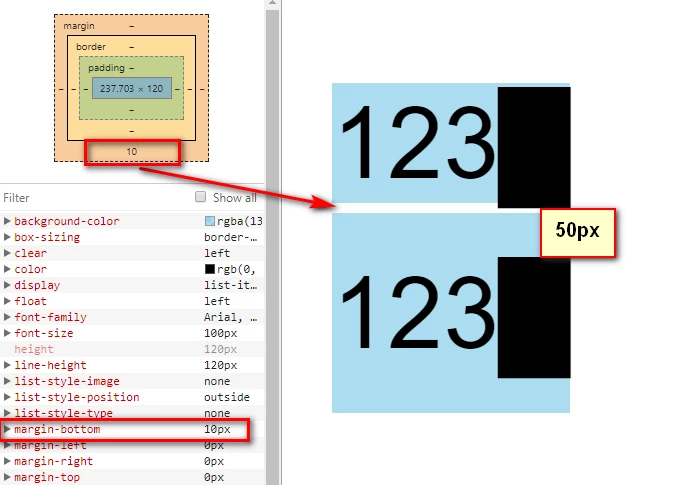
So, to correct this difference, I need to make calculations for this 2 layers.

distance_in_css = distance - (line-height_1 - 1.2 * font-size_1) / 2
                          
- (line-height_2 - 1.2 * font-size_2) / 2

or in Photoshop Script syntax it should look something like this:

distance_in_css = distance - (Layer1.textItem.leading - 1.2 * Layer1.textItem.size) / 2
                           - (Layer2.textItem.leading - 1.2 * Layer2.textItem.size) / 2;

For above example it will be:

distance_in_css = 50px - (120px - 1.2 * 100px) / 2 - (200px - 1.2 * 100px) / 2 = 50px - 0 - 40px = 10px;

And now if we apply this 10px for CSS margin, the visual distance between text layers will be the same as in Photoshop - 50px

I just do not know how to add them to the script.(((


OK.

The following script gives you this result. But it seems to me this is complete nonsense. ))

// version no CS6 or no effects

var old_units = app.preferences.rulerUnits;   

app.preferences.rulerUnits = Units.PIXELS;   


try { app.activeDocument.suspendHistory("Get Text Bounds", "var bounds = get_selected_layers_bounds()") } catch(e) { alert(e); } 


try { executeAction( charIDToTypeID( "undo" ), undefined, DialogModes.NO ); } catch(e) { alert(e); } 


app.preferences.rulerUnits = old_units;   


if (bounds)   

    {   

    if (bounds.length == 2)   

        {   

        var distance = 0;


        if (bounds[0].bottom <= bounds[1].top) distance = bounds[1].top - bounds[0].bottom;   

        else if (bounds[1].bottom <= bounds[0].top) distance = bounds[0].top - bounds[1].bottom;   

        else  alert("Intersecting layers")   

        var distance_in_css = distance - (bounds[0].leading - 1.2*bounds[0].size)/2 - (bounds[1].leading - 1.2*bounds[1].size)/2;

        alert("distance = " + distance + "\ndistance_in_css = " + distance_in_css);

        }   

    else   

        alert("More then 2 selected layers")    


    }   

else    

    alert("There is no selected layers")    


/////////////////////////////////////////////////////////////////////////////////////////////////   

function get_selected_layers_bounds()   

    {   

    try {   

        var ref = new ActionReference();   


        ref.putProperty( charIDToTypeID( "Prpr" ), stringIDToTypeID( "targetLayers" ) );   

        ref.putEnumerated( charIDToTypeID("Dcmn"), charIDToTypeID("Ordn"), charIDToTypeID("Trgt") );   

        var desc = executeActionGet(ref);   


        if (!desc.hasKey( stringIDToTypeID("targetLayers") ) ) return null;   


        var n = 0;   

        try { activeDocument.backgroundLayer } catch (e) { n = 1; }   


        desc = desc.getList( stringIDToTypeID("targetLayers"));   


        var len = desc.count;   


        var selected_bounds = new Array();   


        for (var i = 0; i < len; i++)   

            {   

            try    

                {   

                var r = new ActionReference();   

                r.putIndex( charIDToTypeID( "Lyr " ), desc.getReference(i).getIndex() + n);   


                var ret = executeActionGet(r);   

                var size    = 0;

                var leading = 0;


                if (ret.hasKey(stringIDToTypeID("textKey"))) 

                    { 

                    var textStyleRangeList = ret.getObjectValue(stringIDToTypeID("textKey")).getList(charIDToTypeID("Txtt" ));

                    if (textStyleRangeList.count > 1) { alert("More than one textStyleRange in layer", "Oops!!"); }

                    var textStyle = textStyleRangeList.getObjectValue(0).getObjectValue(charIDToTypeID("TxtS" ));

                    var auto_leading = textStyle.getBoolean(stringIDToTypeID("autoLeading"));

                    size = textStyle.getUnitDoubleValue(stringIDToTypeID("size"));

                    leading = auto_leading?size*1.2:textStyle.getUnitDoubleValue(stringIDToTypeID("leading"));

                    var s = ret.getObjectValue(stringIDToTypeID("textKey")).getString(charIDToTypeID("Txt " )); 

                    s = s.replace(/^./gm, String.fromCharCode(0x2588)); 


                    var d1 = new ActionDescriptor(); 

                    d1.putReference( charIDToTypeID( "null" ), r ); 


                    var d2 = new ActionDescriptor(); 

                    d2.putString( charIDToTypeID( "Txt " ), s); 


                    d1.putObject( charIDToTypeID( "T   " ), charIDToTypeID( "TxLr" ), d2 ); 


                    executeAction( charIDToTypeID( "setd" ), d1, DialogModes.NO ); 


                    ret = executeActionGet(r);   

                    } 


                var bounds = ret.getObjectValue(stringIDToTypeID("bounds"));  // use this in CS6 or when you want to take into account the effects   

                //var bounds = ret.getObjectValue(stringIDToTypeID("boundsNoEffects")); // in CS6 does not work   


                var obj = {

                          left   : bounds.getUnitDoubleValue(stringIDToTypeID("left")),   

                          top    : bounds.getUnitDoubleValue(stringIDToTypeID("top")),   

                          right  : bounds.getUnitDoubleValue(stringIDToTypeID("right")),   

                          bottom : bounds.getUnitDoubleValue(stringIDToTypeID("bottom")),

                          size   : size,

                          leading: leading,

                          };   


                selected_bounds.push(obj);   

                }   

            catch (e)   

                {   

                alert(e);   


                return null;   

                }   

            }   


        return selected_bounds;   

        }   


    catch (e) { alert(e); return null; }   

    }   

2 replies

JJMack
Community Expert
Community Expert
December 24, 2017

A Photoshop document can have many element in different layer kinds and layers can be masked and effect added which effects layers visibility and effects can extend outside  the layer with the effects.  How would the script know which elements you are interested in measuring.

You show text layers. They can be mask and have effects all of the a layer's content may not be visible and effect can be rendered outside a layers bounds for the layer's composite view.

JJMack
yeah_not
yeah_notAuthor
Known Participant
December 25, 2017
How would the script know which elements you are interested in measuring.
Layers should be selected by shift.
Legend
December 25, 2017

The active layer can be only one. If the layers are selected with Shift - this is called targetLayers. This is a list of indexes of the layer. Using it you can get any information about each of the selected layers. Just do not understand what and with what you are going to compare to determine the distance. What do you think is the distance between layers and which ones?

Chuck Uebele
Community Expert
Community Expert
December 24, 2017

I'm not sure if it's accurate with text, but you can use bounds to find the location of various layers, then do some math using the bounds:

var doc = activeDocument;

var layerBounds doc.activeLayer.bounds

//layerBounds[0] = left edge

//layerBounds[1] = top edge

//layerBounds[2] = right edge

//layerBounds[3] = bottom edge

I've found that it's best to convert these results to a number using parseFloat(), as sometime if you do math without converting, you get odd results.

Legend
December 24, 2017

Also do not forget about the property boundsNoEffects )