Known Participant
May 6, 2016
Answered

A script to split each colour into a seperate layer?

  • May 6, 2016
  • 4 replies
  • 10605 views

Greetings, I was just wondering if anybody knows of a script that can automate the task of taking a single layer with a few different colours in it (only a few, I'm talking between 2-10 colours here) and seperate out each colour to put on it's own layer.

I did a quick google search and came accross this Split to Layers | Photoshop Scripts ,
It's not what I want to do specifically obviously but seems to me it should be possible to modify this to somehow select by colour threshold instead of selecting continuous blocks in the alpha channel. I had a look inside the script but I wouldn't have foggiest of how to alter the code to what I need.

Anybody here have any ideas?

Thanks

This topic has been closed for replies.
Correct answer c.pfaffenbichler

@michelr31372089
thanks for the tip, this is interesting but doesn't really do what I need here. have saved it for future reference though!

@c.pfaffenbichler
Looks like I need to provide a little more information about my process

I'm creating my own artworks for print basically, and figured that creating my images in 16-bit CMYK will result it better colours when printed than plain old RGB files. hence the CMYK set up.

I do a lot of weird drawings and my process of turning them into a finished piece involves quite a few steps, firstly scanning them in, cleaning up a little in photoshop, vectorising them with vectormagic, opening them up in illustrator and putting together the composition (which also involves applying a few colours to seperate out different elements) then exporting as a high res pdf (with no anti aliasing), Then finally opening up in photoshop, seperate into layers and applying any final details (shading, highlights, more colours etc)

So basically I'm looking to automate as much of that process as possible to speed things up for me.
This specific script will help automate the final step of opening up my pdf in photoshop & seperating out into layers.

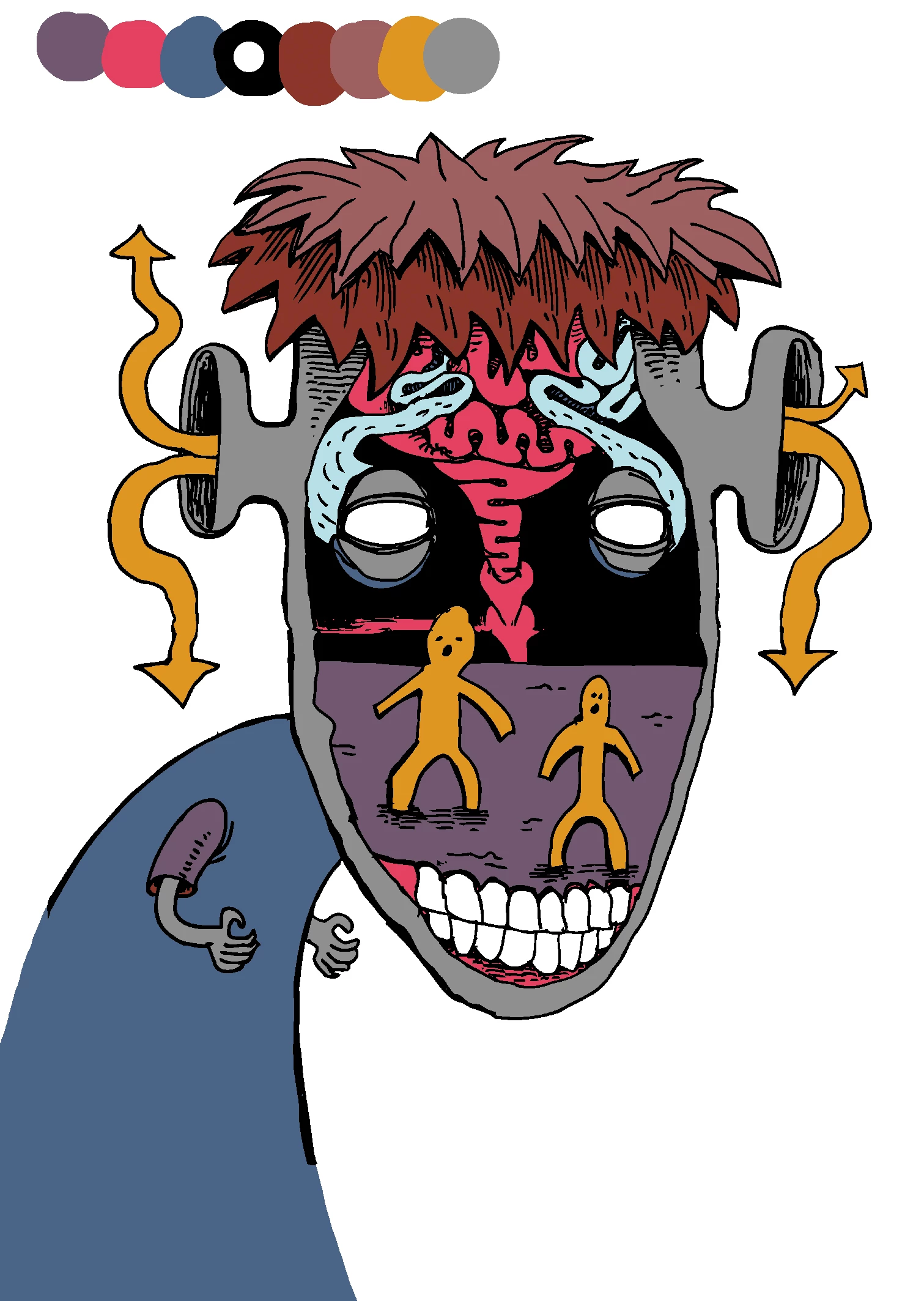
At the moment when I open the .pdf in photoshop I have to manually select my different elements by colour and seperate them out into layers, before I can work on them further. This is the part I want the script to do for me. See in the example below there are 9 colours in total (It's a compressed jpeg because I couldn't upload a pdf or bmp, but the actual file I get from illustrator has no anti aliasing and no compression) .

The colours at this stage aren't important. they could be anything, at the moment I just pick whatever colours work for me visually to seperate out the different elements, If it works for the script I could easily pick these from a specific palette of say 20 colours or so, generally I would only use 5-10 I reckon.
If the script can just pick out the colours that I've used and apply the process to them even better, but if this takes more than a minute to process I'd rather just go from a limited palette and keep things simple.

What do you think could be the best approach?


Then finally opening up in photoshop, seperate into layers and applying any final details (shading, highlights, more colours etc)

Personally I think you might be better off sticking with Illustrator once you vectorised the image.

In the absence of anti-aliasing (I had to clean up the image considerably, PNG should have worked better) and with a limited number of colors a Scripting approach seems feasible indeed.

This Script is strictly for RGB images and attempts to determine the colors, if you know them you could dump a bunch of the code and define theArray manually instead.

// split color regions  of an rgb image into layers;

// 2016, use it at your own risk;

#target photoshop

if (app.documents.length > 0) {

if (app.activeDocument.mode = DocumentMode.RGB) {

var time1 = Number(timeString());

var myDocument = app.activeDocument.duplicate("theCopy", true);

var theLayer = myDocument.activeLayer;

var histo = myDocument.histogram;

var total = 0;

for (var n = 0; n < histo.length; n++) {

total = total + histo;

};

// collect histograms and non-0-values;

var theHistos = new Array;

for (var m = 0; m < 3; m++) {

var histo = myDocument.channels.histogram;

var theValues = new Array;

for (var n = 0; n < histo.length; n++) {

  if (histo != 0) {theValues.push(n)}

  };

theHistos.push([histo, theValues])

};

////////////////////////////////////

var theArray = new Array;

// create difference layer to determine which combinations of values exist more or less;

var theSolid = solidColorLayer (55, 128, 200, "aaa", charIDToTypeID("Dfrn"));

// try;

for (var n = 0; n < theHistos[0][1].length; n++) {

////////////////////////////////////

for (var o = 0; o < theHistos[1][1].length; o++) {

////////////////////////////////////

for (var p = 0; p < theHistos[2][1].length; p++) {

////////////////////////////////////

try {

$.writeln(theHistos[0][1]+"___"+theHistos[1][1]+"___"+theHistos[2][1]

);

changeSolidColorLayer (theHistos[0][1], theHistos[1][1], theHistos[2][1]

);

var checkHisto = myDocument.histogram;

if (checkHisto[0] > 0) {

theArray.push([theHistos[0][1], theHistos[1][1], theHistos[2][1]

])

};

}

catch (e) {};

////////////////////////////////////

};

////////////////////////////////////

};

////////////////////////////////////

};

theSolid.remove();

// try to cut to layers;

for (var a = 0; a < theArray.length; a++) {

try {

selectColorRange (theArray[0], theArray[1], theArray[2], 0);

cutToLayer ();

myDocument.activeLayer = theLayer;

}

catch (e) {};

};

var time2 = Number(timeString());

alert(((time2-time1)/1000)+" seconds\nstart "+time1+"\nend "+time2)

}

};

////// select color range //////

function selectColorRange (theR, theG, theB, fuzziness) {

// =======================================================

var idClrR = charIDToTypeID( "ClrR" );

    var desc4 = new ActionDescriptor();

    var idFzns = charIDToTypeID( "Fzns" );

    desc4.putInteger( idFzns, fuzziness );

    var idMnm = charIDToTypeID( "Mnm " );

        var desc5 = new ActionDescriptor();

        var idR = charIDToTypeID( "Rd  " );

        desc5.putDouble( idR, theR );

        var idG = charIDToTypeID( "Grn " );

        desc5.putDouble( idG, theG );

        var idB = charIDToTypeID( "Bl  " );

        desc5.putDouble( idB, theB );

    var idRGCl = charIDToTypeID( "RGBC" );

    desc4.putObject( idMnm, idRGCl, desc5 );

    var idMxm = charIDToTypeID( "Mxm " );

        var desc6 = new ActionDescriptor();

        var idR = charIDToTypeID( "Rd  " );

        desc6.putDouble( idR, theR );

        var idG = charIDToTypeID( "Grn " );

        desc6.putDouble( idG, theG );

        var idB = charIDToTypeID( "Bl  " );

        desc6.putDouble( idB, theB );

    var idRGCl = charIDToTypeID( "RGBC" );

    desc4.putObject( idMxm, idRGCl, desc6 );

    var idcolorModel = stringIDToTypeID( "colorModel" );

    desc4.putInteger( idcolorModel, 0 );

executeAction( idClrR, desc4, DialogModes.NO );

};

////// cut to layer //////

function cutToLayer () {

try {

// =======================================================

var idCtTL = charIDToTypeID( "CtTL" );

executeAction( idCtTL, undefined, DialogModes.NO );

return activeDocument.activeLayer

} catch (e) {return undefined}

};

////// create solid color layer //////

function solidColorLayer (theR, theG, theB, theName, theBlendMode) {

// =======================================================

var idMk = charIDToTypeID( "Mk  " );

    var desc10 = new ActionDescriptor();

    var idnull = charIDToTypeID( "null" );

        var ref1 = new ActionReference();

        var idcontentLayer = stringIDToTypeID( "contentLayer" );

        ref1.putClass( idcontentLayer );

    desc10.putReference( idnull, ref1 );

    var idUsng = charIDToTypeID( "Usng" );

        var desc11 = new ActionDescriptor();

        var idNm = charIDToTypeID( "Nm  " );

        desc11.putString( idNm, theName );

        var idMd = charIDToTypeID( "Md  " );

        var idBlnM = charIDToTypeID( "BlnM" );

        var idMltp = theBlendMode ;

        desc11.putEnumerated( idMd, idBlnM, idMltp );

        var idType = charIDToTypeID( "Type" );

            var desc12 = new ActionDescriptor();

            var idClr = charIDToTypeID( "Clr " );

                var desc13 = new ActionDescriptor();

                var idRd = charIDToTypeID( "Rd  " );

                desc13.putDouble( idRd, theR );

                var idGrn = charIDToTypeID( "Grn " );

                desc13.putDouble( idGrn, theG );

                var idBl = charIDToTypeID( "Bl  " );

                desc13.putDouble( idBl, theB );

            var idRGBC = charIDToTypeID( "RGBC" );

            desc12.putObject( idClr, idRGBC, desc13 );

        var idsolidColorLayer = stringIDToTypeID( "solidColorLayer" );

        desc11.putObject( idType, idsolidColorLayer, desc12 );

    var idcontentLayer = stringIDToTypeID( "contentLayer" );

    desc10.putObject( idUsng, idcontentLayer, desc11 );

executeAction( idMk, desc10, DialogModes.NO );

return app.activeDocument.activeLayer

};

////// changeSolidColor //////

function changeSolidColorLayer (theR, theG, theB) {

try {

// =======================================================

var idsetd = charIDToTypeID( "setd" );

    var desc17 = new ActionDescriptor();

    var idnull = charIDToTypeID( "null" );

        var ref2 = new ActionReference();

        var idcontentLayer = stringIDToTypeID( "contentLayer" );

        var idOrdn = charIDToTypeID( "Ordn" );

        var idTrgt = charIDToTypeID( "Trgt" );

        ref2.putEnumerated( idcontentLayer, idOrdn, idTrgt );

    desc17.putReference( idnull, ref2 );

    var idT = charIDToTypeID( "T   " );

        var desc18 = new ActionDescriptor();

        var idClr = charIDToTypeID( "Clr " );

            var desc19 = new ActionDescriptor();

            var idRd = charIDToTypeID( "Rd  " );

            desc19.putDouble( idRd, theR );

            var idGrn = charIDToTypeID( "Grn " );

            desc19.putDouble( idGrn, theG );

            var idBl = charIDToTypeID( "Bl  " );

            desc19.putDouble( idBl, theB );

        var idRGBC = charIDToTypeID( "RGBC" );

        desc18.putObject( idClr, idRGBC, desc19 );

    var idsolidColorLayer = stringIDToTypeID( "solidColorLayer" );

    desc17.putObject( idT, idsolidColorLayer, desc18 );

executeAction( idsetd, desc17, DialogModes.NO );

return true

} catch (e) {return false}

};

////// function to get the date //////

function timeString () {

  var now = new Date();

  return now.getTime()

  };

4 replies

Participant
July 19, 2024

who has photoshop color separation atn or script to share,thank you, [removed by moderator]

c.pfaffenbichler
Community Expert
Community Expert
July 19, 2024

What are you talking about exactly? 

Please post meaningful screenshots to illustrate. 

Participant
February 7, 2019

No i want to be work in photoshop only.if it use this script in that image,and more over i have lot of color in another image.so kindly fix it .c.pfaffenbichler

JJMack
Community Expert
Community Expert
February 8, 2019

If you change his script to use color samplers you can split up to 10 colors.

JJMack
Participant
February 7, 2019

I have one vector image I want to split the color to separate layer, following images is sample image

If I run the script it will be shown following image

Kindly resolve the problem, c.pfaffenbichler

c.pfaffenbichler
Community Expert
Community Expert
February 7, 2019

If you start with a vector image this should better be done in Illustrator.

c.pfaffenbichler
Community Expert
Community Expert
May 6, 2016

The description of the intended process you have provided seems unclear to say the least.

Please clarify and consider that posting an example (source and intended result) or screenshots can save a lot of typing.

Known Participant
May 6, 2016

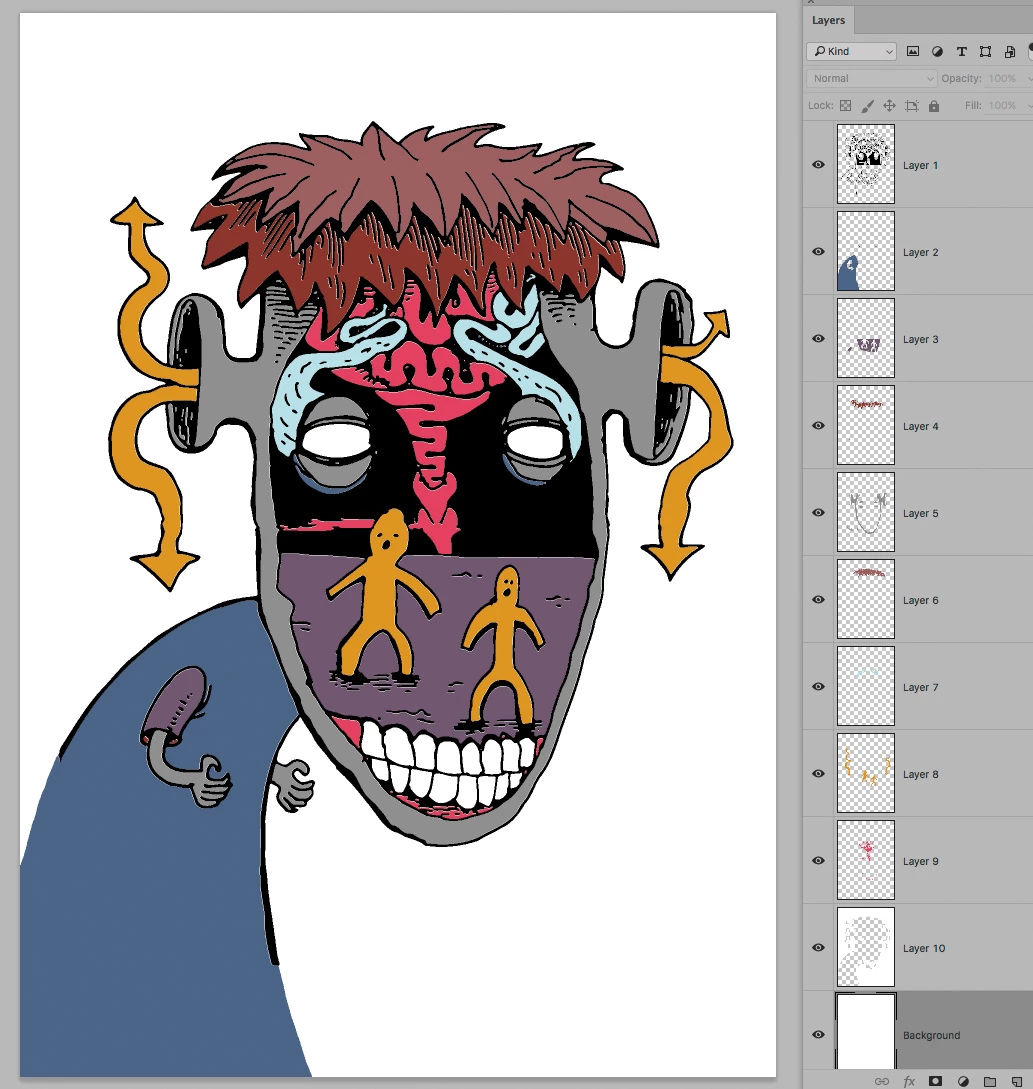
This is basically what I want to achieve. each colour seperated out on it's own layer.

Known Participant
May 8, 2016

anybody?

Even a suggestion on how to embark on writing a script like this?
it might be way over my head but to be pointed in the right direction would be a good start