
Participating Frequently
March 28, 2019
Answered

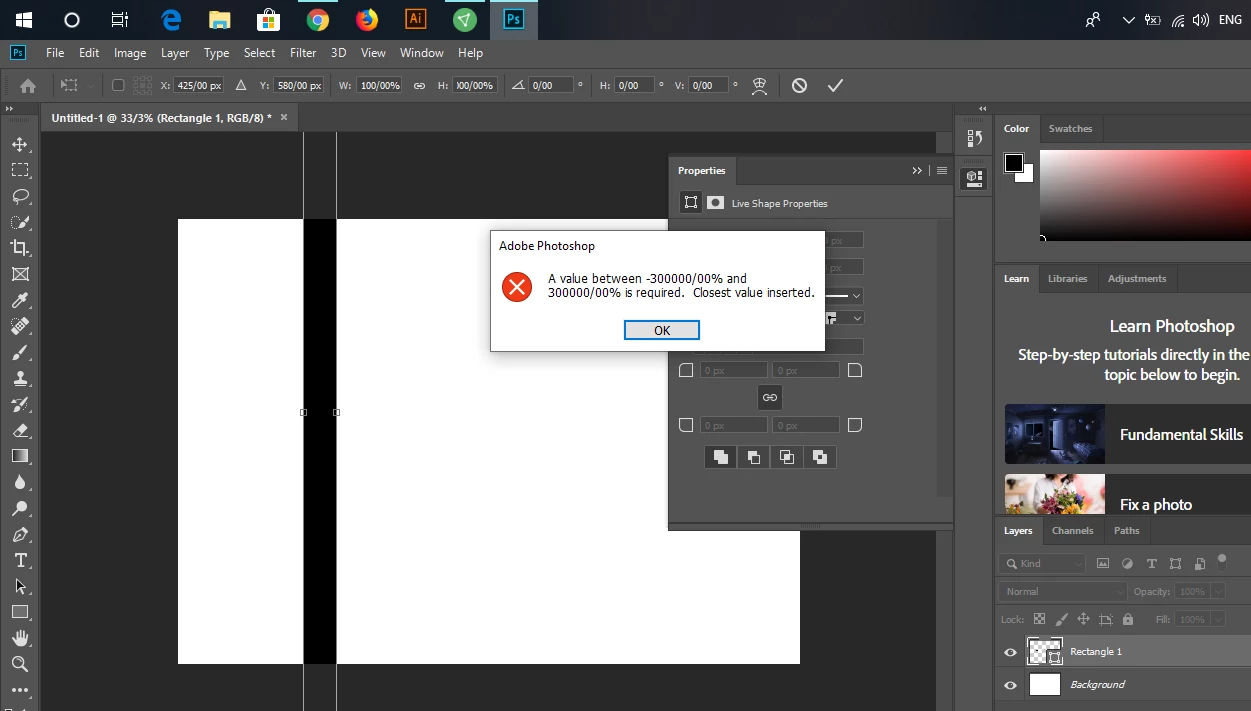
A value between -300000/00% and 300000/00% is required. Closest value inserted.

  • March 28, 2019
  • 3 replies
  • 4603 views

Hello !

It's very bad, when i open Photoshop in Windows 10 buld 1803 last update (2019/08) and then open a picture and want to transformer it, and want to add a value in " W: H: " it's show to me that must use "a value between -300000/00% and 300000/00% is required. Closest value inserted. "

I tried to use https://helpx.adobe.com/photoshop/kb/invalid-numeric-entry-integer-96-8-required-photoshop.html for solve the problem but it not work for it, and no any subject for this error in help.adobe pleas help me .

Thank You for attention.
This topic has been closed for replies.
Correct answer JJMack

Have you  tried to configure Windows for a  different country keyboard then is now set on your machine perhaps a different country character set.   I live in Microsoft country US english and US keyboard.

3 replies

JJMack
Community Expert
JJMackCommunity ExpertCorrect answer
Community Expert
March 28, 2019

Have you  tried to configure Windows for a  different country keyboard then is now set on your machine perhaps a different country character set.   I live in Microsoft country US english and US keyboard.

JJMack
Participating Frequently
March 28, 2019

Thank you, JJMack​ , You helped me a lot

JJMack
Community Expert
Community Expert
March 28, 2019

The vertical size of the Transform bounding box you show look huge grater than canvas size.   The value in the Transform tool option bar look reasonable.  Try resetting your Photoshop Preferences Photoshop ise not workinf correctly.  I also hate that Adobe does not show the rotation point in their new broken transform by default..

JJMack
Participating Frequently
March 28, 2019

The problem is that as soon as I put the mouse on the box, the message comes without the ability to select a bit.

I tried many ways , for example reinstall Photoshop and reset Preferences and change regedit but it not work.

March 28, 2019

Hi

Why do you have a / in the input boxes

Participating Frequently
March 28, 2019

I do not know what that is, from the beginning I installed the Photoshop, this sign was there.

March 28, 2019

Try resetting PS preferences