

Absolute & relative position crop actions
Hello Photoshop masters,
I have a large project that I'm hoping to save hours of monotonous repetitions on. I have been able to and am a litlte comfortable with creating actions for the most basic of tasks. However this project will need a litlte more than I'm capable of creating now with my limited skill set.
Below is a basic idea of the kinds of files & sizes I'll be working with. All (hundreds of them) will be the exact same width. and of varying heights. Not exacty the dimensions written but close enough.
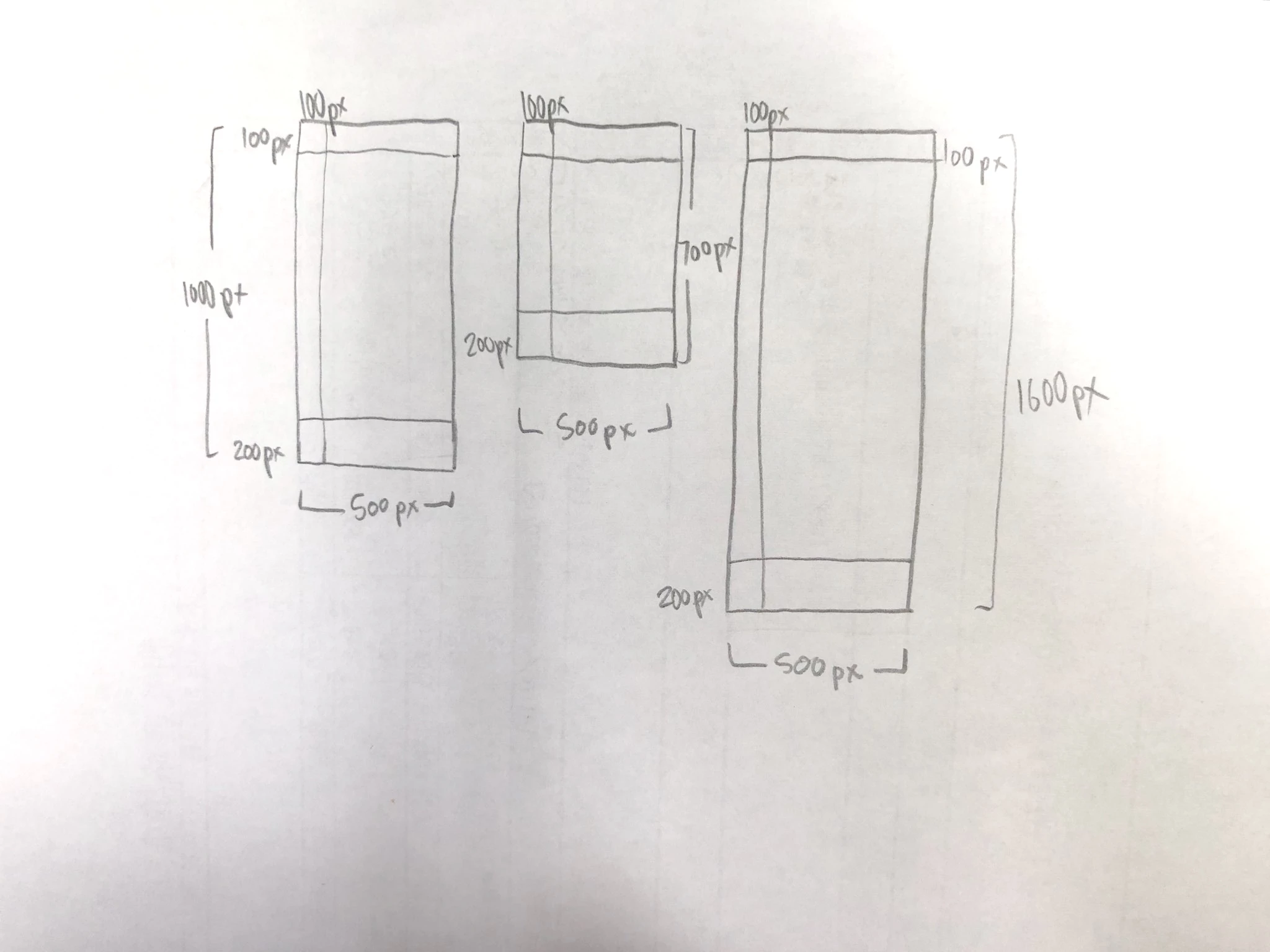
So I can create an action to fill the top 100px & the left side 100 px no problem. As they are absolute positions and identical on all images.
The hard part for me is filling the bottom 200px. As each file is a different height I'm unaware of how I can create an action to "fill the bottom 200 pixels"
After that I'd love to be able to have there be an action that would erase the filled portions & finally crop the empty space away. As it is now. I'm using the actions for the top & side fill to do all the files. I then go in manually and fill the bottom, erase the fill and crop the image to the remaining centers.
Any input on how I could:
- automate the bottom fill
- erasing of the filled portion
- crop out empty space to fit the remaining pixels
Would be greatly appreciated.
Thanks in avance!
 AdChoices