Participant
May 5, 2022
Question

Accessing Preference -> Graphic Processor Settings

  • May 5, 2022
  • 2 replies
  • 385 views

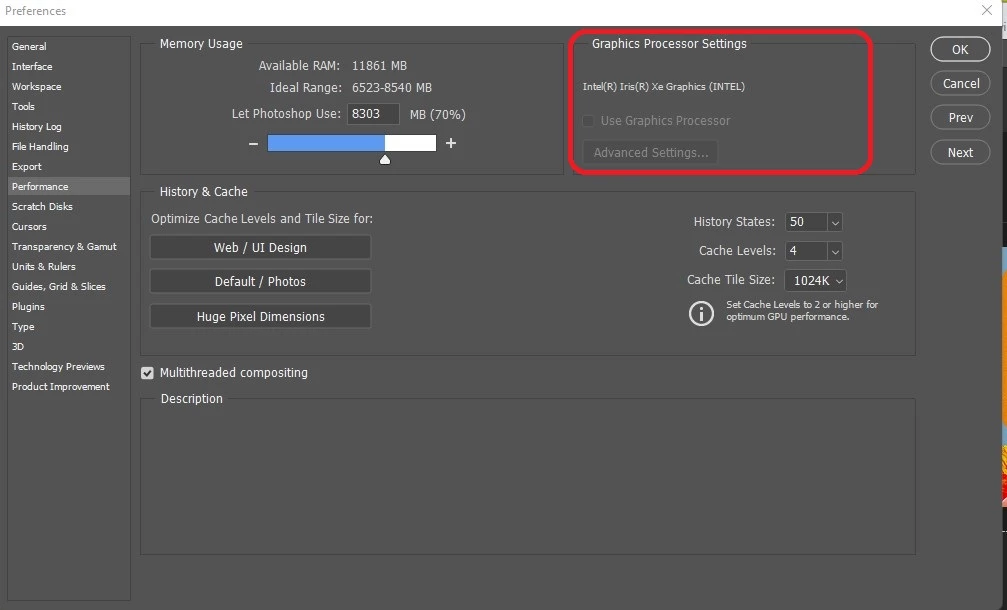
I don't know why cannot access the edit -> Preferences -> Preference ... Graphic Processor Settings. It is gray out as shown in the image below.


Any ideas on how to fix it?


Thank you!
 

This topic has been closed for replies.

2 replies

Bojan Živković11378569
Community Expert
Community Expert
May 5, 2022

I have exactly same issue on my Lenovo laptop which is equiped with i3 2328M and Nvidia 610M. Graphic unit is not recognized/supported. You may be able to run Photoshop but with limited options and reduced performance. Some things will be disabled like Oil Paint or in worse scenario you won't be able to run Photoshop because it will freeze, dialogues will be shown without all options and so on...

KardachoAuthor
Participant
May 5, 2022

Thank you! Same happens to me. Liquify does not work either.

thatsmauri
Community Expert
Community Expert
May 5, 2022

Your GPU is likely not supported by Photoshop and thus you can't make use of it.

KardachoAuthor
Participant
May 5, 2022

Is there another way I can use Oil Paint and Liquify ?

thatsmauri
Community Expert
Community Expert
May 5, 2022

Sadly, no 😞 Both need a supported GPU to work.
