Participant
February 22, 2017
Answered

Achieving dissolve mode effect with the eraser tool

  • February 22, 2017
  • 1 reply
  • 3411 views

Hi there

I love using the dissolve mode to paint with and would like to be able to get the same effect when erasing to ensure consistency of style.

Obviously I'm aware there is no dissolve mode for the eraser tool (as far as I know) but if there's a way of replicating the effect it would make my day.

Hope you can help

Cheers

John
This topic has been closed for replies.
Correct answer Trevor.Dennis

Most tools that use brushes, can be set to various blend modes, but you right that the eraser tool is not one of them.  There are several ways to simulate the effect though:

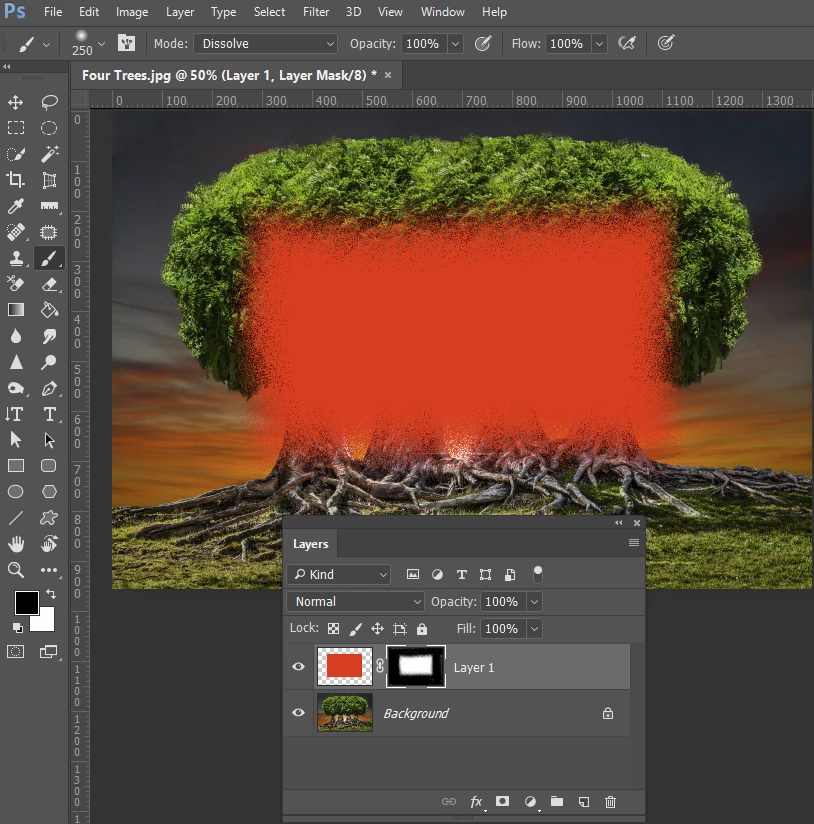
Add a layer mask, and paint with a black brush set to Dissolve in the layer mask

Or paint directly with the brush set to Dissolve, which gives a decent chalk effect

1 reply

Trevor.Dennis
Community Expert
Trevor.DennisCommunity ExpertCorrect answer
Community Expert
February 22, 2017

Most tools that use brushes, can be set to various blend modes, but you right that the eraser tool is not one of them.  There are several ways to simulate the effect though:

Add a layer mask, and paint with a black brush set to Dissolve in the layer mask

Or paint directly with the brush set to Dissolve, which gives a decent chalk effect

Participant
March 1, 2017

Hi Trevor

Thanks for replying so quickly.

The best workflow I've managed to establish is to paint with the dissolve brush and use a mask, as you mentioned, for subtraction.

Periodically I have to remember to 'Apply Layer Mask' so that I can continue to paint in areas subtracted by the mask.

Thanks for your help.

Kind Regards

John