
New Participant
November 7, 2024
Question

Action issue with Level value

  • November 7, 2024
  • 3 replies
  • 561 views

Hi all!

Im trying to resolve something and i need help.

I just made an action in wich i add a adjustment layer (levels) and i change one of the outputs to 80 (while i'm recording). Then i make a couple of othe adjustments like, adding a layer and a fill, then i stop recording.


Now here the thing:

When i playback the action it does everything, except to change the value to 80. What could be the issue here? Because when i look in the panel i see the change(see attachment)
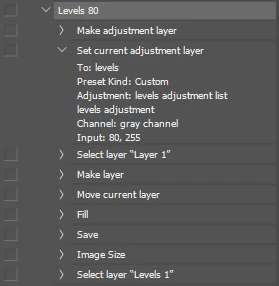
 

Thanks in advance

This topic has been closed for replies.

3 replies

New Participant
November 14, 2024

Save your Levels as a preset, and it will fix your action.

Tested and confirmed.

Irvin0D45Author
New Participant
November 15, 2024

Thanks for the tip! I will try it out

New Participant
November 11, 2024

I experienced the same issue in Photoshop 26.0. My current solution is to install an older version of Photoshop (e.g. PTS 22.2), create and save Actions, then load it into the latest Photoshop. Hope Adobe fix this soon. Here is my Actions:

Brainiac
November 7, 2024

My opinion is that it's a bug.

In the Actions terminology there is no (never was) "gray" channel for grayscale images.

There was always a "black" channel.

They messed something up in the new Photoshops and now Actions for grayscale files may not work.

Irvin0D45Author
New Participant
November 8, 2024

Thanks. Noted!!

I thought i was going nuts 🙂


D Fosse
Community Expert
November 8, 2024

It works correctly when I test it here, on a grayscale file. Black output is changed correctly when running the action.


I notice you say "output" levels - but the action shows that you have actually changed the input slider?