

Action Record Script Items with unique Names
I'm trying to record menu items via scripting, and am coming up empty. Modifying the below, I've gotten it to show up in the Automate Menu as "Bologna", and record as "Bologna" in actions rather than "Scripts Name: "Bologna""
1. How do I create an event ID for my script? I modified this one from Contact Sheet II
2. How do I call my menu item properly with a script? I've tried iterations of: app.runMenuItem(stringIDToTypeID("Bologna"));
And get the error message:
"The object “<unknown> menu item” is not currently available."
3. Alternatively, can I use runMenuItem for any of the scripts? I tride "Automate: Bologna" and "Scripts: Bologna" and neither worked.
GOAL: Is to record a menu item to an action, I'm on an M1 chip and scripting listener no longer works.
Also tried it with contactSheetII and get the same error.
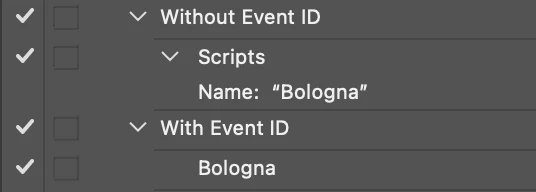
/*
<javascriptresource>
  <name>$$$/AdobePlugin/PIPLInfo/PluginName/testing123=Bologna</name>
<menu>automate</menu>
<category>ScriptTesting</category>
<eventid>0B71D221-F8CE-11d2-B21B-0008C75B322D</eventid>
<terminology><![CDATA[<< /Version 1
    /Events <<
       /0B71D221-F8CE-11d2-B21B-0008C75B322D [($$$/AdobePlugin/PIPLInfo/PluginName/testing123=Bologna) /testing123Settings <<
           /CSIISettings [(Bologna Settings) /typeText]
           /Msge [(Message) /typeText]
         >>]
     >>
   >>
]]></terminology>
</javascriptresource>
*/



 AdChoices