

Action step "add current channel" brings up unwanted dialog
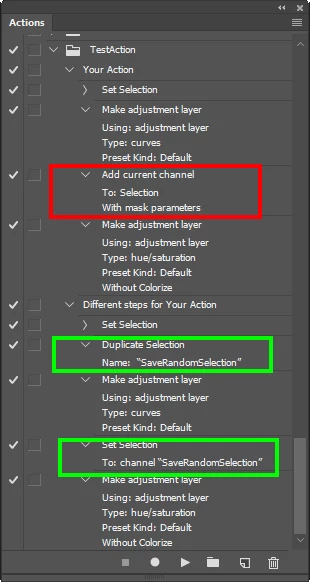
I have recorded an action that contains Add Current Channel steps that bring up Load Selection dialogs that must be accepted before the action will continue to execute.
To see what I'm talking about, do this:
- Load an image into Photoshop
- Go through whatever setup is necessary for you to record a new action
- start recording a new test action that does the following:
-- Make a random selection on your image (I used the marquee tool)
-- Create a Curves layer (the selection will be captured in its layer mask and the selection goes away)
-- Activate and Right click on the Curves layer mask, activating Add Mask to Selection
-- Create an HSL layer (the selection will be captured in its layer mask and the selection goes away)
-- Stop recording
- Open the new action so you can see its steps
Now play it back, stepping through it by activating the first step (Set Selection) and holding down the Ctl/Cmd key when you hit Play.
I consistently have a Load Selection dialog appear when the Add Current Channel step is executed.
There is no dialog button in the left hand column to disable.
This dialog does not appear when I record the action, just as it doesn't appear when directly interacting with Photoshop.
Can someone tell me how to make it NOT appear when the action is played back?
thanks,
richard hargrove
--
 AdChoices