Known Participant
November 21, 2018
Answered

Actions

  • November 21, 2018
  • 1 reply
  • 444 views

I accidentally loaded the same actions twice. How do I delete actions?

This topic has been closed for replies.
Correct answer Stephen Marsh

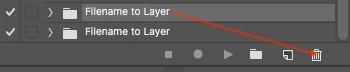
Select the dupe and drag it to the trash in the action panel:
1 reply

Stephen Marsh
Community Expert
Stephen MarshCommunity ExpertCorrect answer
Community Expert
November 21, 2018

Select the dupe and drag it to the trash in the action panel:

Bojan Živković11378569
Community Expert
Community Expert
November 21, 2018

Just to add to the previous answer:

  • Select action set then click on the trash icon. Hold down Alt/Opt while clicking to skip dialog.
  • Click on the Actions panel menu then choose Delete.