Participant
February 13, 2017
Answered

Actions: Can't find in PS

  • February 13, 2017
  • 3 replies
  • 1822 views

Hello

I have a very weird problem and can not find a resolution anywhere.

The thing is I heard about actions but I don't have them in my Photoshop.

When I'm in photosho location folder - they are there - actions .

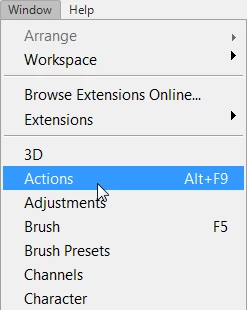
But when I'm opening photoshop  I don't have it , even in - window - show - it's just not there.

I've just updated my PS and still don't have it ... ;(

PLEASE HELP
This topic has been closed for replies.
Correct answer barbara_a7746676

The Actions panel should be listed under the Window menu. Do you see it there?

3 replies

Stephen Marsh
Community Expert
Community Expert
February 14, 2017

More on action palette and preset file locations:

Prepression: Photoshop – Custom Action File Backup & Migration

Benjamin Root
Legend
February 13, 2017

If these are your own actions or a third party's actions, you'll need to manually load them.

Participant
February 13, 2017

But how can i Do it manually ?

2017-02-13 5:02 GMT+01:00 Benjamin Root <forums_noreply@adobe.com>:

Actions: Can't find in PS created by Benjamin Root

<https://forums.adobe.com/people/Benjamin+Root> in *Photoshop General

Discussion* - View the full discussion

<https://forums.adobe.com/message/9327011#9327011>

February 13, 2017

Load actions in the action panel's menu:

Alternative:

Copy the actions to C:\Users\Your_User_Name\AppData\Roaming\Adobe\Adobe Photoshop CC 2017\Presets\Actions

Then they will appear in the action panel's menu.

AppData is a hidden folder. Make it visible in Windows 7 Explorer: Organize > Folder and search options > View > Hidden files and folders > Show hidden files, folders and drives (Windows 10 Explorer: File > Folder and search options ...)

Fenja

barbara_a7746676
Community Expert
barbara_a7746676Community ExpertCorrect answer
Community Expert
February 13, 2017

The Actions panel should be listed under the Window menu. Do you see it there?